Upload a photo of your house, choose a design mode such as facade, paint, or curb appeal, set style preferences, and the AI generates a photorealistic exterior concept in about 30 seconds.
AI Home Exterior Design Generator
AI Home Exterior Design Generator is a free AI tool. Free AI home exterior design: upload a photo of your house and try new siding, paint, roofs, porches and landscaping. Compare styles before you build.
Free to try · first generation free on signup · no credit card
1
Step 1
Upload Image
Start by uploading image
Upload your image
Click to browse or drag & drop
2
Step 2
Select Mode
Choose your transformation style
All-in-one AI exterior remodel — style, materials, roof, color, lighting & landscaping in one shot
3
Step 3
Options
Configure your options
Output quality:
Mode
Smart Remodel
Your AI Design Will Appear Here
Fill in the options on the left, then press Generate.
Upload your image
Drag & drop your file here or click to browse
JPG, PNG, WebP
Max 10MB
AI Ready
Popular in Home Design Studio
Paint My House AIExterior House Paint AIAI Kitchen DesignAI Bathroom DesignAI Bedroom DesignFree AI Architecture GeneratorAI Interior Design From a PhotoAI Landscaping DesignHome Color Combination AIAI Curb Appeal RaterAI Interior Design RaterAI House Style IdentifierAI Renovation Cost EstimatorAI Day to Dusk Photo EditingAI Declutter Room PhotosAI Home Addition VisualizerAI Home Design Tools Compared
Explore Home Design Studio
Picture a new exterior
Test the change before you buy materials.
- House paint visualizerTry exterior colors on a photo of your own house.
- Siding visualizerCompare cladding before you request a quote.
- Roof color visualizerSee how a shingle shade sits with your walls.
- Front door colorsFind a door color that fits the facade.
Rework a room
Keep the room, change what is in it.
- Room interior AIRedesign a room from one photo.
- AI kitchen designExplore layouts and finishes for a kitchen.
- AI bathroom designPlan a bathroom update around what is there.
- Countertop visualizerCompare stone and laminate looks on your counters.
- Virtual staging studioFurnish an empty room before you list it.
Plan the yard
From planting to hardscape.
- Landscaping design AISketch a new yard over a photo of the old one.
- Pool designPlace a pool in the space you actually have.
- Paver visualizerTest patterns on a patio or path.
- Outdoor kitchen visualizerSee a grill station on your own patio.
Decide with more information
Useful before you speak to a contractor.
- Renovation cost estimatorGet a rough idea of what a project could cost.
- House style identifierName the style of a house from a photo.
- Best siding colorsRead which shades suit common house types.
- Home design guideSee how the tools fit together on a project.
Quick facts about AI Home Exterior Design Generator
- Tool nameAI Home Exterior Design Generator
- CategoryHome Design
- PriceFree to try
- InputPhoto upload + text prompt
- OutputAI-generated image
Before / After
Example results
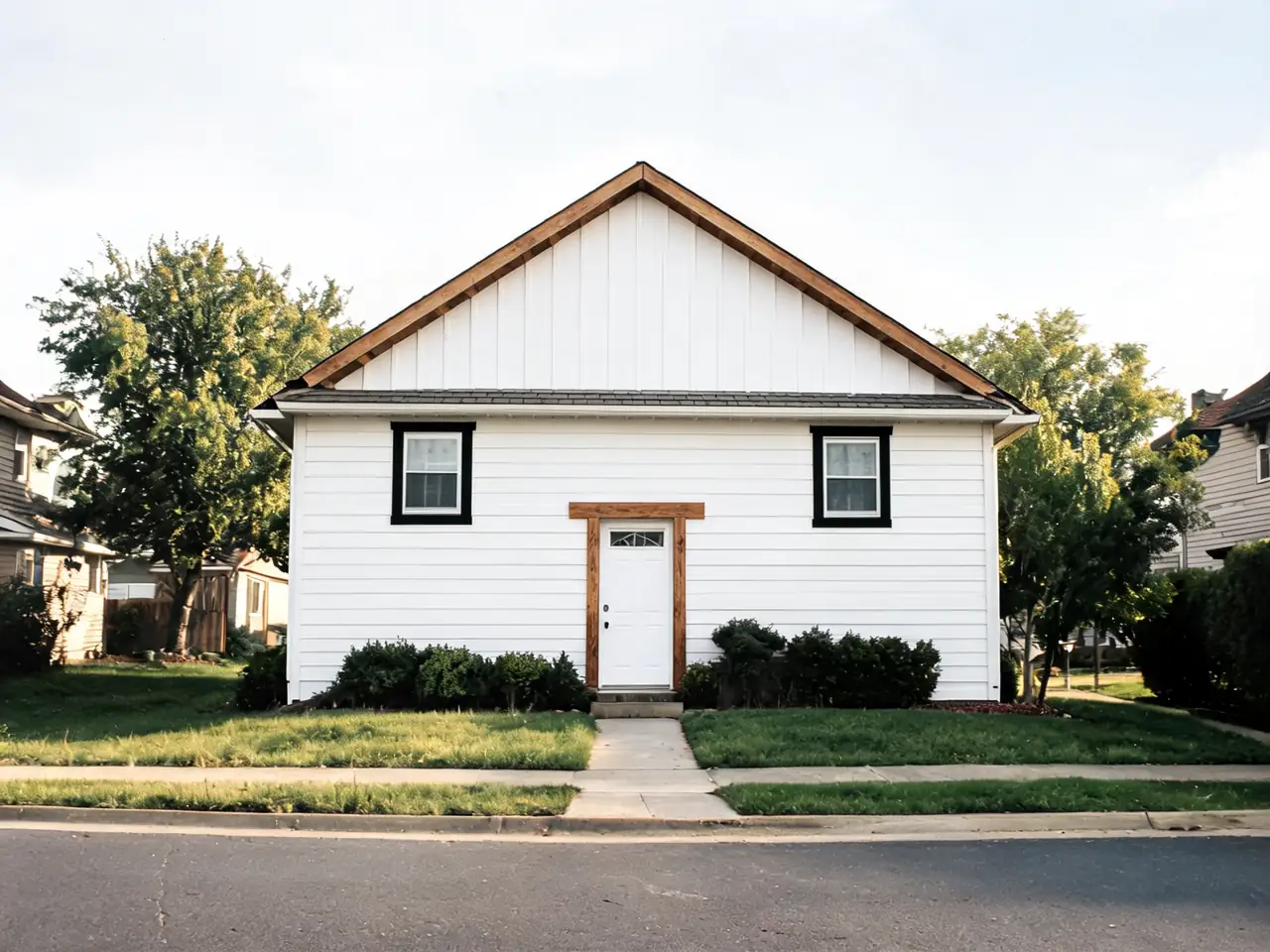
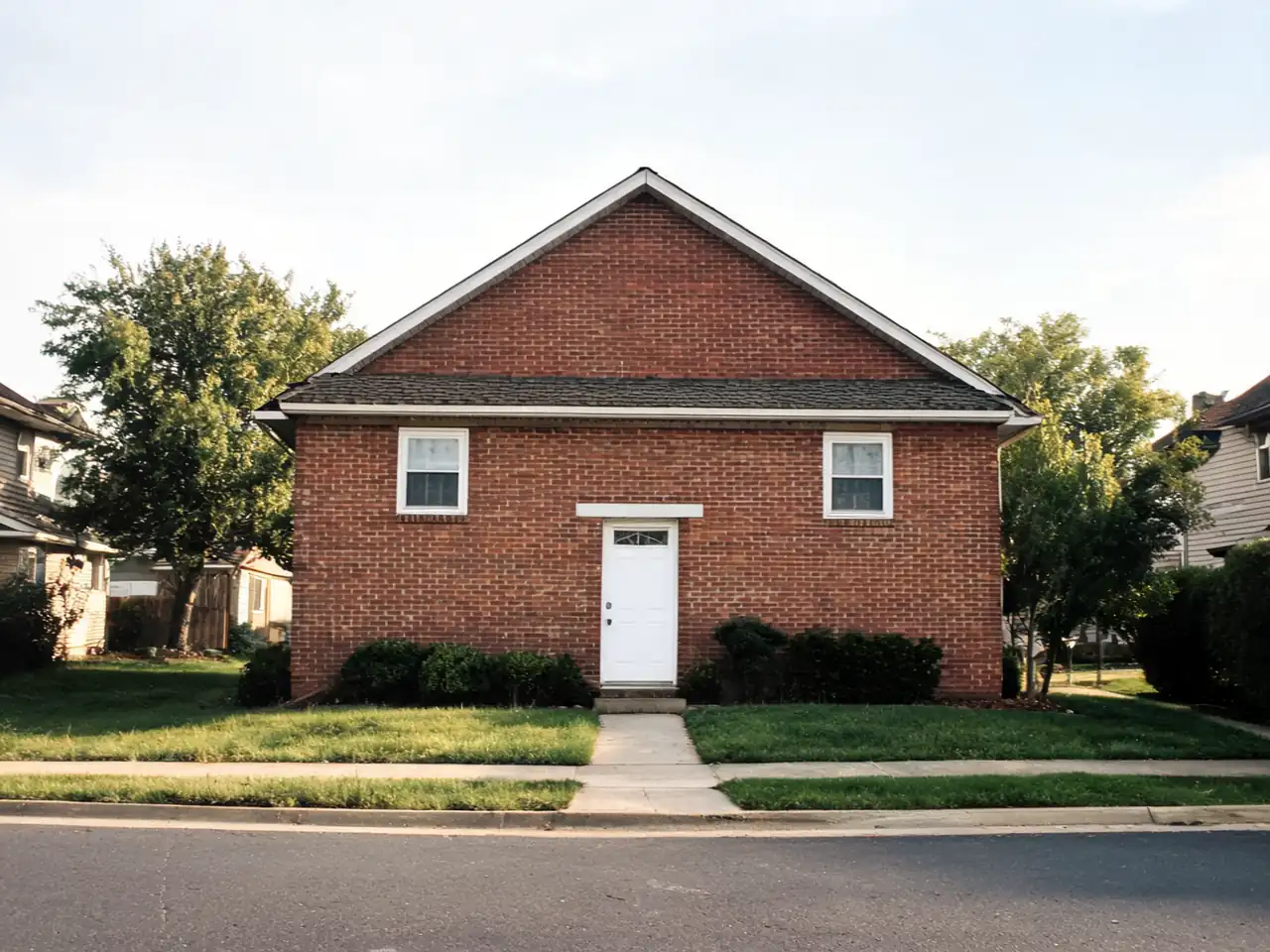
Drag to compare
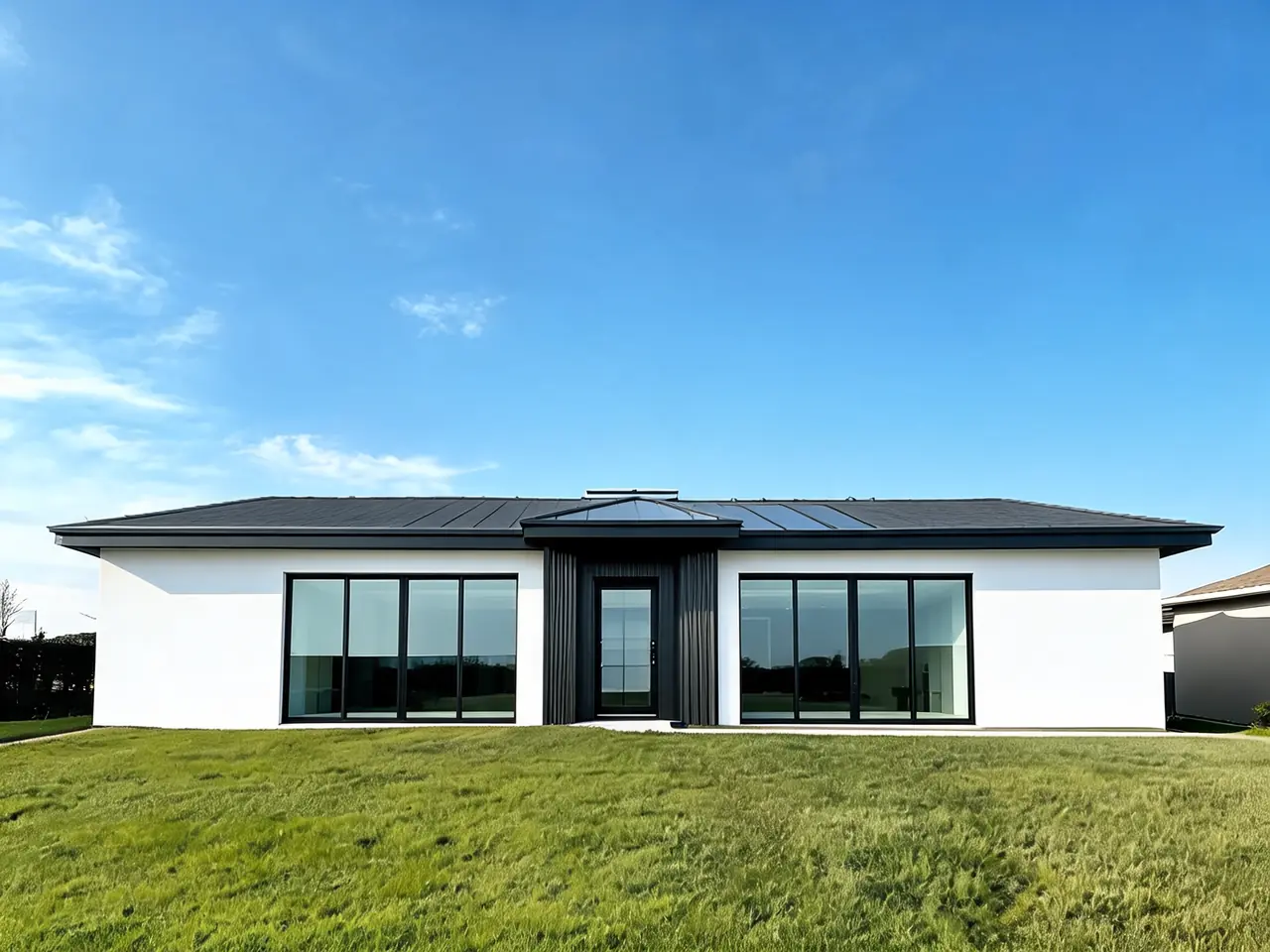
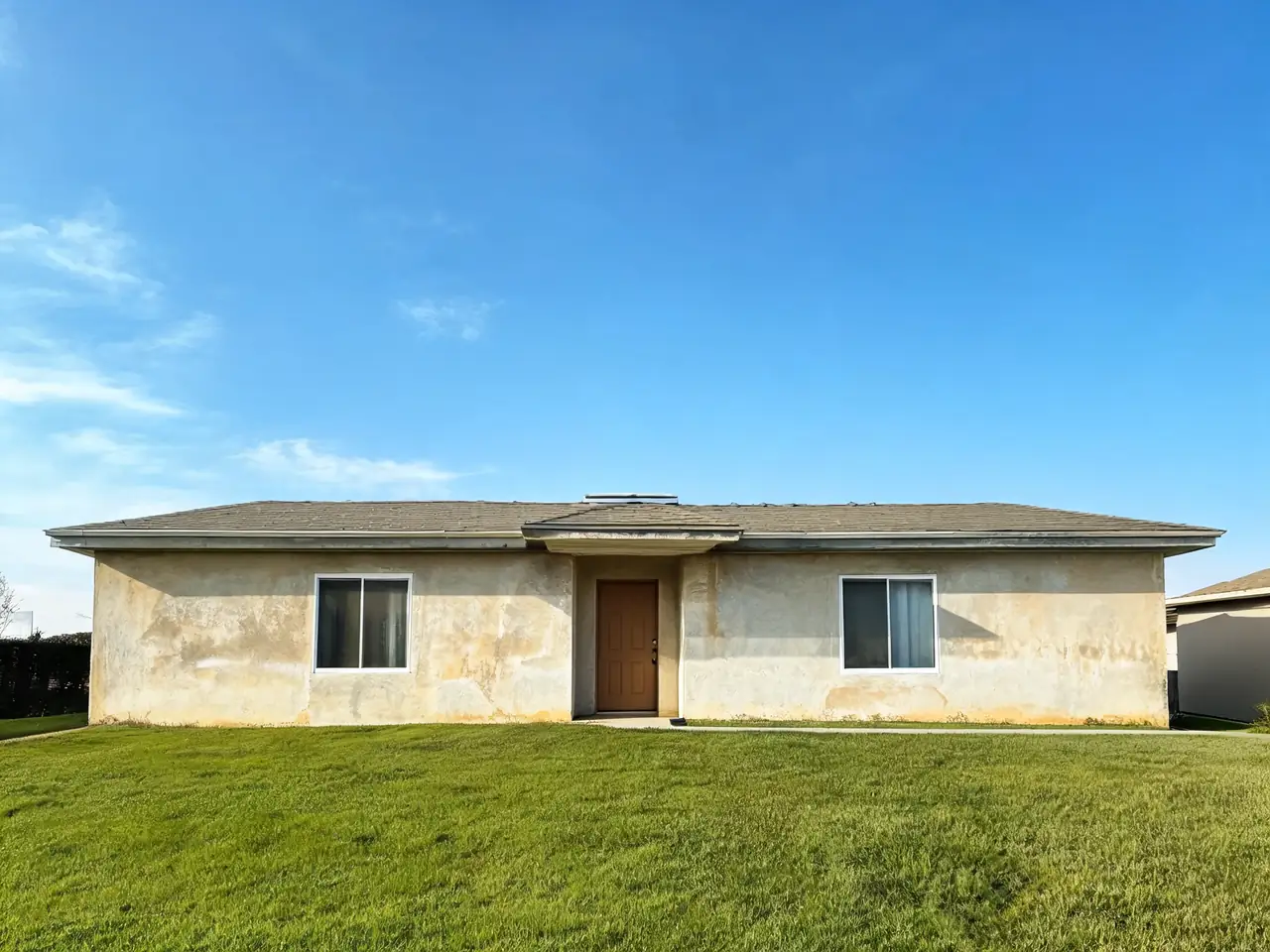
Drag to compare
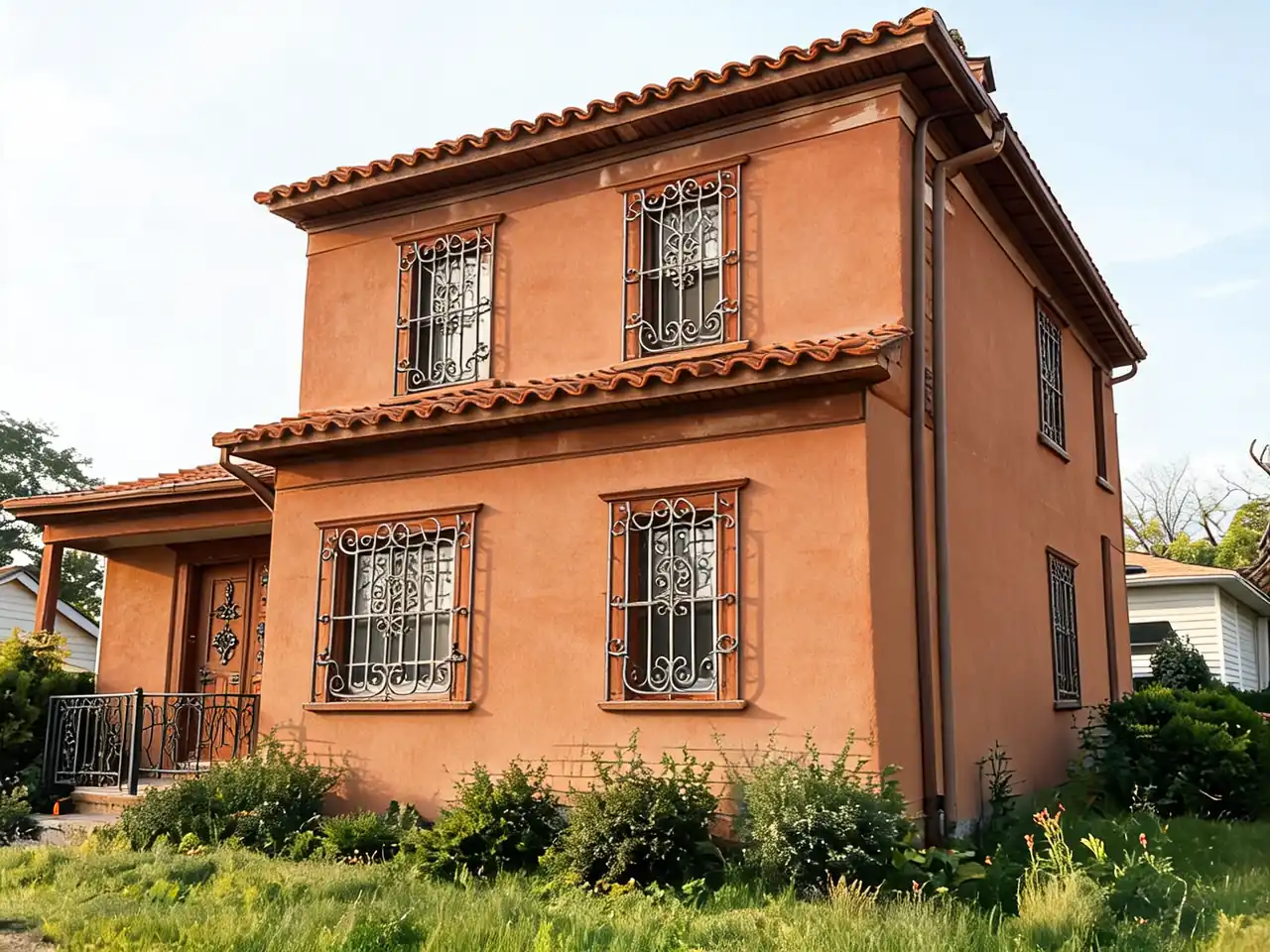
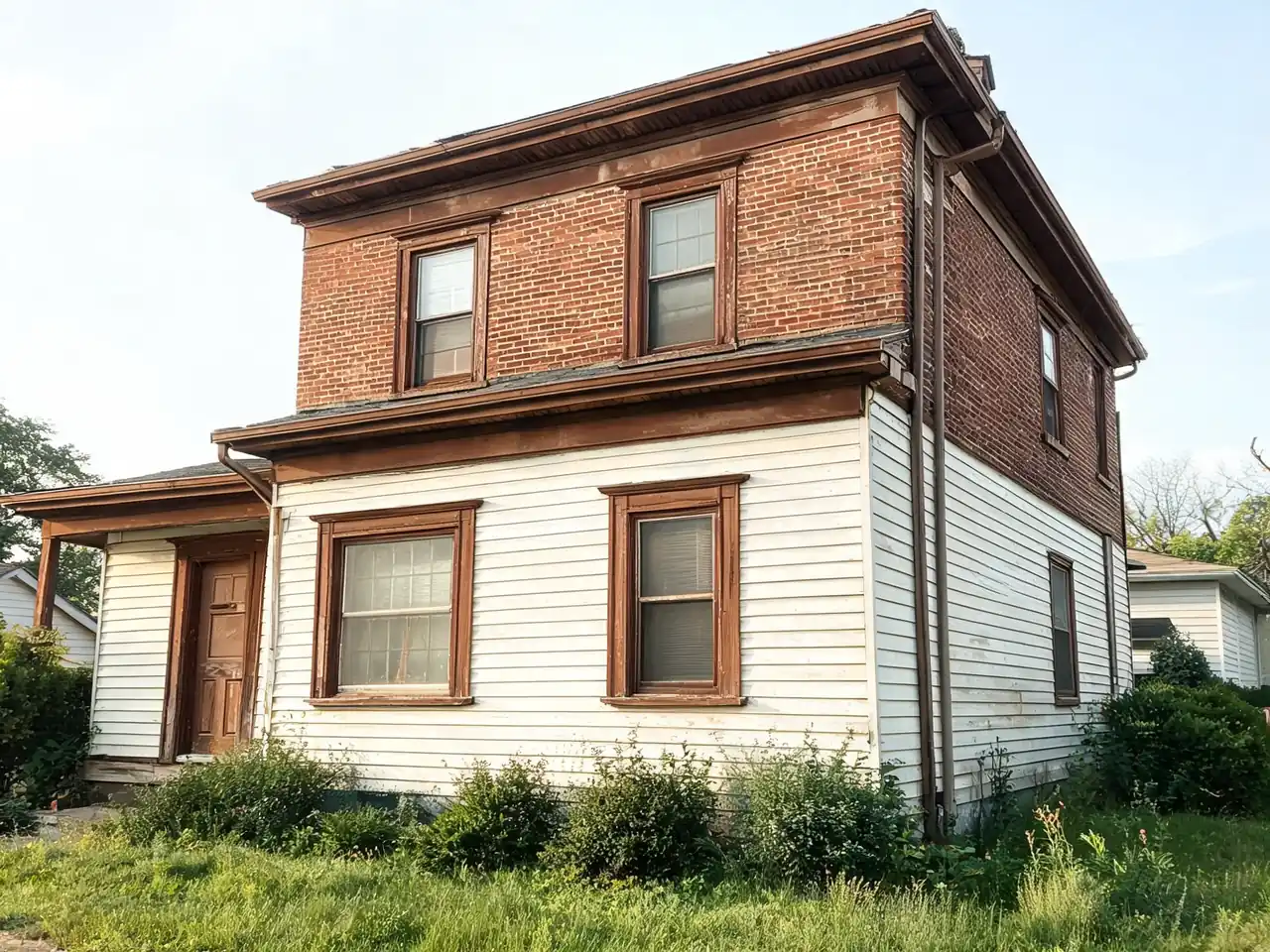
Drag to compare
Real, unretouched output from this tool. Drag any slider to compare.
Upload a photo of your home exterior and visualize remodels with AI. Try new facade styles, paint colors, curb appeal upgrades, and structural changes in about 30 seconds. Free to start online.
Trusted by over 306,000 users.
How to use the free AI home exterior design tool
Homeowners use this before calling a contractor. You photograph the front elevation, pick a design mode like facade, paint, or curb appeal, and see a realistic render in about 30 seconds.
The render keeps the roofline and window positions from your photo, so you can discuss real options with a builder instead of guessing from paint chips alone.
1
Upload an exterior photo
Straight on shots in daylight work best. Include the full facade, driveway, and yard if curb appeal matters. JPG, PNG, or WebP under 10MB.
2
Choose a design mode
Facade remodel, elevation design, exterior paint, curb appeal, structural additions, and full style transforms each focus on a different renovation goal.
3
Set style and materials
Pick architectural styles, facade materials, and mood notes. Add budget level if you want conservative versus bold changes.
4
Generate and share
Download renders for contractor quotes, listing presentations, or family decisions. Run multiple modes on the same photo to compare paths.
How to photograph your house for the best result
The photo decides most of the result. Two minutes spent getting it right saves several reruns.
1
Stand back and shoot straight on
Cross the street or walk to the end of the drive so the whole front fits, roof and ground included. Hold the phone level at chest height and use the normal 1x lens, not the 0.5x wide lens, which bends the walls.
2
Pick soft daylight
An overcast day, or the hour after sunrise or before sunset, lights every wall evenly. Hard midday sun puts one side in deep shadow, and the AI loses the detail there.
3
Clear the view
Move cars and bins out of the way if you can. Bushes and trees that cover windows hide details the AI needs to keep your house recognisable.
4
One house per photo
Crop out the neighbours so the AI knows which building to redesign. A horizontal photo usually fits a whole house best.
What AI exterior home design can visualize
The tool produces photorealistic concept images, not construction documents. Still, seeing proportion, materials, and color together speeds up early planning.
1
Facade and paint
Test siding, stone, brick, stucco, and paint palettes on your actual house photo.
2
Structural and curb appeal
Explore porches, entry upgrades, landscaping direction, and second story concepts as visual starting points.
What you can change on your house exterior
Each of these can be tested on your own photo. Pick the mode that matches the change, then describe the details in your own words.
1
Siding and cladding
Vinyl, fiber cement, wood, board-and-batten, brick, stone or stucco, in the colour you choose.
2
Roof
Swap the roofing material and colour, such as shingles, standing-seam metal, clay tile or slate.
3
Paint and trim
Try a new body colour, trim colour and shutters before you buy a single sample pot.
4
Front door and entry
Test a new door style and colour, plus lighting and entry details.
5
Porch
Preview a covered porch, new columns or a reworked entry as a starting point for discussion.
6
Driveway and walkway
Compare pavers, concrete, gravel or a new walkway layout.
7
Landscaping
Try lawn, foundation planting, garden beds and hedges around the house.
Exterior styles to try on your house
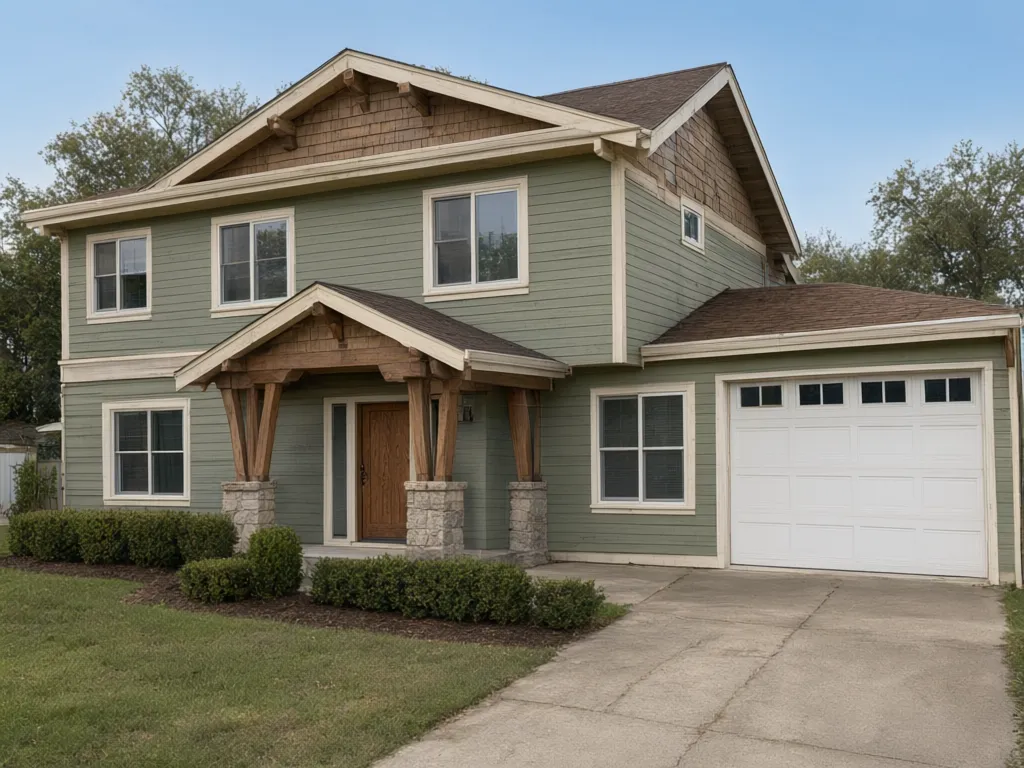
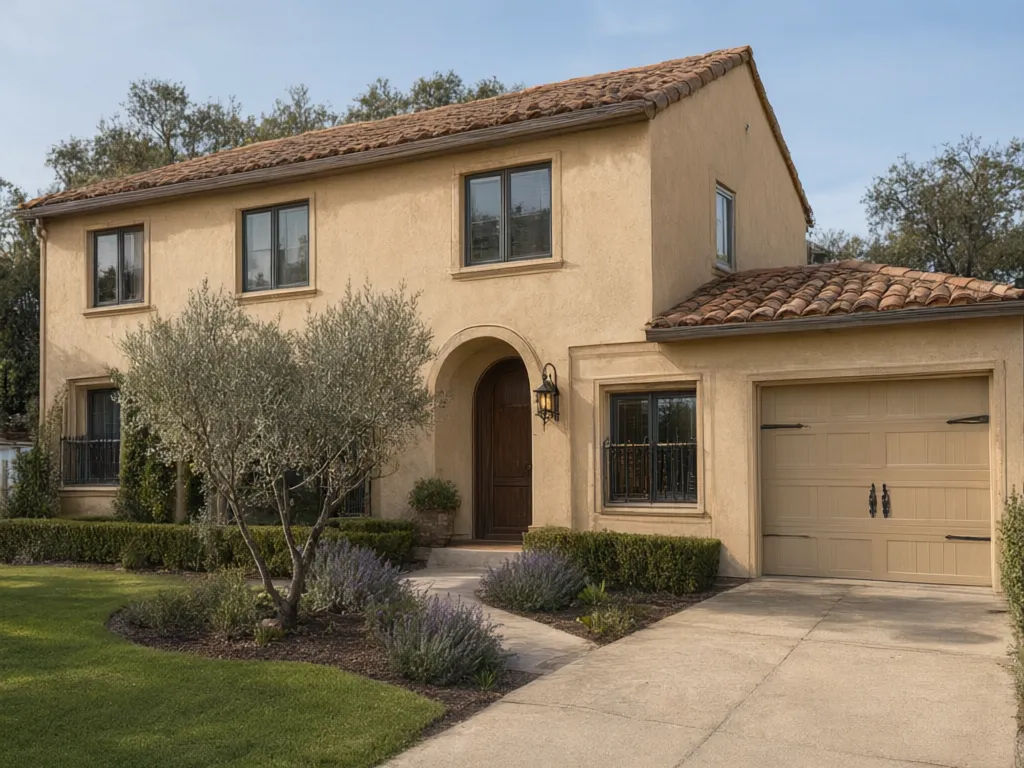
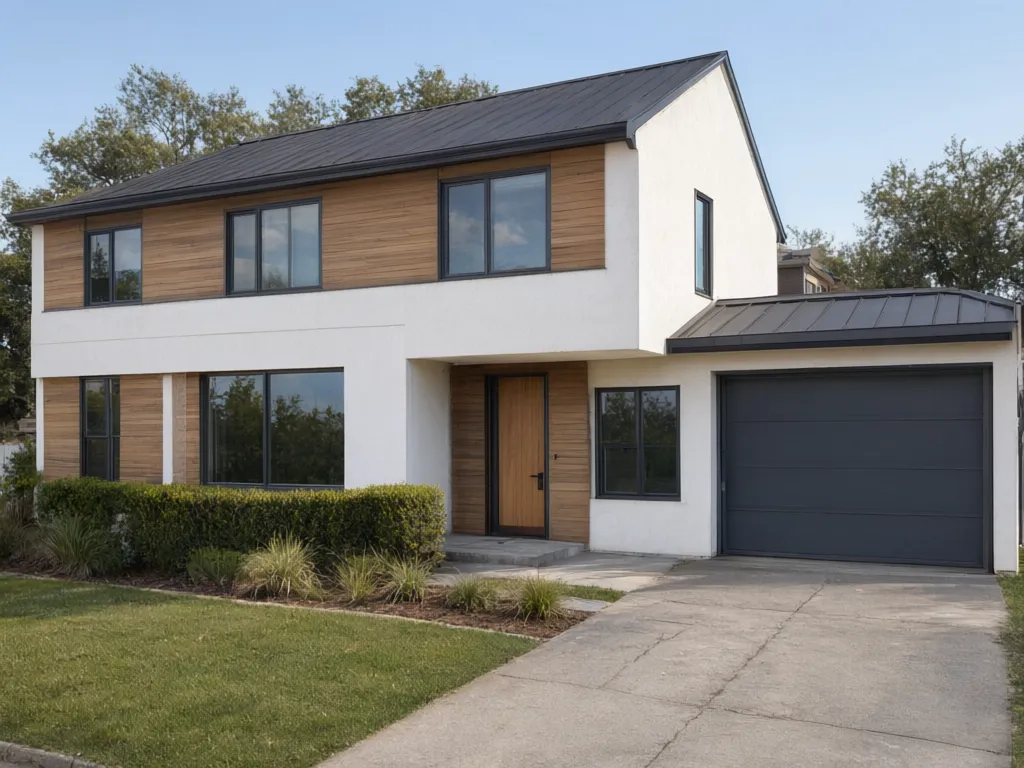
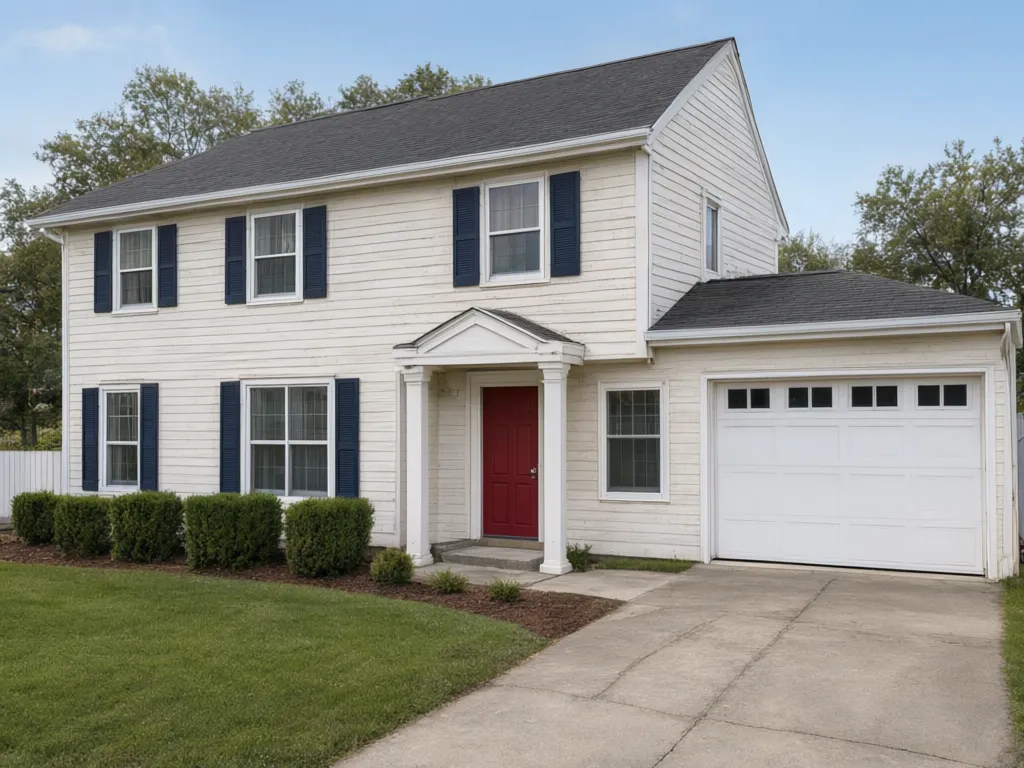
These are all the same ordinary 1980s house photo, run through Smart Remodel with a different style each time. The footprint, the window positions and the garage stay where they are. The siding, colours, roof, entry and planting change.
Extras such as the craftsman porch or the colonial portico are the AI's suggestion, so check anything structural with a builder before you plan around it.
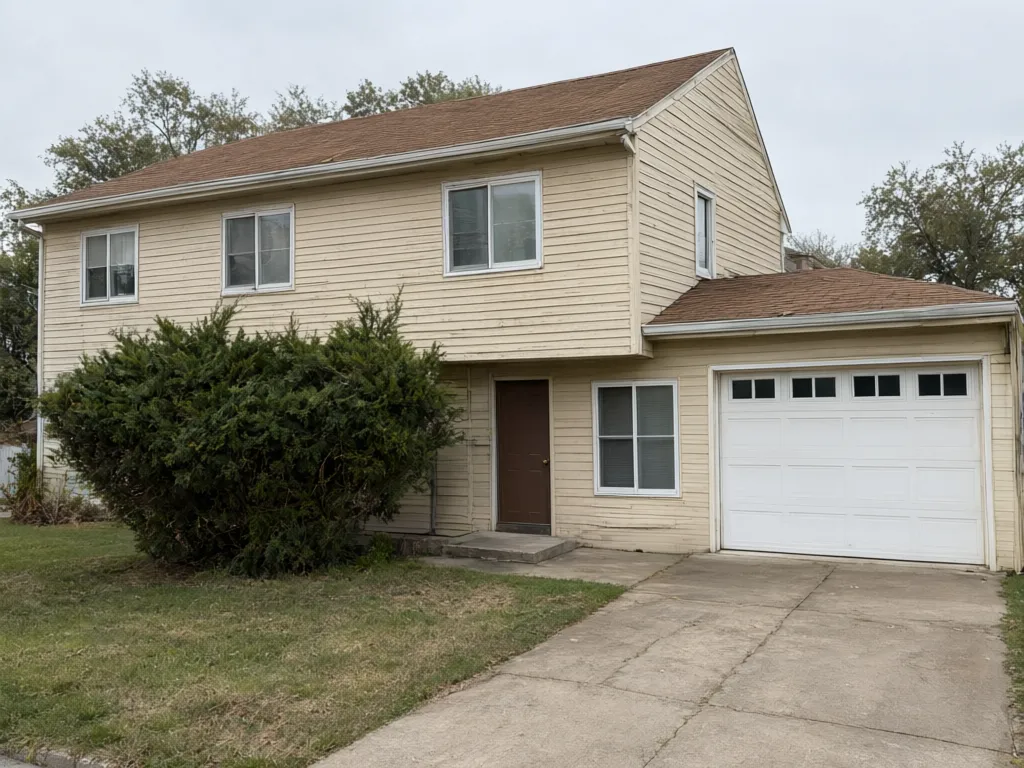
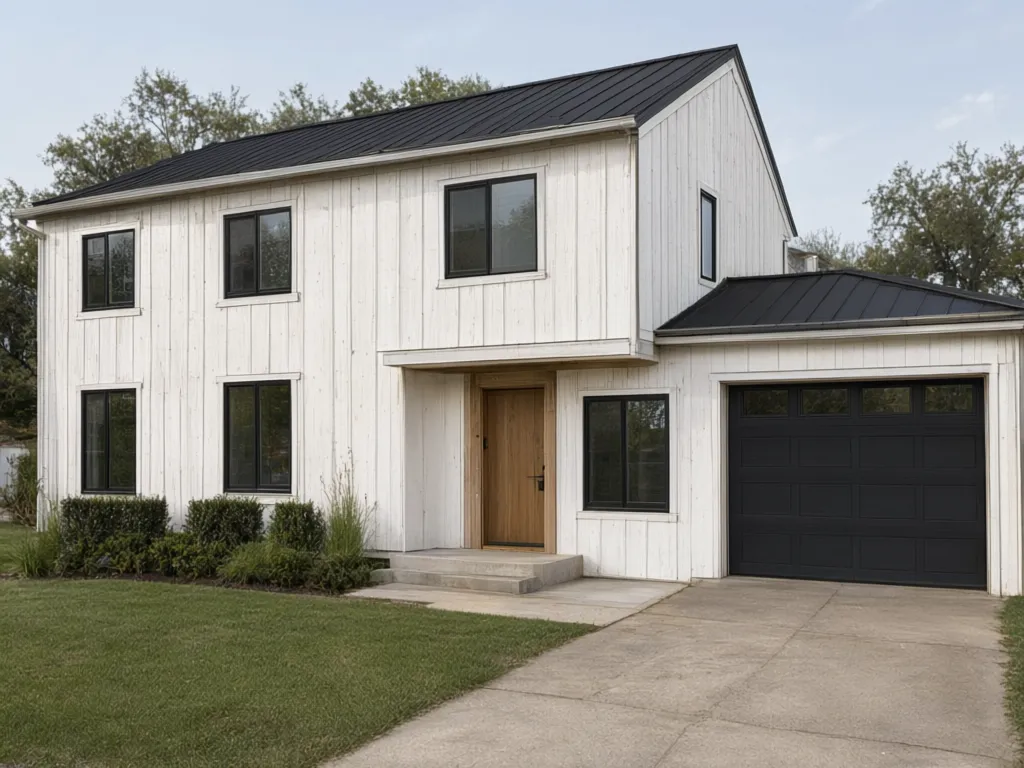
1
Modern farmhouse
White board-and-batten siding, black window frames and a dark standing-seam metal roof. It suits simple gabled houses like this one.
2
Craftsman
A gabled porch on tapered wood posts with stone bases, shingle detail in the gables, sage green siding and cream trim.
3
Mediterranean
Warm sand stucco, a terracotta tile roof, an arched entry, and olive trees and lavender in the planting.
4
Modern contemporary
Smooth white render with warm timber panels, dark window frames and a charcoal garage door.
5
Colonial
White clapboard, navy shutters, a columned entry portico and a red front door.
Use cases for a home exterior preview
A render is useful whenever you need to explain or compare an exterior idea before money is spent.
1
Buying a house
Photograph a dated listing and see what new paint and landscaping could do, before you decide how much work you are taking on.
2
Renovating
Compare two or three complete directions and bring the favourite to your builder as a reference.
3
Selling
Show buyers the potential of a tired exterior, or choose which curb appeal upgrades to make before listing.
4
Planning-permission mock-ups
Make a quick visual of the change you have in mind to discuss with neighbours or your designer. It is a concept image, not a drawing for submission.
What actually changes in an AI exterior render
The model works inside the geometry of your photo. It reads where the walls meet, where the roofline runs, how deep the porch is and where the light is coming from, then re-renders the surfaces and features inside that same frame. Your windows stay where your windows are. That constraint is what makes the output usable in a conversation with a builder rather than just pleasant to look at.
It is generous with materials, colour, cladding, trim, planting and mood, and conservative with structure. Ask for board-and-batten over brick and you will get a convincing answer. Ask it to move a load-bearing wall or add a storey and you are past what a restyle can honestly do — that is the Home Addition Visualizer's job, and even there the output is a visualisation rather than anything an engineer has signed.
The most common failure is the photograph, not the model. A straight-on shot of the full elevation in flat daylight gives it what it needs. An angled shot in hard midday sun, with one wall blown out and the other in shadow, gives it far less, and the render drifts from your real house.
Getting the style right instead of just getting a style
Most exterior remodels that look wrong are not badly executed — they are the right idea on the wrong building. A modern farmhouse treatment on a house whose proportions are mid-century reads as costume rather than architecture, and no amount of quality in the materials fixes it.
Find out what your house already is before deciding what it should become. The House Style Identifier reads a photo and names its architectural language, such as the eave depth, window rhythm and roof pitch. Then you are choosing between remodels that respect the bones and remodels that fight them.
From there, work in whole schemes rather than single elements. Cladding, trim, roof, door and planting read as one thing from the street, and an element that looks weak on its own often only needs a different partner. Generating three complete directions and comparing them the next morning gets you to a decision faster than iterating endlessly on one.
If the change you want is colour rather than construction, Paint My House AI is the more precise tool, and the Curb Appeal Rater will tell you — with a score and an ordered list of fixes — whether the exterior work you are planning is actually the highest-return thing you could spend the money on.
Planning an exterior home remodel with AI
An exterior home remodel is one of the few renovations you can fully judge from a picture, because the whole result is visible from the street. That makes it the ideal case for rendering before committing: new siding, a reworked entry, different window trim, a porch, a colour scheme — each can be tested on a photo of your actual house for the cost of a generation rather than a design fee.
Move from cheap decisions to expensive ones. Start with paint and trim, then cladding and materials, then structural moves like a porch or entry rework. Generate a complete direction at each stage rather than isolated swatches, because a siding colour that looks wrong alone is often right next to the roof it sits under.
When the project goes beyond the skin of the house, such as an addition or a whole-home renovation, Renovate AI is built for structural change. For a new building from a sketch or empty plot, the AI Architecture Design generator handles the ground-up case. This page is strongest at the exterior itself: facade, materials, colours and curb appeal.
House facade design with AI
The facade is the face of the house — cladding, openings, trim and entry composed into one street-facing picture — and it is the part of an exterior remodel where AI visualization earns its keep. The Facade Remodeling mode takes a photo of your home facade and re-renders it in the style you describe, with the materials you select: brick, stone, stucco, render, timber, fiber cement or metal cladding, each drawn with realistic texture and weathering.
Use it as a facade ideas engine. Instead of scrolling other people's houses and guessing whether a look transfers, generate ideas on your own elevation: board-and-batten over the existing brick, a rendered white finish with timber accents, or dark brick with black window frames. Your photo's geometry is preserved, so each idea previews your house.
A practical sequence: identify what your house already is, generate two or three complete facade directions, then narrow to colour. Once cladding is settled, Paint My House AI handles the colour pass with more precision than a full remodel run.
🔎
House Style Identifier →
Name your home's existing style before choosing a facade direction that fights it.
🎨
Paint My House AI →
A dedicated colour pass on the facade once materials are decided.
⭐
Curb Appeal Rater →
Score the current facade and get an ordered list of highest-return fixes.
📏
Front Elevation AI →
Create a front elevation design online with the dedicated elevation maker.
🏛️
AI Architecture Design →
Sketch-to-render and ground-up building design when the project goes beyond a remodel.
Free design vs paid download
Your first design is free when you create a free account. It shows your own house redesigned, with a watermark on the image, which is enough to judge a style, a colour or a material.
A paid plan adds credits for more designs, removes the watermark and unlocks higher quality. That is the version to send to a builder, a designer or the family when you are choosing between two directions.
Can I use the designs for my business?
Yes. Our terms say you can use the images you create with AI Two in your business, and AI Two claims no ownership of them. You need the rights to the photo you upload, so use your own photo or one you have permission to use.
Free designs carry a watermark. For a listing, a client presentation or print, download from a paid plan without the watermark. If you show a render in a property listing, label it as a digital rendering of a proposed change, so buyers know it is not the house as it stands today.
Selling the house? Stage the rooms too
If the exterior is for a listing, the inside comes next. Empty or dated rooms photograph badly, and buyers scroll past them.
Who uses AI house exterior design
🏠
Homeowners
✓Plan renovations before committing to bids.
✓Compare traditional versus modern exterior directions on the same photo.
💡
Real estate agents
✓Show buyers renovation potential on dated exteriors.
✓Create listing visuals that highlight curb appeal upgrades.
🏢
Architects and contractors
✓Align clients quickly on style intent.
✓Use AI renders as mood references in early meetings.
✨
AI Home Exterior Design Generator
Upload your imageTap anywhere here — your AI design will appear in this space after you generate.JPG · PNG · WebP
All-in-one AI exterior remodel — style, materials, roof, color, lighting & landscaping in one shot
Premium users can generate images without watermark
Higher quality options available for premium users
Describe the architectural style you want — be as specific as you like, the AI understands natural language
Output quality:
Frequently Asked Questions
Yes. You can start without signup. Free generations let you test the workflow. Paid options add higher resolution, more runs, and premium features.
Facade materials, paint colors, elevation updates, landscaping direction, porches, garages, second stories, and full style changes from colonial to modern and farmhouse looks.
They are strong visual guides for proportion, color, and materials. Always confirm feasibility, codes, and costs with licensed contractors before building.
A well lit, straight on exterior photo in JPG, PNG, or WebP. Higher resolution inputs produce sharper material detail in the output.
Yes. In Smart Remodel or Facade Remodeling, pick a siding material under Primary Materials, such as Vinyl, Fiber Cement, Hardie Board, Wood or Cedar, and describe the colour you want. To keep the siding and only change its colour, use Paint & Color Change.
Yes. On a result, the Visualize New Roof action swaps the roof material, such as architectural shingles, standing-seam metal, clay or concrete tiles, natural slate, wood shake or solar tiles, in the colour you pick. Smart Remodel also has a Roof option for the roof shape: gable, hip, flat, shed, gambrel or mansard.
Yes. In Smart Remodel, choose Stone, Brick, Granite or Masonry under Primary Materials, and say where it goes in Additional Details, for example stone only on the lower part of the front wall, or brick around the front door. Facade Remodeling has the same materials for a full facade change.
Your first design is free when you create a free account. After that, a paid plan adds credits for more designs, removes the watermark and unlocks higher quality.
A straight-on daylight photo of the whole front works best. An angled photo still works, but the AI may change more of the house. Night photos, deep shade, and cars or trees covering the walls hide detail the AI needs, so take the photo from a clear spot if you can.
Any style you can name. Type it into Target Style in Smart Remodel or Facade Style in Facade Remodeling, such as modern farmhouse, craftsman, Mediterranean villa, Victorian, Tudor, colonial or mid-century modern. Try two or three styles on the same photo and compare them.
Your first design is free when you create a free account, so you can see how your own house looks before you decide anything. After that, a paid plan adds credits for more designs, removes the watermark and unlocks higher quality.
Yes. Download the render to your device and keep it with your project notes, or share it with your builder, designer or family. Run the same photo through two or three styles and save each one to compare them side by side.
You can describe any style, and the common ones work well: modern farmhouse, craftsman, Mediterranean villa, Victorian, Tudor, colonial, mid-century modern, prairie, Bauhaus and Art Deco. Pick one in Target Style or Facade Style, or type your own.
Yes. Upload one clear photo of the front of your house, pick a design mode such as facade, paint or curb appeal, and your first design is free with a free account. Photos from a phone work fine; stand back far enough that the whole front, roof line and driveway are in frame.
AI exterior house design means a model redraws the outside of your real house from a photo: siding, brick, stone, paint, roof color, doors, porches and landscaping. You see a photorealistic version of your own home, so you can compare options before you pay a painter, roofer or builder.
It can restyle the front elevation of a house from a photo, changing the facade material, colors, roof line, windows and porch while keeping your home recognizable. It produces a visual concept to compare styles; it does not produce measured architectural drawings, so give your architect or builder the saved render as a reference.
You do not need to install anything. The exterior design generator runs in your phone browser: take a photo of your house, upload it, choose a style and download the result.
No. It is a photo-based exterior design generator: you upload a real photo and get a realistic image of your own house in a new style, not a 3D model you can walk around. For a new building from a sketch or an empty plot, use the AI Architecture Design generator linked on this page.
Yes. Choose a farmhouse look in Target Style or Facade Style, or describe it yourself: white board-and-batten siding, black window frames, a metal roof and a covered front porch are common requests. Generate two or three variations of the same photo and keep the one you like best.
Yes, that is the most common use. Try different siding, paint and roof colors on your own house first, save the versions you like, and bring them to contractors so every quote is for the same look. The Curb Appeal Rater linked on this page can help you pick which fixes matter most.
Use this page for a full exterior redesign. For one change, the focused tools are faster to set up: add a porch, change to a brick exterior, a black exterior or a new garage design.