Sofas, beds, tables, chairs, desks, storage pieces and decorative items — essentially anything that is not built into the room. Built-in cabinets and fitted shelving can be kept selectively.
AI Furniture Removal
AI Furniture Removal is a free AI tool. Free AI furniture remover - Remove all furniture from room photos to show empty spaces for staging or redesign. Perfect for real estate, interior designers & home sellers.
Free to try · first generation free on signup · no credit card
1
Step 1
Upload Image
Start by uploading image
Upload your image
Click to browse or drag & drop
2
Step 2
Select Mode
Choose your transformation style
Remove all furniture to show empty space
3
Step 3
Options
Configure your options
Output quality:
Mode
Create Empty Room
Your AI Design Will Appear Here
Fill in the options on the left, then press Generate.
Upload your image
Drag & drop your file here or click to browse
JPG, PNG, WebP
Max 10MB
AI Ready
Popular in Home Design Studio
Paint My House AIExterior House Paint AIAI Kitchen DesignAI Bathroom DesignAI Bedroom DesignFree AI Architecture GeneratorAI Interior Design From a PhotoAI Landscaping DesignHome Color Combination AIAI Curb Appeal RaterAI Interior Design RaterAI House Style IdentifierAI Renovation Cost EstimatorAI Day to Dusk Photo EditingAI Declutter Room PhotosAI Home Addition VisualizerAI Home Design Tools Compared
Quick facts about AI Furniture Removal
- Tool nameAI Furniture Removal
- CategoryHome Design
- PriceFree to try
- InputPhoto upload + text prompt
- OutputAI-generated image
Furniture removal strips a photographed room back to its shell — walls, floor, windows, built-ins if you keep them — so it can be restaged or shown as raw space. It is a different job from decluttering, and picking the wrong one for a listing is the most common mistake people make with either tool.
Free to try · results in about 30 seconds · no card required
Empty the room, or just tidy it?
These two edits solve different problems and it is worth being precise about which one you need. Furniture Removal is for when the existing furniture is the problem — outdated, oversized, badly arranged, or simply not to the taste of the buyer you are trying to reach. Stripping it out gives you a blank canvas: a buyer can imagine their own furniture, or you can restage it digitally with something better suited to the space.
If the furniture itself is fine and the room only looks messy — laundry on a chair, cables visible, a cluttered worktop — removing everything is overkill and throws away the lived-in warmth that makes a room feel like somewhere people actually live. That job belongs to Declutter, which keeps the furniture and clears the mess around it.
A simple test: would you be happy if a buyer saw the room exactly as it is, minus the mess? If yes, declutter. If the furniture itself would put a buyer off, empty the room instead.
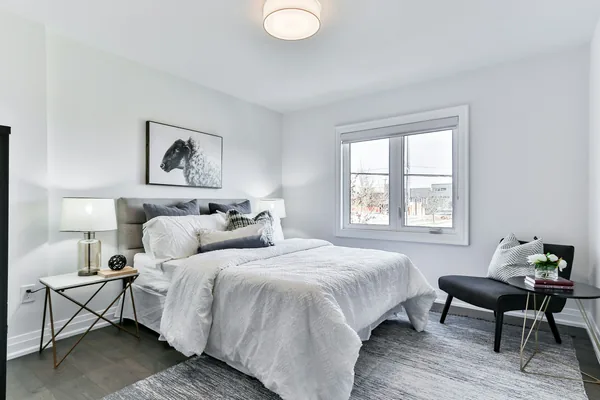
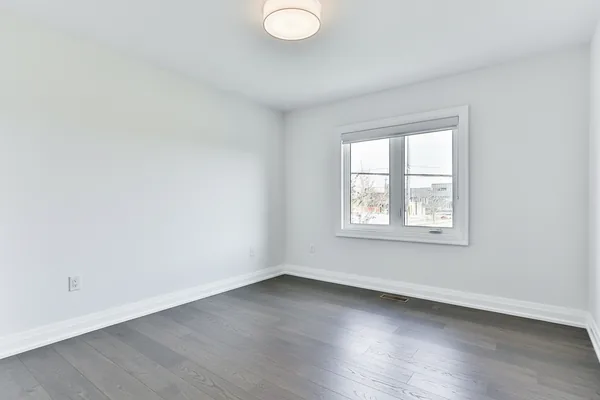
Why empty rooms photograph badly — and why agents ask for them anyway
An empty room in real life usually photographs worse than a furnished one — it looks smaller, colder, and harder to read at scale, because furniture normally gives a viewer a sense of proportion. That is exactly why this is done digitally rather than by physically clearing the house: you can generate the empty version, decide it does not sell the space well, and go straight to a staged version instead, without ever having moved a sofa.
The practical case for an empty shot is showing a buyer the actual bones of the room — floor condition, wall space, window placement, natural light — separate from someone else's taste in furniture. Some buyers specifically want to see this before deciding whether the layout works for their own furniture.
The more common real-world use is as an intermediate step: empty the room, then run it through Virtual Staging with a style that matches the target buyer, rather than being stuck with whatever furniture happened to be there when the photos were taken.
What stays and what gets rebuilt
When furniture is removed, the model has to invent what was behind and underneath it — the section of floor under a rug, the wall behind a headboard, the corner behind a bookshelf. It does this by extending the visible floor pattern, wall color and lighting into the gap, which works well for consistent surfaces and less predictably for rooms with patterned rugs or accent walls partly hidden by furniture.
Built-in features — fitted cabinets, shelving, fireplaces — are structural to the room rather than furniture, so keeping them selected preserves exactly what makes the space distinctive. Light fixtures and window treatments are optional to keep for the same reason: a pendant light or curtains often say more about the room's character than the sofa did.
Floor finish is a judgment call, not a fabrication rule: choosing "natural wood" or "tile" for the newly bare floor is stating a plausible finish for an empty room, not claiming that is what is actually under the existing carpet. If accuracy of the underlying floor matters, keep the floor preference close to what you can already see at the room's edges.
Getting a clean, believable result
Shoot wide and from a corner, ideally showing as much floor and wall as the room allows. The model reconstructs hidden surfaces by extending what it can already see, so the more floor and wall are visible in the original photo, the less it has to guess.
Avoid photos where furniture blocks most of a distinctive feature — a fireplace surround, an architectural window, textured wall paneling. If a feature is mostly obscured, the reconstruction behind it is closer to a plausible guess than a faithful recreation of the real wall.
Run the emptied result through Virtual Staging next if the goal is a listing photo rather than a bare-shell reference shot — an empty room rarely outperforms a well-staged one for actually attracting buyers.
🪑
AI Furniture Removal
Upload your imageTap anywhere here — your AI design will appear in this space after you generate.JPG · PNG · WebP
Remove all furniture to show empty space
Be specific for better results0/400
Output quality:
Frequently Asked Questions
The model reconstructs the floor, walls and lighting behind removed furniture by extending what is already visible in the photo, which produces a natural-looking empty room in most cases. Rooms with heavily patterned or mostly-hidden surfaces reconstruct less predictably.
It is a useful intermediate step. An empty room alone can look colder and smaller than a furnished one, so most listings pair it with Virtual Staging rather than showing the bare shell as the final photo.
Use the Declutter mode instead — it keeps the main furniture and clears mess, personal items or specific categories rather than emptying the room entirely.
Furniture Removal strips the room to an empty shell. Declutter keeps the furniture and removes only the mess around it. Use removal when the furniture is the problem; use declutter when it is fine and the room just looks busy.
The model extends the visible floor pattern or wall color into the hidden area. It is a plausible reconstruction, not a photograph of what is actually there, so treat the finish as an estimate if exact accuracy matters.
Yes — clean and polished, natural wood, carpet or tile. This states a plausible finish for the bare floor; it does not reveal what is physically under any existing flooring.
Signing up gives you free credits with no card required, enough to empty several room photos. Paid plans add credits and unlock the rest of the platform.