Yes. Upload a photo of the piece and describe the fabric type and target color — for example "change the linen sofa to sage green" — and the AI recolors it while keeping the weave and shadow detail.
AI Furniture Color Changer - See New Colors Instantly
AI Furniture Color Changer - See New Colors Instantly is a free AI tool that lets you transform your interior design process! Use our AI Furniture Color Changer to instantly test new colors and finishes on any piece of furniture—from a sofa or chair to cabinets, beds, and decorative items. Easily change furniture color online using advanced AI.
Free to try · first generation free on signup · no credit card
1
Step 1
Upload Image
Start by uploading image
Upload your image
Click to browse or drag & drop
2
Step 2
Options
Configure your options
Output quality:
Mode
Color Change
Your AI Design Will Appear Here
Fill in the options on the left, then press Generate.
Upload your image
Drag & drop your file here or click to browse
JPG, PNG, WebP
Max 10MB
AI Ready
Popular in Home Design Studio
Paint My House AIExterior House Paint AIAI Kitchen DesignAI Bathroom DesignAI Bedroom DesignFree AI Architecture GeneratorAI Interior Design From a PhotoAI Landscaping DesignHome Color Combination AIAI Curb Appeal RaterAI Interior Design RaterAI House Style IdentifierAI Renovation Cost EstimatorAI Day to Dusk Photo EditingAI Declutter Room PhotosAI Home Addition VisualizerAI Home Design Tools Compared
Quick facts about AI Furniture Color Changer - See New Colors Instantly
- Tool nameAI Furniture Color Changer - See New Colors Instantly
- CategoryColor Changer AI
- PriceFree to try
- InputPhoto upload + text prompt
- OutputAI-generated image
Upload a photo of a sofa, chair, cabinet, table or any other piece of furniture and preview a new color on it before you buy fabric, paint, or a reupholstery job. The AI keeps the piece's shape, texture and the rest of the room exactly as photographed — only the color changes — so you can judge a recolor against the room it actually has to sit in.
Free to try · results in about 30 seconds · no card required
Fabric holds color differently than painted wood
The single biggest factor in how convincing a furniture recolor looks is what the piece is actually made of, because fabric and painted wood interact with color and light in genuinely different ways — and the tool works best when your prompt acknowledges that difference rather than just naming a color.
1
Upholstered fabric
Woven fabric (linen, cotton, velvet, bouclé) scatters light across thousands of individual fibers, so a color on fabric always reads slightly softer and less saturated than the same color on a flat surface. Velvet in particular shifts shade depending on the direction of the pile, showing a paler and a deeper tone of the same color depending on the angle — describing the fabric type in your prompt, not just the color, helps the AI render that texture-dependent shading correctly.
2
Leather and faux leather
Leather takes color as a more even, slightly glossy surface with visible grain and natural creasing at stress points — the seat edge, the armrests. A leather recolor that ignores those creases and grain patterns and just flat-fills the color is usually what makes a leather recolor look pasted-on rather than real.
3
Painted or stained wood
Solid wood furniture — a dresser, a dining table, a cabinet — takes a painted color as an even, opaque coat that still shows the wood's joinery lines, panel seams, and any existing hardware. A wood-to-wood stain change (walnut to oak, for instance) is a different, more subtle shift than painting wood a solid color, and naming which of the two you want avoids a wrong-toned result.
Matching a new color to the room it already sits in
A furniture recolor almost never happens in isolation — the piece sits on an existing floor, against existing walls, near other furniture whose colors you are not changing. The most common mistake is picking a color that looks good in isolation on the piece itself but clashes with everything already in the frame, because a color swatch held up to a screen doesn't carry any information about the room's actual lighting or its other tones.
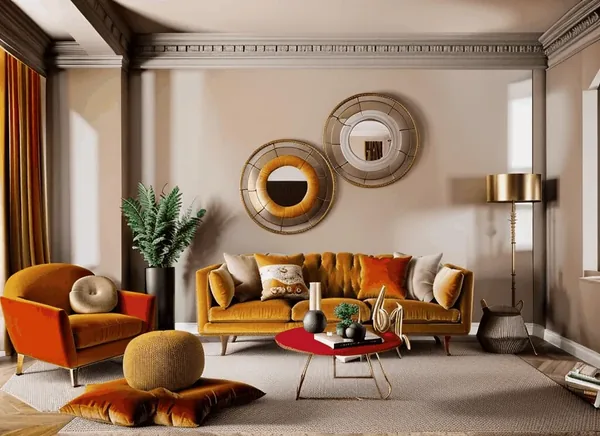
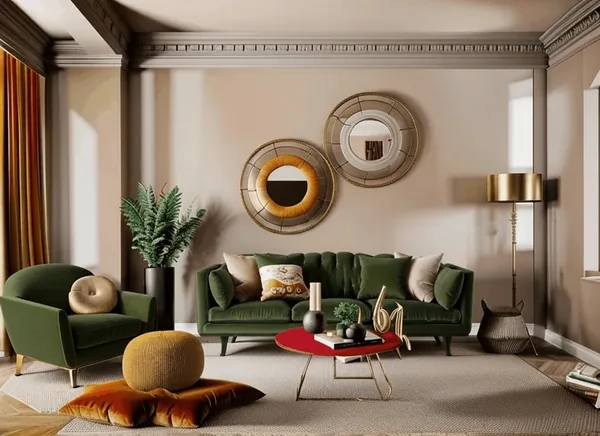
Warm-toned rooms — wood floors, cream or beige walls, brass hardware — generally take warm furniture colors (terracotta, mustard, warm green, chocolate brown) better than cool ones; cool-toned rooms — gray floors, white or navy walls, chrome or black hardware — usually pair better with cool furniture colors (navy, sage, charcoal, dusty blue). Neither rule is absolute, which is exactly why testing the recolor against your actual room photo, rather than guessing from a fabric swatch, is worth the thirty seconds it takes.
Because this tool changes only the furniture piece and leaves the floor, walls, and everything else in the photo untouched, it is a direct way to check whether a color you're considering actually works with the room you have — not the room in a showroom photo.
What makes a recolor look fake
A handful of specific mistakes are behind most unconvincing furniture recolors, and most of them come down to the edit ignoring the piece's existing shading rather than the color choice itself.
1
Flat color with no shadow
Real upholstery and wood both have shadows in the folds, seams, and where the piece meets the floor. A recolor that fills the shape with one flat tone and drops those shadows reads instantly as an edit rather than a photograph — naming the material (velvet, leather, painted oak) in your prompt helps the AI keep that shading intact.
2
Color that ignores existing light
If the original photo has warm afternoon light coming from one side, a recolored piece that looks evenly lit from all angles will stand out against a room that still has directional shadows everywhere else. Photos shot in flat, even daylight give the most consistent recolor results for this reason.
3
Overly saturated or unnatural shades
Extremely saturated or neon colors rarely exist in real upholstery or furniture paint, so pushing for one tends to produce a result that reads as a digital effect rather than a real fabric or finish — sticking to colors that plausibly exist as a fabric bolt or a paint can keeps the result believable.
4
Recoloring a busy or low-resolution photo
A cluttered background, harsh mixed lighting, or a small, compressed source photo all give the AI less to work with and tend to produce softer, less precise edges around the piece being recolored. A clear, well-lit, reasonably close photo of the furniture piece gives the cleanest result.
Who uses a furniture color preview
🏠
Homeowners choosing reupholstery fabric
✓Preview a fabric color on the actual sofa before ordering yardage or booking an upholsterer.
✓Compare two or three shades side by side against the same room photo instead of guessing from small swatches.
💡
Furniture and home goods sellers
✓Show one product photo in multiple color variants for a listing without a separate photoshoot per color.
✓Test which shade of a chair or cabinet looks best before committing to a production color run.
🏢
Renters and stagers
✓See whether painting or slipcovering an existing piece could avoid buying new furniture entirely.
✓Preview a neutral recolor for a rental listing without altering the actual piece.
Pair a furniture recolor with the rest of the room
A furniture color rarely stands alone in a full room redesign — most people testing a new sofa or cabinet color are also weighing a wall color, a flooring change, or a full room restyle at the same time.
🎨
Wall Changer AI →
Test a new wall color or material to go with the recolored furniture.
🏗️
Floor Changer AI →
Preview a flooring change alongside the new furniture color.
🛋️
AI Interior Design →
Restyle the whole room once the furniture color is settled.
📸
Virtual Staging →
Stage an empty room with furniture before deciding on a recolor.
More Color Changer AI tools
Popular on AI Two
Browse every tool in this category: Color Changer AI
🎨
AI Furniture Color Changer - See New Colors Instantly
Upload your imageTap anywhere here — your AI design will appear in this space after you generate.JPG · PNG · WebP
Premium users can generate images without watermark
Higher quality options available for premium users
Be specific for better results0/300
Premium users can generate images without watermark
Higher quality options available for premium users
Output quality:
Frequently Asked Questions
Yes. Leather, faux leather, painted wood, and stained wood all work. Naming the material in your prompt helps the AI keep the right texture and finish for that material.
The tool changes only the furniture piece and leaves the rest of your photographed room untouched, so you can judge the new color directly against your real floor, walls, and lighting rather than an isolated swatch.
Use a clear, well-lit photo, name the material (fabric, leather, wood) in your prompt, and pick a plausible fabric or paint shade rather than an extreme saturated color — those choices keep the shading and texture believable.
Yes. Run the same photo with different color prompts and download each result to compare side by side before committing to a fabric or paint purchase.
Describe each piece and its target color clearly in your prompt. For very different pieces, running separate generations per item usually gives more precise control over each color.
Yes. It is one of the most common uses — preview a fabric color on your actual sofa or chair before ordering yardage or booking an upholsterer.
Signing up gives you free credits with no card required, enough to try several furniture colors. Paid plans add credits and unlock the whole platform rather than charging per tool.