All common window types, including double hung, casement, picture windows, bay windows, arched windows, floor-to-ceiling windows and French windows, in different frame materials and colors.
AI Window Replacement Visualizer
AI Window Replacement Visualizer is a free AI tool. Free AI window visualizer - Preview new windows, add windows, or change window styles in your home photos. Perfect for renovation planning & contractor presentations.
Free to try · first generation free on signup · no credit card
1
Step 1
Upload Image
Start by uploading image
Upload your image
Click to browse or drag & drop
2
Step 2
Select Mode
Choose your transformation style
Replace windows with different styles and frames
3
Step 3
Options
Configure your options
Output quality:
Mode
Change Window Style
Your AI Design Will Appear Here
Fill in the options on the left, then press Generate.
Upload your image
Drag & drop your file here or click to browse
JPG, PNG, WebP
Max 10MB
AI Ready
Popular in Home Design Studio
Paint My House AIExterior House Paint AIAI Kitchen DesignAI Bathroom DesignAI Bedroom DesignFree AI Architecture GeneratorAI Interior Design From a PhotoAI Landscaping DesignHome Color Combination AIAI Curb Appeal RaterAI Interior Design RaterAI House Style IdentifierAI Renovation Cost EstimatorAI Day to Dusk Photo EditingAI Declutter Room PhotosAI Home Addition VisualizerAI Home Design Tools Compared
Quick facts about AI Window Replacement Visualizer
- Tool nameAI Window Replacement Visualizer
- CategoryHome Design
- PriceFree to try
- InputPhoto upload + text prompt
- OutputAI-generated image
Windows are one of the most expensive line items in a renovation and one of the hardest to picture from a spec sheet alone. This tool renders new window styles, frame materials and colors directly on your house, or adds a new window to a wall that does not have one, so you can compare options before you call a supplier.
Free to try · results in seconds · no card required
Window styles and what each one is actually for
Double-hung windows are the default for a reason — both sashes move, they are easy to clean from inside, and they suit almost any traditional or transitional house. Casement windows crank outward and seal tighter against wind, which makes them a common upgrade in energy-conscious renovations. Picture windows do not open at all — they are for a view and maximum daylight, typically paired with operable windows on either side.
Bay and arched windows change the shape of a room, not just the wall. A bay window adds a few feet of interior floor or seating space and reads as a strong architectural feature from the street; an arched window suits Mediterranean, Spanish and some craftsman homes but looks out of place on a plain modern box. Floor-to-ceiling and French windows suit modern and contemporary builds where the goal is maximum glass and a connection to the yard.
Mixing styles across one elevation rarely looks intentional unless it is a deliberate design move — a picture window flanked by double-hung sashes is a classic combination, while five different window shapes on one wall usually just reads as unplanned.
Glazing matters as much as the frame shape, especially in extreme climates. Double-pane glass is now the practical minimum in most regions; triple-pane adds meaningful insulation in very cold climates at extra cost and weight. None of that shows up in a visual render, so treat the style preview as the aesthetic half of the decision and ask your supplier about glazing performance for your climate separately.

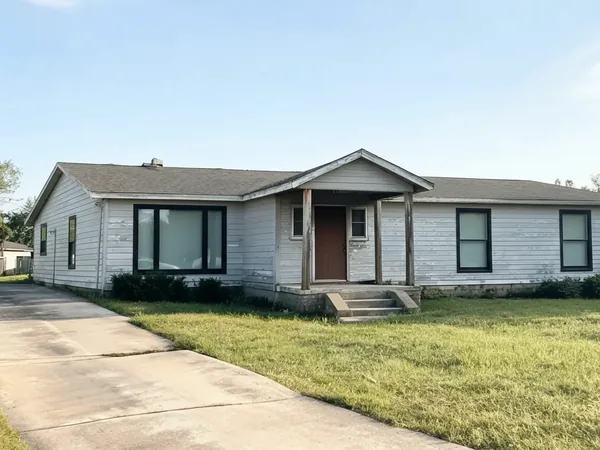
Frame material and color — the part people underrate
Vinyl is the affordable, low-maintenance default: it does not need painting and resists rot, but it comes in a narrower color range than other materials and usually cannot be repainted later. Wood frames give the warmest look and can be stained or painted to match anything, at the cost of periodic maintenance and sealing. Aluminum frames are slim and strong, which suits a modern look with large glass panes, but they conduct heat and cold more than vinyl or wood unless thermally broken. Fiberglass splits the difference — paintable like wood, low-maintenance like vinyl, at a higher price point.
Frame color changes a house's read almost as much as the window shape does. Black frames read as crisp, deliberate contrast against almost any siding color; white frames are the safe, classic choice that recedes into the wall; natural wood and brown frames suit craftsman and traditional homes.
Check frame color against your existing trim, not just your siding — a black-framed window against white trim reads very differently than the same black frame against trim painted to match the wall.
Interior and exterior frame color do not have to match. Many manufacturers offer a white interior frame for a bright room with a black or bronze exterior frame for street-facing contrast — worth asking about if the render you like is exterior-only and you have not thought about how the frame looks from inside.
Adding a window where there is not one
Adding a window is a bigger structural step than swapping one style for another in the same opening, because it means cutting into a wall and framing a new rough opening. Use the size and position options to test whether a new window actually improves the room — a window placed too high or too small often disappoints once it is real.
Position matters for both light and privacy. A window centered on a wall reads as intentional and symmetrical from outside; one placed to the side can be the right call when it needs to clear plumbing, structure, or a neighbor's sightline into the room. A window set near the ceiling brings in light without sacrificing wall space for furniture or artwork below it.
Treat an "add window" render as a planning tool for the conversation with a contractor or structural engineer about what the wall can actually support, not as confirmation that the opening is straightforward — that depends on framing, wiring and plumbing you cannot see in a photo.
Using the render with a window supplier
Bring saved renders to a window supplier instead of describing "something modern with black frames" — style names and what counts as "modern" vary by manufacturer, and a photo of your own house removes that ambiguity in the first meeting.
Ask for actual frame samples before ordering. Vinyl and fiberglass colors especially can look different under direct sun than they do in an indoor showroom, and this tool is meant to help you choose a direction, not to guarantee an exact factory match.
If you are replacing every window in the house, get quotes for a full-house upgrade rather than window-by-window — many suppliers price whole-house jobs differently, and it is worth comparing that against a lighter, style-only refresh of the frames you are least happy with.
🪟
AI Window Replacement Visualizer
Upload your imageTap anywhere here — your AI design will appear in this space after you generate.JPG · PNG · WebP
Replace windows with different styles and frames
Be specific for better results0/400
Output quality:
Frequently Asked Questions
Yes — use the "Add New Window" mode to add a window of a chosen style, size and position to any wall in your photo. Treat it as a planning render; whether the wall can actually take a new opening is a question for a contractor.
It is useful for showing a client a direction before work starts — a photo of their own house with the proposed window is easier to agree on than a verbal description or a catalog photo of someone else's house.
Yes — keep the window size and style while changing frame material and color to compare vinyl, wood, aluminum and fiberglass options side by side.
Vinyl and fiberglass need the least upkeep — no painting, good rot resistance. Wood looks the warmest but needs periodic staining or sealing. Aluminum is durable but conducts temperature more unless thermally broken.
Treat it as a strong reference, not a guaranteed match. Frame colors can look different under direct sun than in a showroom — always confirm against a physical sample before ordering.
No. Cutting a new opening depends on framing, wiring and plumbing behind the wall that a photo cannot show. Use the render to decide on style and placement, then have a contractor confirm feasibility.
Signing up gives you free credits with no card required, enough to try several window options. Paid plans add credits and unlock the whole platform rather than charging per tool.