Upload a photo of your room, choose a furniture style (or a specific piece to target), and the AI replaces the existing furniture with new pieces matched to the room's scale, light and positioning.
AI Furniture Replacement
AI Furniture Replacement is a free AI tool. Free AI furniture replacement - Replace existing furniture with new styles, brands, or custom designs. Visualize different furniture in your room before buying.
Free to try · first generation free on signup · no credit card
1
Step 1
Upload Image
Start by uploading image
Upload your image
Click to browse or drag & drop
2
Step 2
Select Mode
Choose your transformation style
Replace furniture with different styles
3
Step 3
Options
Configure your options
Output quality:
Mode
Style Swap
Your AI Design Will Appear Here
Fill in the options on the left, then press Generate.
Upload your image
Drag & drop your file here or click to browse
JPG, PNG, WebP
Max 10MB
AI Ready
Popular in Home Design Studio
Paint My House AIExterior House Paint AIAI Kitchen DesignAI Bathroom DesignAI Bedroom DesignFree AI Architecture GeneratorAI Interior Design From a PhotoAI Landscaping DesignHome Color Combination AIAI Curb Appeal RaterAI Interior Design RaterAI House Style IdentifierAI Renovation Cost EstimatorAI Day to Dusk Photo EditingAI Declutter Room PhotosAI Home Addition VisualizerAI Home Design Tools Compared
Quick facts about AI Furniture Replacement
- Tool nameAI Furniture Replacement
- CategoryHome Design
- PriceFree to try
- InputPhoto upload + text prompt
- OutputAI-generated image
Furniture replacement swaps what is sitting in a room for something else — a different style, a different piece, or both — while leaving the room itself untouched. Getting a believable result depends less on the style you pick than on matching the new furniture to the room's actual scale and light, which is where most disappointing results come from.
Free to try · results in about 30 seconds · no card required
Restyle everything, or replace one piece
Style Swap changes the character of a whole room at once — modern, mid-century, farmhouse, industrial — restyling every visible piece of furniture to match. It is the right tool when the room as a whole feels wrong for the buyer or resident you are picturing, not just one item in it.
Replace Specific Piece is narrower and more controllable: it targets one named item — the sofa, the bed, the dining table — and swaps it for a new style, color and material while leaving everything else in the room exactly as it was. Use this when the room mostly works and only one piece is dated, damaged, or wrong for the space.
A practical rule: if you are already listing more than two things you would change, use Style Swap and let it restyle coherently. If it is genuinely one item, Replace Specific Piece keeps the rest of the room's character intact instead of risking a full restyle you did not ask for.
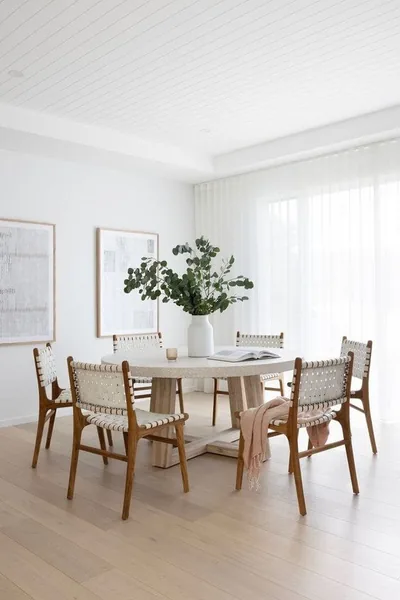
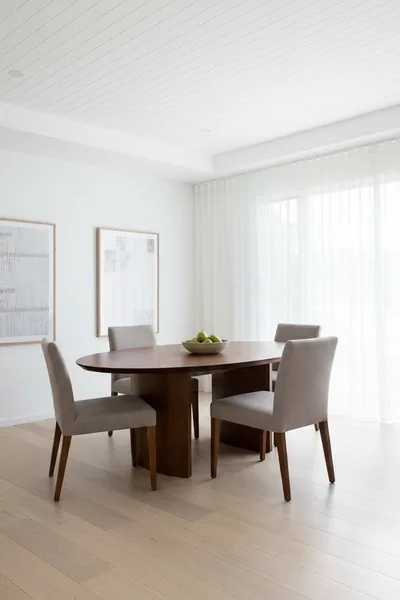
Scale is what makes replacement furniture believable
The single biggest giveaway in a bad furniture swap is scale — a sofa that is subtly too large or too small for the space it sits in reads as wrong even to someone who cannot say why. The model works from the proportions visible in your photo, so it sizes replacement pieces against the room's existing dimensions rather than an abstract idea of "a sofa."
This is also why the piece you are replacing matters as a reference: a large sectional swapped for a slim two-seater in the same footprint can leave the room looking sparse, while a small accent chair swapped for an oversized armchair can crowd a space that was previously balanced. If proportion drift shows up in a result, describing the size relative to the room — "keep it the same footprint as before" — in additional requirements usually fixes it.
Positioning follows the same logic. Replacement furniture generally lands where the original piece was, against the same wall, at the same angle — which is usually right, since that is where the room's traffic flow and focal points already work.
Matching light direction and material to the room
Light direction is the second thing that separates a convincing swap from an obviously edited one. A room lit from a window on the left needs new furniture with shadows and highlights consistent with that direction — a leather sofa with a highlight on the wrong side reads as pasted-in even when the shape and color are right. The model reads the existing light in your photo and carries it onto the replacement, which is part of why a well-lit original photo produces a more convincing result than a dim or backlit one.
Material changes interact with light differently than color changes do — velvet, leather, matte fabric and glossy wood each catch light differently, so switching material as well as style is a bigger visual jump than switching color alone. If a result looks slightly off, try changing one variable at a time rather than style, color and material all at once.
Undertone matching matters more than most people expect: a "gray" sofa can lean warm or cool, and a mismatch against warm wood flooring or cool-toned walls is often what makes a technically correct replacement still look wrong in the finished photo.
When replacement is not the right tool
If the room's layout itself is the problem — furniture blocking a walkway, an awkward arrangement, too much crammed into a small space — no amount of style-swapping fixes that, because replacement keeps the existing positions. Room Layout Optimizer, on the Floor Plan Generator page, addresses arrangement rather than style.
If you are trying to sell a property and are not sure the current furniture should be there at all, consider whether the room needs staging from empty rather than a style swap of what already exists — the two produce different results and start from different assumptions.
And if the goal is genuinely to see several style directions before deciding, generate two or three variations rather than treating the first result as final — style is subjective enough that the "right" one is usually found by comparison, not by the first prompt.
🛋️
AI Furniture Replacement
Upload your imageTap anywhere here — your AI design will appear in this space after you generate.JPG · PNG · WebP
Replace furniture with different styles
Be specific for better results0/400
Output quality:
Frequently Asked Questions
Yes. Use the Replace Specific Piece mode to target one item — sofa, bed, table, chair, desk, dresser or bookshelf — while everything else in the room stays exactly as it was.
The model sizes replacement furniture against the proportions visible in your photo, so it generally matches the room's scale. If a result looks off in size, adding a note like "keep the same footprint" in additional requirements usually corrects it.
Yes, that is part of what makes a replacement look real rather than pasted in — the model reads the light direction in your original photo and applies matching shadows and highlights to the new furniture.
Yes. Generate a few different style options and compare them before deciding — style is subjective enough that comparison usually beats judging the first result alone.
Style Swap restyles every piece of furniture in the room at once. Replace Specific Piece targets one named item and leaves the rest of the room untouched. Use Style Swap for a full refresh, the other for a single dated or damaged piece.
No — walls, floor, windows and layout stay as photographed. Only the furniture changes. If you want to change the room's layout, not just its furniture, a layout tool is a better fit.
Signing up gives you free credits with no card required, enough to try several furniture styles. Paid plans add credits and unlock the rest of the platform.