
Home photo editing tools on AI Two
Object Remover, furniture color, walls, floors, staging, declutter, and day-to-dusk tools for listing photos in Home Design Studio.
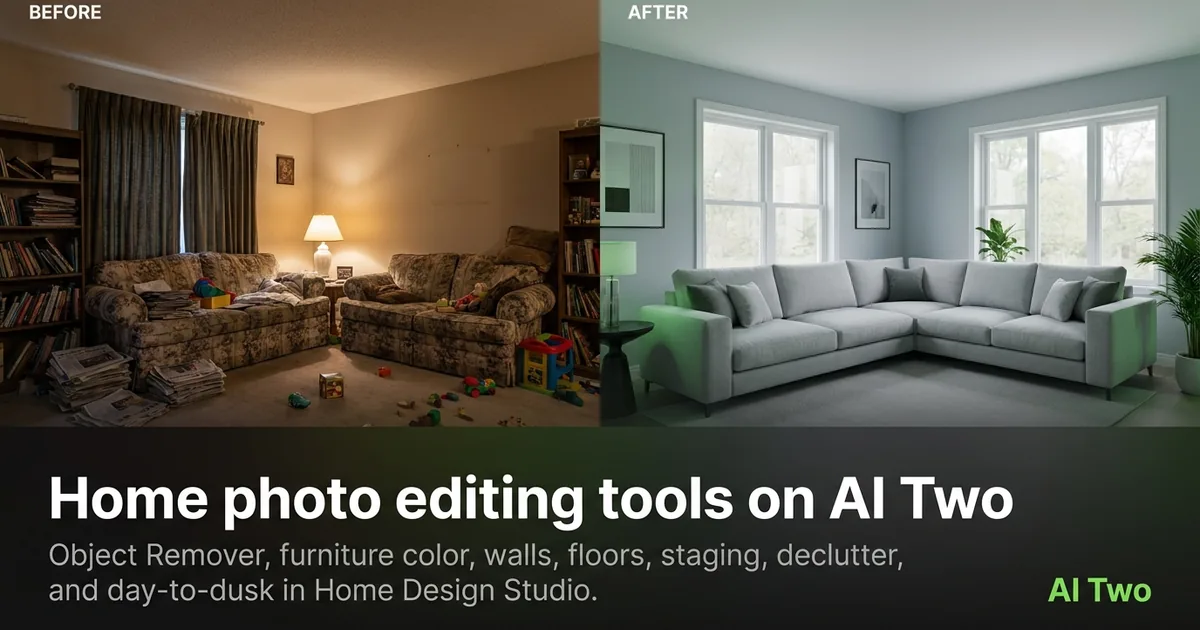
Home photo editing on AI Two is the cluster I open when a listing photo needs a fix before it goes live. Walls, floors, furniture color, clutter, empty rooms, and dusk lighting all live here so agents and sellers can reshape an interior still without booking a reshoot. When I take on a vacant listing, I start in this group after I decide the exterior shot is already usable. That order keeps credits on the rooms buyers care about first. Home Design Studio lists every page in this cluster from one sidebar so you do not hunt across the site.
Who this editing group is for
Open this cluster if you already have a room photo and need a cleaner or more sellable version. Real estate agents, home stagers, furniture sellers, and landlords use these pages when the bones of the room are fine but the photo still blocks a listing.
When I walk a property with a phone camera, I shoot wide first, then open Object Remover or Declutter before I touch paint colors. Removing visual noise early makes later wall and floor tests easier to judge.
These tools serve people who sell or rent homes, not fashion sellers. If your job is putting apparel on a model, Fashion Studio is the wrong branch. Home Design Studio is the audience that needs room and listing edits.
I batch by room type. Living rooms get staging or furniture replacement. Kitchens get declutter and object removal. Exterior dusk shots wait until interiors pass review so I do not burn credits on a twilight frame for a listing that still needs empty-room work.
Paid monthly credits matter when you edit twenty rooms across a weekend open house. Free signup credits are enough to test one hero room and learn which tool order works for your camera style.
I never promise a buyer the finished renovation from these stills. I use them as listing drafts and client preview frames so everyone agrees on direction before contractors start.
Tools in this group
Nine pages cover interior photo edits. Object Remover clears stray items. Furniture Color shifts sofa and cabinet hues. Wall Changer and Floor Changer preview finishes. Furniture Removal clears large pieces. Furniture Replacement swaps in new pieces. Virtual Staging furnishes empty rooms. AI Declutter softens mess without a full restage. Day to Dusk turns daytime exteriors into evening listing frames.
I pick Object Remover when one object ruins an otherwise strong shot. I pick Declutter when the whole room feels busy. Furniture Removal is for sofas and beds that must leave the frame. Replacement and staging are for empty or dated rooms that need a new story.
Wall and floor tools come after clutter is gone. Color on dirty floors or crowded walls wastes a credit because the eye still lands on the mess. Day to Dusk sits at the end of my list once interiors are approved.
Each child walkthrough post covers upload tips for that page. Use the cards below when you want the focused guide instead of this cluster map.
Furniture Color is not the same as Clothing Color in Fashion Studio. Here the subject is a sofa, cabinet, or chair in a room. Keep apparel color work in Fashion Studio so the audience and chrome stay correct.
How I run an editing workflow
Step one: upload a sharp, level photo with the room fully framed. Step two: remove clutter or objects before any color change. Step three: decide whether the room needs empty space, replacement furniture, or full staging. Step four: lock wall and floor finishes. Step five: run Day to Dusk only on exteriors that already match the listing story.
When I tested Furniture Color on a gray sofa last month, the fabric weave stayed readable while the hue shifted. That is my pass check. Soft logos and mushy wood grain mean I go back to a sharper source file.
I change one control per run when I am learning a room. Stacking wall paint and floor finish in the same pass hides which setting helped. After I know the direction, I still keep the original file untouched for client side-by-sides.
Virtual Staging works best on empty rooms with clear wall and floor planes. If a stained mattress is still in frame, I remove it first so the staged sofa does not fight leftover clutter.
Credits are metered on every generation. I plan three test runs per hero room, then batch the rest once the client picks a direction. That habit stops me from burning the monthly balance on random wall swatches.
If Floor Changer invents a weird reflection, I re-shoot with the camera higher and less glare on the boards. Bad geometry in the source becomes worse after a finish swap.
What photo works best
Straight, daylight interiors with level horizons beat fisheye phone shots. Extreme wide angles bend door frames and make wall paint look wrong after a color change. If a lamp is half cropped, Object Remover has less clean edge to work with.
I keep originals in a dated folder and never overwrite them. Editing is iterative, and clients often ask to see the occupied room beside the staged version.
Mixed yellow bulbs and daylight in one frame confuse finish previews. I shoot with curtains open or lights off so Wall Changer sees one lighting story.
For Day to Dusk, I need a clear skyline and readable facade. Heavy tree cover or blown-out windows produce muddy evening frames. I shoot the exterior again if the daytime file is soft before I spend credits on dusk.
Furniture Replacement needs the target piece fully visible. Cropped chair legs lead to odd proportions. I step back and reframe before I generate.
Declutter handles lived-in mess better when counters and floors are at least partly visible. A frame buried in laundry leaves the model guessing what the surface is.
Where to go next
After interiors look right, open the exterior cluster for paint, roof, and curb work, or the analyze cluster when you need ratings and style IDs before more edits. The Home Design Studio pillar maps every group. The compare guide explains when Edit beats Exterior or Analyze for today’s job.
If you only need a scorecard before touching paint, start in Analyze instead of burning edit credits. If the facade is the problem, Exterior is the better first stop than this room-edit group.
Return to Home Design Studio when you need the full sidebar. Keep Fashion Studio closed unless the project actually needs apparel on a model.
Child how-to posts for each tool in this group will expand upload tips and sibling links. Use this cluster page as the map, then open the card that matches today’s problem.
FAQs
Related studio guides

Exterior home design tools on AI Two
Guide to exterior home design tools on ai two in Home Design Studio on AI Two.
Read guide
Room design tools on AI Two
Interior, kitchen, bedroom, bathroom, ceiling, and floor plan tools for room redesign in Home Design Studio.
Read guide
Outdoor and structure design tools on AI Two
Pool, fence, deck and patio, and driveway design tools for outdoor structures in Home Design Studio.
Read guide