Color Shift Wrap Visualizer
Color Shift Wrap Visualizer is a free AI tool that lets you see a color shift (chameleon) wrap on a photo of your own car: purple to green, blue to purple, green to gold and more, in gloss, satin or matte. Free to try.
Free to try · first generation free on signup · no credit card
Start by uploading image
Upload your image
Click to browse or drag & drop
Configure your options
Related Tools
Your AI Design Will Appear Here
Fill in the options on the left, then press Generate.
Upload your image
Drag & drop your file here or click to browse
See a chameleon wrap on your car before you commit
Color shift films are the hardest wraps to imagine. They are not one color: they flip between two or more depending on where you stand and where the light comes from, and the effect looks different on every car shape. Pick a color pair and a finish and see how the shift plays across the curves of your own car.
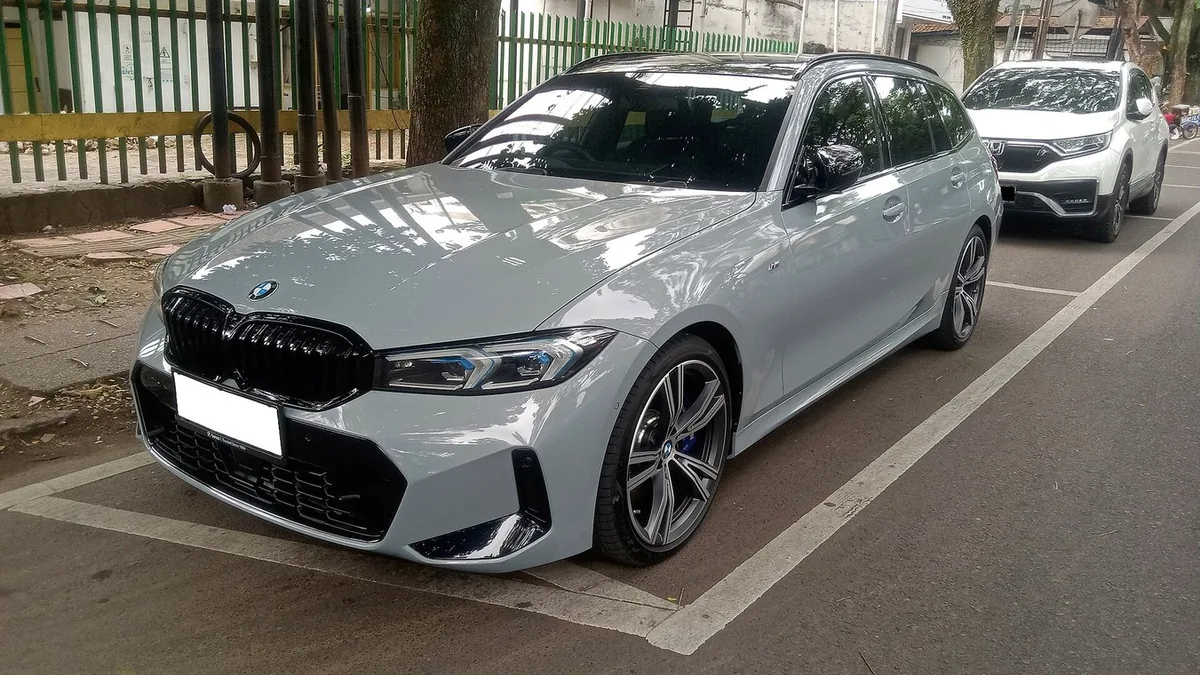
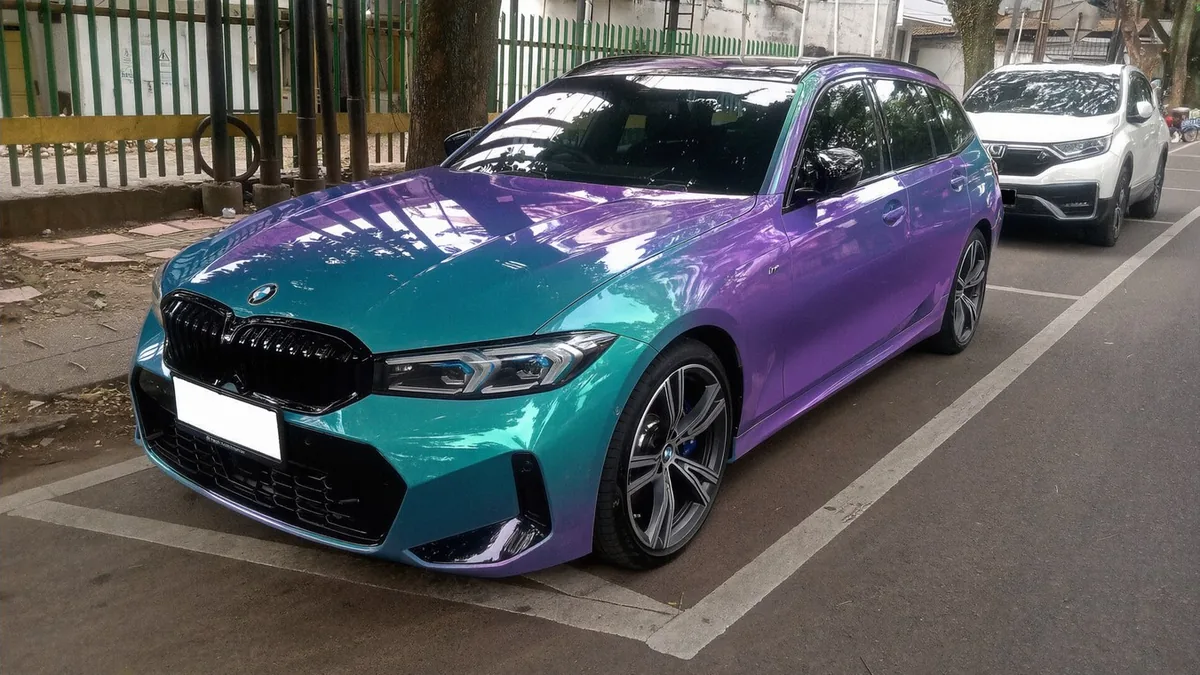
Settings: Color pair "Teal to purple", Finish "Gloss", Shift strength "Strong".
Three steps
Use a three-quarter photo
The shift shows up on curves. A photo that shows the front and one side of the car, with a rounded fender or roofline, gives the model something to play the two colors across.
Pick the color pair and finish
Choose which two colors the film moves between, then gloss, satin or matte. Set the strength to "subtle" if you want a pearl-like hint instead of a dramatic flip.
Render twice and compare
Every render places the shift slightly differently, much like walking around the real car. Run the same settings twice to see more of the effect.
Why a color shift wrap changes color
The color comes from light, not only from pigment. Thin layers inside the film reflect different wavelengths at different angles, so the color you see depends on where you stand.
Curves show both colors
On a bulging fender, a rounded roof or a sculpted door, one part of the panel faces you and another curves away, so you see both colors at once with a gradient between them.
Flat panels settle
A flat hood seen straight on tends to show mostly one color. Cars with lots of curves get the most out of a color shift film; very boxy cars show less of it.
Light matters
Direct sun makes the shift strong and vivid; overcast light makes it softer. Expect the real car to look different in the morning, at noon and under street lights.
Common color shift combinations
Purple to green
The classic chameleon look and the most dramatic flip. Strong on dark-colored cars with big curves.
Blue to purple
A cooler, calmer shift that reads as a deep blue most of the time and flashes purple on the curves.
Teal to purple
Bright and modern, popular on sports cars and hatchbacks.
Green to gold
A warm, rich flip that looks more like premium paint than a wrap, especially in satin.
Red to gold
Fiery and warm; strong in the sun and close to a candy-paint look.
Silver to blue
A subtle shift for people who want something different without a loud color. Good as a first color shift wrap.
Gloss, satin or matte color shift
Gloss
The most reflective and the strongest shift. It looks the most like a show car.
Satin
Softer reflections and a smoother gradient between the colors. Many owners find satin color shift easier to live with every day.
Matte
The most subtle version; the flip is still there but quieter, and the car looks more sculpted than shiny.
Things to know before a color shift wrap
It photographs differently
Phone cameras often capture only one of the colors. The car may look more dramatic in person than in photos, or the other way round.
Repairs are harder to match
If one panel is damaged, the replacement film must come from a matching roll to shift the same way. Ask your installer how they handle panel repairs.
Try a subtle version too
If the full flip feels too loud, render the same pair with the strength set to subtle. It often reads like a pearl paint with a hint of the second color.
Questions sellers actually ask
What is a color shift wrap?
A color shift (or chameleon) wrap is a vinyl film with thin optical layers that reflect different colors depending on the angle you look from and where the light hits. On a curved fender you can see two colors at once, for example purple at the top of the curve fading into green lower down. On a flat panel seen straight on it settles into mostly one color.
Which color pairs can I preview?
The menu has the common pairs: purple to green, blue to purple, teal to purple, green to gold, red to gold, blue to bronze, silver to blue and a multi-color rainbow flip. Use the notes box to describe any other pair, such as "deep red shifting to black".
Why does the shift look different on each panel?
That is how the real film behaves. The prompt asks the model to show the first color on surfaces facing the light and the second color on surfaces curving away from it, so a render with no visible shift at all usually means the photo is too flat or too front-on. A three-quarter photo shows the effect best.
Gloss, satin or matte color shift?
Gloss color shift films show the strongest, most mirror-like flip. Satin softens the reflections and makes the shift look smoother and more expensive. Matte versions are the most subtle. The finish menu lets you compare all three on the same photo.
Is the render an exact match for a real film?
No. A single photo can understate or exaggerate a color shift, because the effect depends on light and on moving around the car. Use the preview to decide whether you like the look at all and which pair suits your car, then ask an installer to show you a real sample on a curved panel outdoors.
How much does it cost?
It is free to try. Each render uses 2 credits; paid plans add more credits, remove watermarks and unlock premium models.
More ways to restyle your car
Want a single solid color instead of a shift? Preview any paint color on the main car color changer.
Try a full vinyl wrap in matte, satin, gloss or chrome on your own photo.
See a contrast roof, a black hood or an upper and lower color split.
Paint the calipers red, yellow, blue or any color behind your wheels.
Put a carbon fiber hood, roof, mirrors or trim on your car photo.