Carbon Fiber Car Visualizer
Carbon Fiber Car Visualizer is a free AI tool. Upload a photo of your car and see a carbon fiber hood, roof, mirror caps, lip or spoiler on it. Compare gloss twill, matte and forged carbon before you buy parts or wrap. Free to try.
Free to try · first generation free on signup · no credit card
Start by uploading image
Upload your image
Click to browse or drag & drop
Configure your options
Related Tools
Your AI Design Will Appear Here
Fill in the options on the left, then press Generate.
Upload your image
Drag & drop your file here or click to browse
See carbon fiber parts on your own car
Carbon fiber is a strong look, and it does not suit every car or every color. Before you buy a carbon hood or wrap the roof, see it on a photo of your car: choose which parts turn carbon, the weave and the finish, and compare a single carbon hood with a full set of accents.
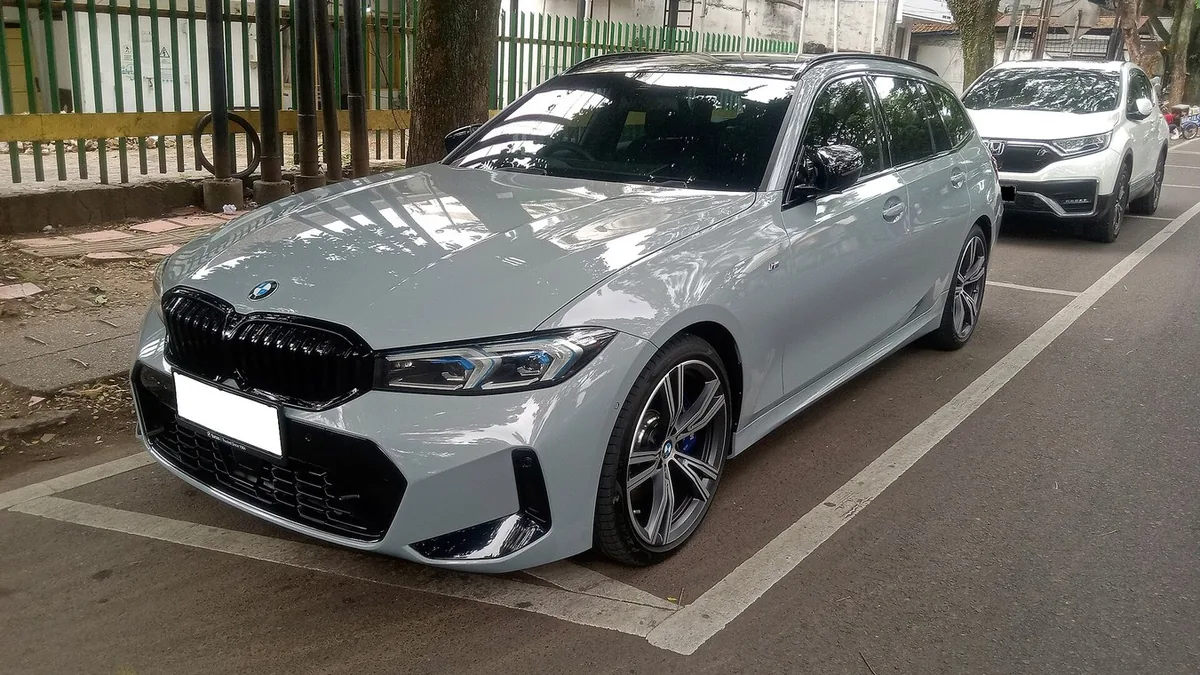
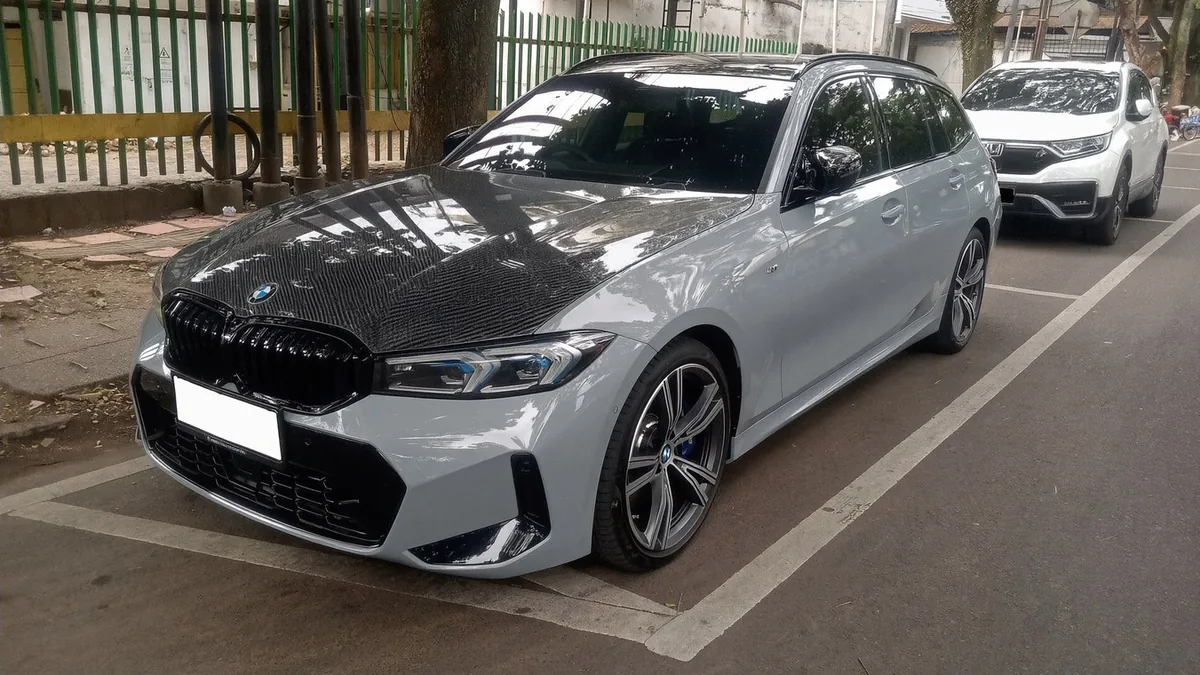
Settings: Parts "Hood", Weave and finish "Gloss 2x2 twill".
Three steps
Upload a three-quarter photo
Standing height, daylight, the whole car in frame. Use a closer front three-quarter photo if you only care about mirrors or the front lip.
Choose the parts and the weave
Pick one part or a combination, then classic twill, matte, forged or tinted carbon.
Compare one part with a full set
A carbon hood alone and a full accent set (mirrors, lip, skirts, spoiler) give very different cars. Render both and decide how far to go.
Carbon fiber looks you can preview
Gloss 2x2 twill
The classic diagonal weave under a glossy clear coat. The weave is most visible in this finish, and it is what most people picture when they think of carbon fiber.
Matte or satin twill
The same weave without the shine. It looks darker, more technical and more uniform from a distance.
Forged carbon
Chopped fibers pressed together, giving a marbled, camouflage-like pattern instead of a regular weave. A newer, more distinctive look.
Tinted carbon
A red or blue tint in the weave. Subtle in shade, more obvious in sun; it pairs well with matching body or caliper colors.
Where carbon fiber works
Hood
The single biggest carbon statement on a car. It reads as performance-oriented, especially with a gloss weave on a light body color.
Roof
A carbon roof works like a black contrast roof with texture. It lowers the look of the car without changing the body color.
Mirror caps
A small, inexpensive accent that is visible from every angle. A good first carbon part.
Lip, skirts and spoiler
Carbon on the lower edges and the rear spoiler outlines the car and makes it look lower and wider.
Carbon fiber and body color
Light colors
White, silver and light gray show the most contrast with carbon; the parts stand out clearly.
Bright colors
Red, yellow, orange and blue with carbon accents give a classic motorsport look.
Dark colors
On black or dark gray, carbon parts are subtle and only show their weave up close and in sun. Forged carbon stands out more than twill on dark cars.
Real carbon or carbon-look wrap
Real carbon parts
Lighter than steel or aluminum panels and the most authentic look; usually the most expensive route. Some "carbon" parts are a carbon layer over fiberglass, so check what you are buying.
Carbon-look vinyl
A printed or textured film over the existing panel. Cheaper and reversible; the weave looks flatter up close than real carbon.
Clear coat matters
Carbon left without a clear coat looks dull and matte and needs UV protection. Gloss-coated carbon shows the weave best.
Questions sellers actually ask
Which parts can I turn into carbon fiber?
The menu covers the hood, the roof, the mirror caps, a front lip and side skirts, a rear spoiler or trunk lid, a hood and roof together, and a full set of accents (mirrors, lip, skirts and spoiler). If your car has no spoiler or lip, the tool turns the existing panel into carbon fiber rather than adding new parts; ask for a new part in the notes box if you want one.
What weave and finish can I preview?
Classic 2x2 twill in gloss clear coat, the same weave in a matte or satin finish, forged carbon (the marbled, chopped-fiber look), and colored carbon with a red or blue tint in the weave. Gloss clear coat shows the weave the most; matte looks darker and more uniform.
Real carbon parts or carbon wrap?
The preview looks the same for both. Real carbon fiber parts are lighter and usually more expensive; carbon-look vinyl is a cheaper, reversible way to get the appearance. Use the render to decide on the look and the parts, then decide which route fits your budget.
Will the rest of the car change?
The prompt tells the model to keep the body color, wheels, glass, lights and background exactly as they are and to change only the chosen parts. Thin parts like mirror caps and lips are easy for the model to miss, so check them and re-run if needed.
What photo works best?
A three-quarter photo in daylight, taken from standing height so the hood and roof are visible. For mirror caps or a front lip, a closer front three-quarter photo shows the weave better.
How much does it cost?
It is free to try. Each render uses 2 credits; paid plans add more credits, remove watermarks and unlock premium models.
More ways to restyle your car
Carbon parts depend on the body color around them; try a new body color on the main car color changer.
Try a full vinyl wrap in matte, satin, gloss or chrome on your own photo.
Preview a chameleon wrap that flips between two colors across the body.
See a contrast roof, a black hood or an upper and lower color split.
Paint the calipers red, yellow, blue or any color behind your wheels.
Add splitters, spoilers or a wide-body kit, then make them carbon here.