Brake Caliper Color Visualizer
Brake Caliper Color Visualizer is a free AI tool. Upload a photo of your car or wheel and preview red, yellow, blue, black or any brake caliper color behind your own wheels before you paint them. Free to try.
Free to try · first generation free on signup · no credit card
Start by uploading image
Upload your image
Click to browse or drag & drop
Configure your options
Related Tools
Your AI Design Will Appear Here
Fill in the options on the left, then press Generate.
Upload your image
Drag & drop your file here or click to browse
Pick a caliper color by seeing it behind your wheels
Painted calipers are a small change that people notice. The right color depends on three things at once: the body color, the wheel color and how much of the caliper the spokes let through. Upload a photo where the calipers are visible, pick a color and see the exact combination on your car.
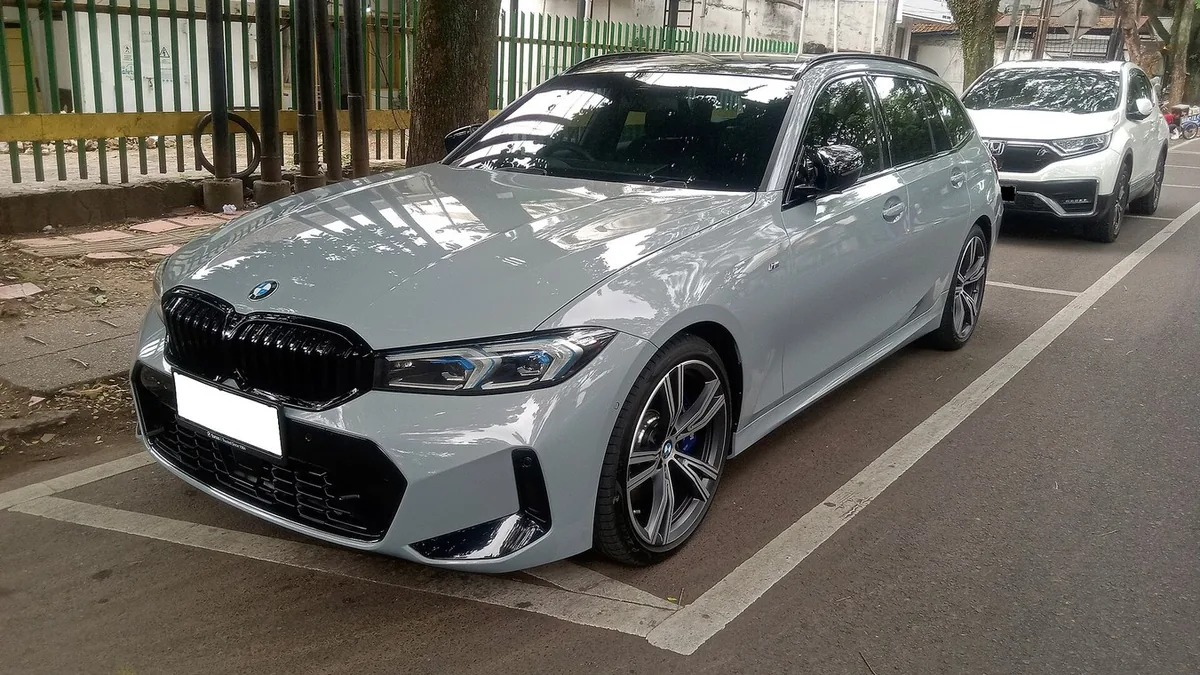
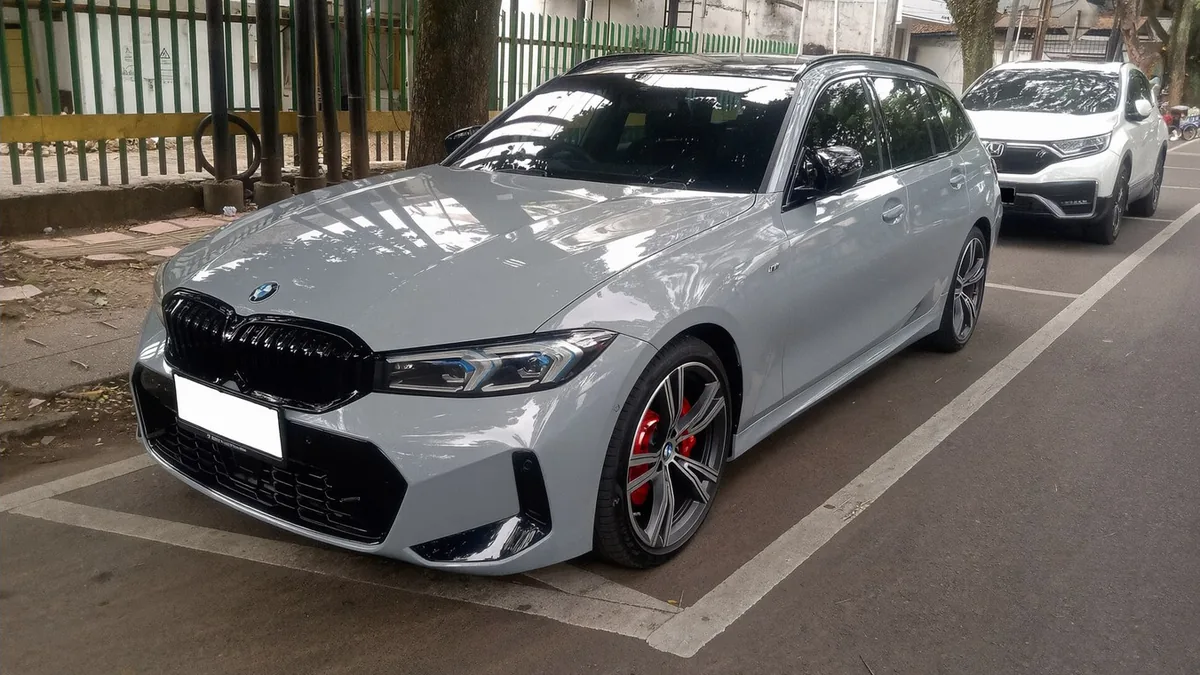
Settings: Caliper color "Red", Finish "Gloss", Lettering "None".
Three steps
Take a photo at wheel height
Crouch down so the camera is level with the wheel center. Open-spoke wheels show the most caliper; a close photo of one wheel works well.
Choose a color and finish
Pick a caliper color, gloss or satin, and whether you want short lettering on the caliper.
Render a bold and a subtle option
Compare one contrasting color, such as red or yellow, with one subtle color, such as gunmetal or body color, on the same photo.
Caliper colors and what they say
Red
The most common sporty choice. It stands out against black, silver and gunmetal wheels and works on almost any body color.
Yellow
Bold and track-inspired. Very visible behind dark wheels and a strong match for black, gray and white cars.
Blue
A cooler sporty color that pairs well with white, silver and blue cars, and with blue badge accents.
Lime green or orange
Loud, modern colors that suit bright cars or cars that already have matching accents.
Black, silver or gunmetal
Subtle and close to the factory look. Gunmetal and black also hide brake dust better than bright colors.
Body color
Calipers painted to match the car look coordinated and custom without shouting.
Matching calipers to wheels and body
Black wheels
Bright calipers (red, yellow, orange, lime) contrast the most; dark blue or gunmetal gives a more integrated look.
Silver or chrome wheels
Red, black and blue all work; very light colors like silver can disappear against silver spokes.
Bronze or gold wheels
Black, gunmetal or a dark red tend to sit better than bright yellow, which can clash with gold tones.
Same color everywhere
Calipers that repeat an accent already on the car (badges, stripes, interior stitching) look planned rather than added.
Practical notes on painted calipers
Use heat-rated paint
Calipers get hot, so painted calipers need a high-temperature caliper paint or a powder coat. Ordinary spray paint discolors and peels.
Covers are another route
Bolt-on caliper covers give the color without painting, but fit varies by car. The render shows the color either way.
Check the lettering
If you want lettering on the caliper, keep it short and generic, and check the spelling in the render before you have it made.
Photos that work best
Open spokes
The more of the caliper you can see in the photo, the more the model can recolor. Mesh and closed wheels give very small results.
Even light
Shade or overcast daylight avoids hard shadows inside the wheel, which can hide the caliper.
Turn the wheel
Turning the steering a little exposes more of the front caliper in a three-quarter photo.
Questions sellers actually ask
Do my calipers need to be visible in the photo?
Yes. The tool recolors the calipers you can see through the wheel spokes, so open-spoke wheels and a photo taken at wheel height work best. If the wheels have very closed designs, the model has little to recolor. A close photo of one wheel works as well as a photo of the whole car.
Which caliper colors can I try?
Red, yellow, blue, orange, lime green, gloss black, silver, gunmetal gray, gold and a color that matches the car body. Use the notes box for anything else, such as "pink" or "the same blue as my badges".
Can I add text on the calipers?
You can ask for it in the notes box, for example "small white lettering on the caliper". Keep the wording short and generic; the model renders short lettering, but it can misspell long text, so check the result.
What caliper color goes with my car?
Red is the most common sporty choice and works on white, black, silver and gray cars. Yellow and lime green read as bold and track-inspired. Silver, gunmetal and black are subtle and close to the factory look. Body-color calipers make the car look coordinated. The quickest way to choose is to render two contrasting options and one subtle one on your own photo.
Will it change my wheels or tires?
The prompt tells the model to change only the brake calipers and keep the wheels, tires, brake discs, lug nuts, body and background as they are. If you also want new wheel colors, use the wheel and rim color changer afterwards on the result.
How much does it cost?
It is free to try. Each render uses 2 credits; paid plans add more credits, remove watermarks and unlock premium models.
More ways to restyle your car
Calipers look best when they suit the body color; try the body color first on the main car color changer.
Try a full vinyl wrap in matte, satin, gloss or chrome on your own photo.
Preview a chameleon wrap that flips between two colors across the body.
See a contrast roof, a black hood or an upper and lower color split.
Put a carbon fiber hood, roof, mirrors or trim on your car photo.
Change the wheel color too, then run the caliper color on the result.