Bodycon Dress AI Model Photos
Bodycon Dress AI Model Photos is a free AI tool. Bodycon dress AI models: upload a dress photo and see it worn by an adult AI model. On-model photos for fitted dresses, no photoshoot. Free to try.
Free to try · first generation free on signup · no credit card
Start by uploading image
Upload your image
Click to browse or drag & drop
Same face across every shot. All models are synthetic and free for commercial use.
Choose your transformation style
Upload a product photo — get a photo-realistic on-model shot. Pick a roster model below to keep the same face across shots.
Configure your options
Your AI Design Will Appear Here
Fill in the options on the left, then press Generate.
Upload your image
Drag & drop your file here or click to browse
When the fit is the product, the flat lay has already lost
A bodycon dress off the body is a rectangle. Everything a shopper is buying — where it holds, where it releases, how the hem sits, whether the seams follow a real waist — only exists once something is inside it. That makes this the category with the most to gain from an on-model shot and the least tolerance for a vague brief.
Three decisions that make or break a fitted-dress generation
On a mannequin, with raking light
If you have a dress form, use it. A mannequin shot carries two things a flat lay cannot: the actual tension of the fabric under stretch, and the true shape of the neckline and hem when the garment is loaded. Then light it from the side rather than straight on — a seam, a rib and a dart all record as tiny shadows, and flat frontal light erases every one of them. A flat lay still works; it just makes the generation guess at the part you most need it not to guess at.
Write the fit down, then turn the rewrite off
This is the one category where the notes field earns its place. Write what the garment does — close-fitting stretch jersey, no ease through the waist, seams following the body, hem sitting above the knee — because none of that is visible in a flat photograph. Then open Advanced Options and untick "Let AI improve my prompt". The checkbox’s own description says off means your prompt goes through exactly as written, and a rewrite is what turns "no ease through the waist" into "elegant fitted styling". The safety screen still runs either way.
Read the silhouette edge first
Look at the outline of the dress against the background before you look at anything inside it. A fitted dress is judged on that contour, and it is also what a dark background quietly destroys — which is why Light gray or White studio, not Black studio, is the plate for a primary image. Of the 36 photography styles, E-commerce asks for even lighting and true-to-life colour and is the safe default here; Moody low-key looks expensive and hides the exact line the shopper came to see.
Bodycon dress prompt: what to write, and what the photo already says
People search for a prompt; the faster route is a good garment photo.
The photo carries the dress
Colour, length, neckline, seams and fabric finish come from the picture you upload. You do not have to describe them again.
If you do write a prompt
Name length (mini, knee, midi), neckline, sleeve, fabric finish (matte, ribbed, satin) and colour in plain words. Keep it to the garment and the framing. A short, specific line beats a long one.
Read the result like a buyer
Check the hem, the seams and where the fabric sits. A fitted dress lives or dies on the silhouette, so compare it with your real dress before you use it.
What to check on a fitted-dress result
Fitted dresses show errors faster than loose ones.
Seams and panels
Side seams and ruching should follow the body naturally. If a seam wanders, regenerate rather than editing around it.
Hem and length
The hem should land where your real dress ends. A hem that changes length misleads buyers.
Colour accuracy
Compare the dress colour with your source photo. Dark and neon colours are the most likely to drift, so check them.
Which of the five poses shows a fitted silhouette
The default Product to Model pose grid is five presets — Standing, Walking, Sitting, Editorial, Casual — with Custom and Match photo tabs beside it, and the full 40-preset library behind Pose Set (Consistent Model). For a fitted dress the rule that picks among them is blunt: anything that folds the garment at the waist or hip hides the product.
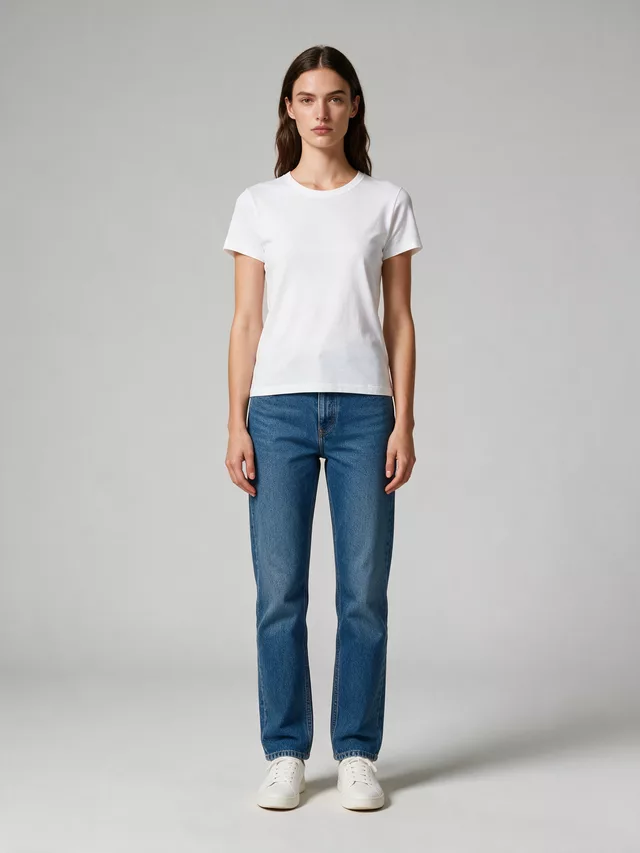
The full shoulder-to-hem line, uninterrupted and evenly lit. Unglamorous, and the frame a shopper actually judges fit from.
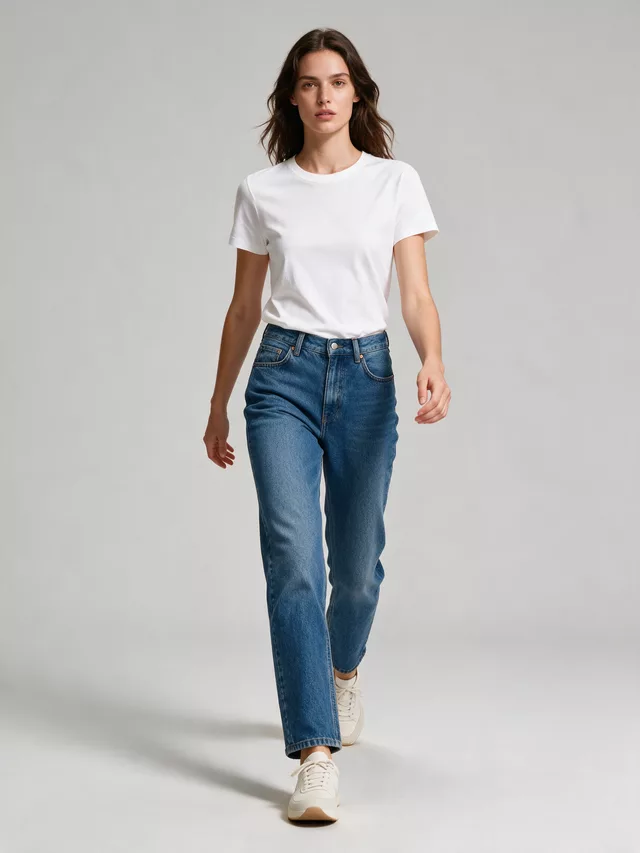
One leg forward loads the fabric and shows it moving with the body rather than hanging on it. The best second image for this category.
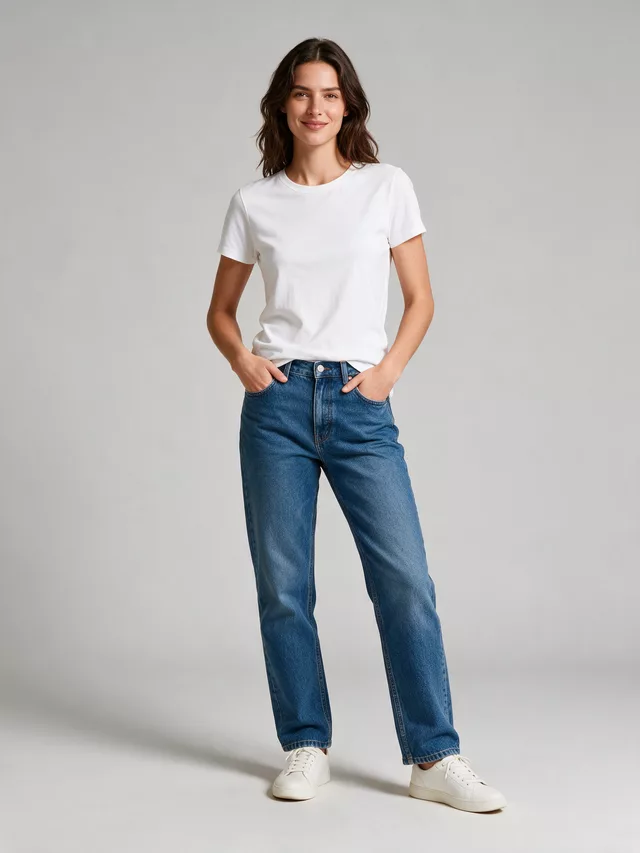
A relaxed stance breaks the vertical line and usually puts an arm across the waist. Fine for a styled lifestyle frame, weak for fit.
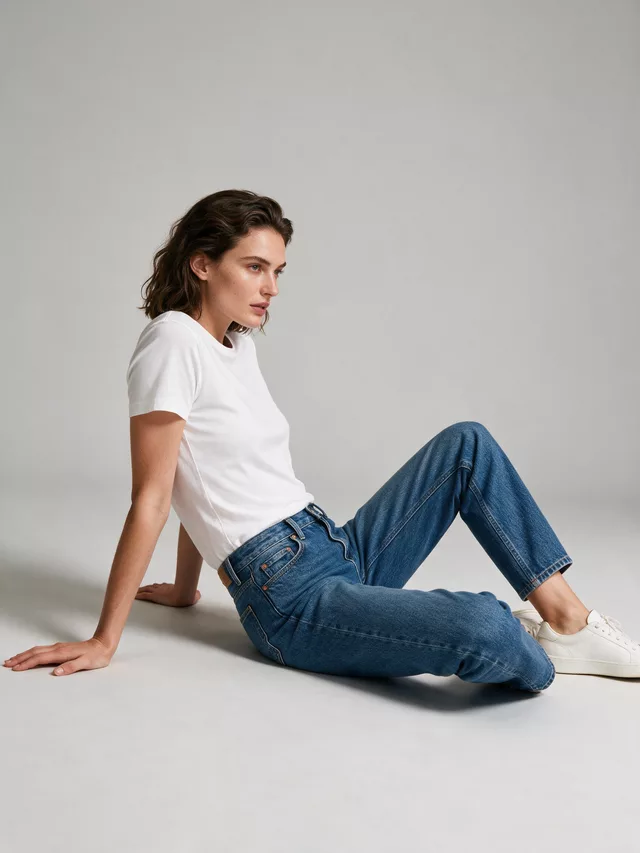
Folds the dress exactly where the shopper is looking — waist, hip, hem — and rides the hem up unpredictably. Avoid it for fitted dresses.
| Light gray | Default here | Holds an edge against black, white and every mid tone, which is why it beats white studio as the general-purpose plate for this category. |
|---|---|---|
| White studio | Mid and bright | The marketplace-expected primary plate. Right for colour and mid tones, wrong for a white or cream dress that dissolves into it. |
| Black studio | Eats the silhouette | A black dress on a black plate loses its outline, and the outline is the product. Use it only once the shape is established elsewhere. |
| Marble | Second image | Reads as expensive and competes for attention — the veining crosses the silhouette edge and softens it. Good third frame, poor first. |
Questions dress sellers ask before spending a credit
Are the models adults?
Yes. Every model this tool generates is an adult, and the page exists for adult womenswear e-commerce photography — catalog and listing images for fitted dresses.
The dress came back looser than it really is. How do I fix that?
Say so in the brief and give the upload a chance to show it. A bodycon flat lay is a rectangle of fabric — nothing in that image tells the generation the garment is stretch. Photograph it on a mannequin if you can, so the tension is visible, and use the notes field to state it plainly: close-fitting stretch jersey, no ease at the waist, seams following the body. Then untick "Let AI improve my prompt" in Advanced Options, because a rewrite is exactly what turns a precise fit instruction into a generic one.
Which pose actually shows the silhouette?
Standing, for the primary image, and it is not a compromise — a fitted dress is sold on the line from shoulder to hem, and standing is the only preset that shows that line uninterrupted. Walking is the good second frame because it proves the fabric moves with the body. Sitting is the one to avoid for a fitted dress: it folds the garment at the waist and hip, which is precisely where the shopper is looking.
Can I show the same dress on more than one body type?
Yes, and for this category it is the highest-value thing you can do with your credits. Fit is the entire product and it is also the single biggest driver of returns on fitted dresses. Generate the same upload against two or three different model descriptions and put them in the same gallery — a shopper who can see the dress on a body like theirs does not have to guess.
Seam lines and ribbing keep disappearing.
They are low-contrast detail, so they need light and resolution before anything else. Shoot with a side light rather than a flat frontal one — raking light is what makes a seam or a rib cast the tiny shadow that records it — and get the garment large in the frame. On the output side, judge the result at the princess seams and the hem band first; if those are soft, the upload was soft.
Which background works for a black dress?
Not Black studio, and not Dark luxury. A black bodycon against a dark plate loses its edge, and the edge is the silhouette you are selling. Light gray is the reliable choice — its own description is that it keeps garments readable — and White studio is right for anything mid or bright. Save the dark plates for a styled second image where the shape is already established.
Can I get several angles of the same dress on the same model?
Pose Set (Consistent Model) is built for it: add your first result as the reference, pick several poses, and each becomes its own full-size generation with the face, body type and the garment’s cut and pattern held consistent. Each pose is billed as a separate generation, so pick the three you will actually publish rather than ticking the grid.
Do I need a bodycon dress prompt?
No. The result is driven by your dress photo plus the model you pick, not by a long text prompt. If you are writing a prompt for another image tool, name the dress length, neckline, fabric finish, colour and the framing you want.
Which bodycon dress fabrics show best?
Matte and clearly textured fabrics such as ribbed knit, jersey and crepe read well because the fabric is easy to see. Very shiny or sheer fabrics are harder, so check highlights and seams in the result.
Does it work for midi and mini bodycon dresses?
Yes. Upload a photo that shows the full dress including the hem, and the model will wear it at that length. Keep the whole dress in frame.
Can I show the same dress in other colours?
Yes. Use the clothing colour changer on your dress photo to make another colourway, then run each colourway through the model page.
Related tools, and why you would switch
The general womenswear page — go there when the garment is not fit-critical.
For the sizing imagery that sits next to a fit-driven product on the listing.
The e-commerce-side page, set up for a full catalog run rather than one hero image.
Same face across every shot. All models are synthetic and free for commercial use.
Upload a product photo — get a photo-realistic on-model shot. Pick a roster model below to keep the same face across shots.
Premium users can generate images without watermark
Higher quality options available for premium users