
AI bedroom design ideasyou can test on your own room
I redecorated my bedroom twice in two years and regretted the first one within a month. AI would have saved me $800 in paint and a trip to return a headboard that looked nothing like the catalog.
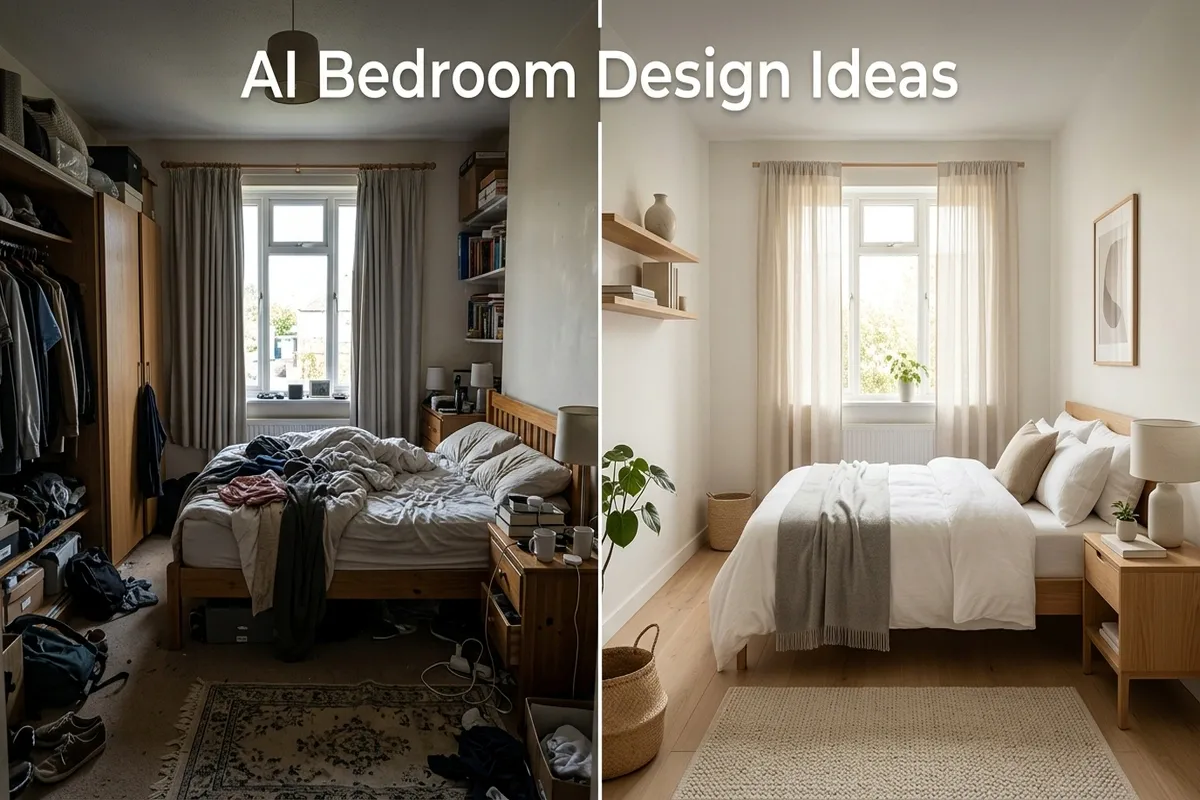
The idea is straightforward. You take a photo of your bedroom as it looks right now, upload it to an AI design tool, pick a style, and get back a redesigned version of the same space. The walls, windows, and layout stay the same. The furniture, colors, and decor change.
I tested this on my own bedroom last fall. The room was a mess of mismatched IKEA furniture and a wall color I picked from a tiny paint chip. I uploaded a photo, selected "Scandinavian minimalist," and got back an image that made me realize half my furniture needed to go. Not because the AI told me, but because seeing the clean version next to my actual room made the clutter obvious.
You can try this now in AITWO interior design tool. Want to see AI versus a human designer? Read AI interior design vs hiring a decorator.
Bedroom styles that produce the best AI results
| Style | What AI does well | Watch out for |
|---|---|---|
| Minimalist | Clean lines, open space, neutral palette | Can look too empty if your room is small |
| Scandinavian | Light wood, white walls, soft textiles | Output sometimes ignores existing dark flooring |
| Modern | Geometric furniture, bold accent walls | Avoid if you prefer warm tones, it leans cool |
| Japandi | Low bed frames, natural materials, calm palette | Works best with larger rooms, cramped rooms lose the effect |
| Cozy cottage | Layered bedding, warm lamps, soft rugs | Can feel cluttered if original room is already full |
When I tested Japandi on my 12x14 bedroom, it looked great. Same prompt on a 10x10 guest room looked cramped because the low furniture made the walls feel closer. Style selection depends on room size more than personal taste if you want realistic results.
How to get a good design from your photo
- Shoot from a corner so two walls are visible. That gives the AI the most spatial data to work with.
- Turn on all lights and open curtains. Brighter photos produce sharper, more realistic output.
- Remove personal items from the bed and desk. Clutter confuses the model and creates strange artifacts.
- Take multiple shots and upload the one with the clearest view of the floor and ceiling line.
My first upload was a dark photo taken at night with a phone flash. The AI turned my walls green and added a window that does not exist. Second try in daylight with overhead lights on gave me something I could actually show a furniture store. For virtual staging on empty rooms, read how to virtually stage a room with AI.
What you can actually do with the output
The generated image is not a blueprint. You cannot hand it to a contractor and say "build this." But you can use it in a few practical ways that save real money and time.
- Paint color testing. Generate three styles with different wall colors. Compare them before buying sample pots. I saved $40 on testers this way.
- Furniture shopping reference. Show the design to a store employee and ask for similar pieces. Faster than describing what you want from memory.
- Partner decision making. When two people disagree on a room direction, generate both styles on the same room photo. Seeing both options side by side settled a three-week argument in my house.
- Rental staging. If you manage rentals, generate a furnished look for listing photos on an empty unit. See our staging guide for that workflow.
Mistakes that make bedroom designs look off
- ✗Uploading a photo with the bed unmade. The AI tries to "design" the wrinkled bedding as part of the room. Make the bed first, even roughly.
- ✗Picking a style meant for large spaces on a small room. Industrial loft on a 10x10 room looks like a storage unit. Match the style to your actual square footage.
- ✗Only generating one option. Run at least three styles. The first one is rarely the best. My third try is usually the one I keep.
For cost comparison between AI and professional interior design, check AI interior design vs hiring a decorator. If you want to try exterior work too, see how to visualize your exterior before renovating.
Test a new bedroom look in 30 seconds
Upload a photo, pick a style, and see your room redesigned. Free credits on signup.