
How to use AI Fashion Models on AI Two
Turn garment photos into on model stills with AI Fashion Models in Fashion Studio for apparel listings and lookbooks.
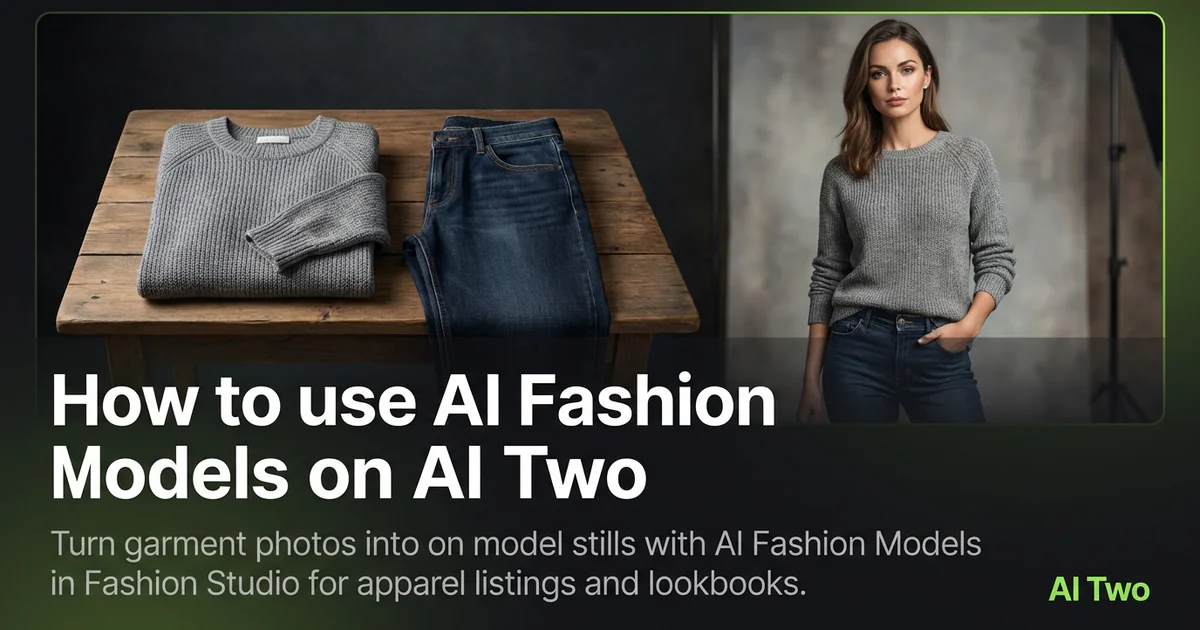
AI Fashion Models on AI Two is the Fashion Studio page I open when a flat garment needs an on model still for a listing or lookbook. Sellers use it to place apparel on a photorealistic model without booking a full cast day. When I tested a structured blazer flat shot, the output kept lapel stitching readable at marketplace zoom, which is the check I use before I upload.
What AI Fashion Models does
Upload a garment photo, choose the presentation options on the form, and generate an on model still. Fabric texture, seams, and logos should stay readable after the run.
When I tested a navy blazer flat shot, the cleaned on model output kept the button spacing sharp enough for a marketplace zoom. That is the check I use.
Fashion Studio keeps this beside female, male, kids, and virtual model pages in the apparel cluster.
Built for sellers who need a model to wear the product, not for picking today’s outfit as a consumer tool.
I open this page after lint is gone and the garment is flat or on a form. Wrinkles copy into the listing still.
Free signup credits covered early SKUs for me. Paid plans raise monthly limits for catalog drops.
In my experience, dark fabric needs lint removal before upload. Specks that look minor on a phone screen copy into the on model still.
I keep a lint roller next to the camera so every SKU starts clean.
How to run it step by step
Step one: sign in or create a free account. Step two: upload a sharp garment photo with seams visible. Step three: pick the mode, keep defaults on run one. Step four: generate and wait about 30 seconds. Step five: download or adjust one setting and compare.
Keep originals. Colorways share patterns across seasons.
When I tested a blazer, I checked lapel edges at full zoom before I approved the pack.
I run front and back as separate uploads when both sides sell the SKU. One twisted hang hides sleeve length buyers need.
Credits apply per generation, so I lock one presentation mode on the hero SKU before I batch five colorways.
If fabric looks plastic, I reshoot with softer daylight instead of stacking more runs on a harsh flash photo.
Which photo works best
Even daylight or softbox light shows fabric texture better than mixed yellow bulbs.
Lay garments flat or on a form so edges are clear. Crumpled piles hide size.
Match the framing on the Fashion Studio before and after card for this tool.
Remove lint before you shoot. Dark navy and black show every speck.
Avoid heavy beauty filters. Buyers zoom, and soft logos get returns.
Smooth wrinkles along lapels, hems, and seams. Creases read as fit problems in a thumbnail.
Shoot on a neutral surface. Busy studio floors pull attention away from seam lines.
Include the full garment in frame. Cropped sleeves hide length shoppers compare across brands.
Mistakes I avoid
Uploading lifestyle shots when the listing needs a clean on model product frame first.
Changing pose, color, and background together.
Expecting campaign sweat sheen from a catalog on model tool. Run lifestyle pages after the clean product still is approved.
Batching five colorways from one blurry phone snap.
Changing background, cast, and crop together. One variable per run keeps returns low.
Skipping a lint pass on dark fabric. Every fleck shows in the download.
When to use another Fashion tool
Need a female only, male only, or kids cast? Open those dedicated model pages. Need casting changes on an existing on model photo? Use Body Type Modifier or Model Age Changer. Ecommerce category packshots live in the ecommerce photography cluster.
The apparel on models cluster maps sibling model pages. The Fashion Studio pillar covers the wider toolkit.
Ghost mannequin helps when you need an invisible form shape instead of a worn view.
When I build a seasonal drop, I finish on model stills here for hero styles, then open casting tools only when the channel asks for a different body type.
FAQs
Related studio guides
How to use Female Fashion Models on AI Two
Place apparel on female fashion models with Female Fashion Models in Fashion Studio.
Read guide
How to use Male Fashion Models on AI Two
Place apparel on male fashion models with Male Fashion Models in Fashion Studio.
Read guide
How to use Kids Clothing Modeling on AI Two
Place kids apparel on age appropriate fashion models with Kids Clothing Modeling in Fashion Studio.
Read guide