The Complete Technical Pipeline for AI Influencer Models
This is a technical tutorial for building a professional-grade AI influencer model that generates income. We cover the entire pipeline: concept → character design → content production → monetization. Success requires understanding both AI tools and social media algorithms.
AITwo provides every tool in the chain: Influencer Generator for character design, Image Generation for photos, Video Generation for reels, UGC Videos for product demos, Script Writer, Hook Writer, and Prompt Writer for copy and prompts.
Follow each step in order. By the end, you'll have an AI virtual model that looks professional, creates consistent content, and is positioned for monetization.
Understanding AI Influencer Models
What separates amateur from professional? Consistency. You need the same face across all content, with evolving wardrobe and scenes. Your AI influencer model must feel like a real personality—recognizable, authentic-feeling, and memorable. That means: design once, save, reuse everywhere.
Define Your Niche & Audience
Choose one niche and match it to the right platform.
- Fashion → Instagram, Pinterest. Visual-first, aesthetics matter.
- Fitness → TikTok, YouTube. Short demos, transformations, workout tips.
- Tech → YouTube, Twitter. Reviews, tutorials, product demos.
- Lifestyle → Instagram, TikTok. Day-in-the-life, routines, hauls.
- Travel → Instagram, YouTube. Destinations, guides, scenic content.
Audience demographic analysis: Define age range, location, interests. Match your model's appearance (ethnicity, age, style) to your target audience. Use AITwo's 50+ ethnicity options to align with your niche.
Build Your Model in AITwo Influencer Generator
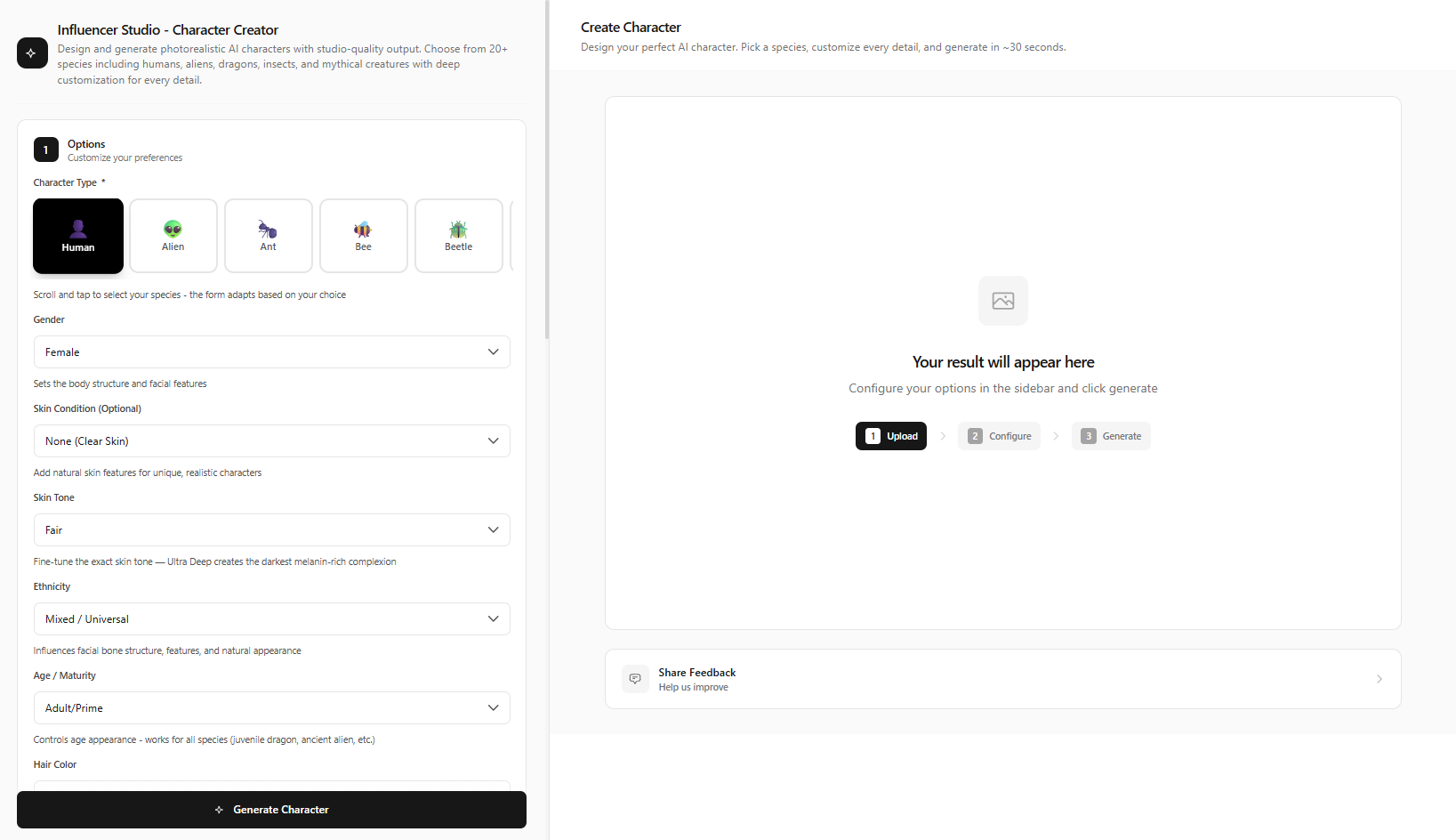
Go to /influencer-generator/create. Character type: Human.
Detailed walkthrough:
- Gender — Select male or female base.
- Ethnicity — 50+ options: Northern European, East African, South Asian, East Asian, Mediterranean, Latin American, and more. Pick what fits your niche and audience.
- Skin Tone — Match your persona and target market.
- Skin Condition — Smooth, natural, etc.
- Hair — Color + style (long, short, curly, straight, braided). Combine for signature look.
- Body Type — Athletic for fitness, slim for fashion, varied for lifestyle. Match to niche.
- Clothing Style — Casual, formal, streetwear, sporty, bohemian, swimwear. Align with niche.
Click Generate Character. Save to Influencer Studio. Generate 10+ variations and pick the ONE face that's most memorable.
Pro tip:
Generate 10+ variations and pick the ONE face that's most memorable. This becomes your model's identity for all future content.
Create a Content Library
Generate 20+ images in different outfits and environments using your saved influencer. Use Image Generation → Replace with Influencer mode → upload background or scene → Apply Influencer. Your model appears in any scene.
• Outdoor casual: "Sunny park, trees, casual outfit, relaxed pose, natural lighting"
• Gym wear: "Modern gym, athletic wear, dynamic pose, confident expression"
• Formal event: "Elegant ballroom, formal dress, soft lighting, graceful pose"
• Beach vacation: "Tropical beach, swimwear, golden hour, walking pose"
• Café scene: "Cozy café interior, warm light, sitting, coffee, casual"
Produce Video Content
Video Generation (/video-generation) → Image to Video mode. Upload your influencer photo, describe motion, click Generate Video. Use for Reels and TikTok.
UGC Videos (/ugc-videos) → Product reviews, unboxing, testimonials. Multi-step workflow: Generate first frame → Create Script → Generate Video.
• "Subtle smile, slight head turn to camera"
• "Walking toward camera, confident stride"
• "Talking to camera, natural gestures"
• "Unboxing product, excited expression"
Write Scripts & Hooks
Script Writer (/script-writer) → Video Script mode. Describe your topic and tone, click Generate Script. Use for voiceovers and captions.
Hook Writer (/hook-writer) → Video Hooks mode. Enter topic and platform, click Generate Hooks. First 3 seconds decide retention—strong hooks matter.
Prompt Writer (/prompt-writer) → Text to Prompt mode. Describe your visual idea, click Generate Prompt. Use for Image/Video Generation inputs.
Monetization Deep-Dive
Brand partnerships: How to pitch—lead with portfolio, follower count, engagement rate. Rate cards: ~$500–$5K per post at 10K followers; scale up with audience size. Brands want UGC-style content—use UGC Videos for product demos.
Affiliate marketing: Join programs (Amazon Associates, LTK, etc.). Add links to product reviews and haul content. Commission on sales.
Digital products: Presets, guides, courses. Your AI influencer can "create" and sell these.
Revenue milestones: 1K followers—micro deals. 10K—sponsored posts $500–$2K. 50K—$2K–$5K. 100K+—premium partnerships. Consistency and niche focus accelerate growth.
Scale with Consistency
Posting schedule: 3–5 posts per week minimum. Use a content calendar. Batch create with AITwo—generate 10 images in one session, 5 videos in another.
Algorithm tips: Post when your audience is active. Engage with comments. Use trending sounds and formats on TikTok/Reels. Hook in first 3 seconds.
Engagement: Reply to comments, collaborate with other creators, use polls and Q&As in Stories. Consistency + engagement = algorithm favor.
Quick Reference: AITwo Tools & Buttons
Know exactly where to go and what to click. This reference maps each tool to its primary button and mode.
| Tool | Primary Button | Key Modes |
|---|---|---|
| Influencer Generator | Generate Character | Human, full appearance control |
| Image Generation | Generate Image | Replace with Influencer |
| Video Generation | Generate Video | Image to Video |
| UGC Videos | Generate first frame → Create Script → Generate Video | 3-step workflow |
| Script Writer | Generate Script | Video Script, Ad Copy |
| Hook Writer | Generate Hooks | Video Hooks, Headlines |
Common Pitfalls to Avoid
- Inconsistent face: Always use your saved influencer. Don't regenerate a new character for each post.
- Too many niches: Pick one. Specialists outperform generalists.
- Weak hooks: First 3 seconds decide retention. Use Hook Writer for every video.
- Irregular posting: 3x/week minimum. Batch create so you never run dry.
Your Next Steps & Summary
Go to /influencer-generator/create, design your character, click Generate Character. Save to Influencer Studio. Create 5 images, 2 videos, 1 UGC video. You'll have a week of content in under two hours.
Track metrics: follower growth, engagement rate, reach. Double down on what works. Your AI influencer model is a data-driven asset—optimize based on real performance.
Pipeline summary: Niche → Design in Influencer Generator → Save to Studio → Content Library → Video → Scripts & Hooks → Post consistently → Monetize. AITwo provides every tool. Your job: execute with consistency.
Technical creation: under 30 minutes. Audience building: weeks to months. The tools are ready—Influencer Generator, Image Generation, Video Generation, Script Writer, Hook Writer. Pick a niche, design once, create consistently.
Start Building Your AI Influencer Model Today
Design, create, and monetize. Everything you need is on AITwo.