
How to design your backyardwith AI
Take a photo of your yard. See it transformed into a cottage garden, zen space, or tropical retreat in seconds. No digging, no guessing.
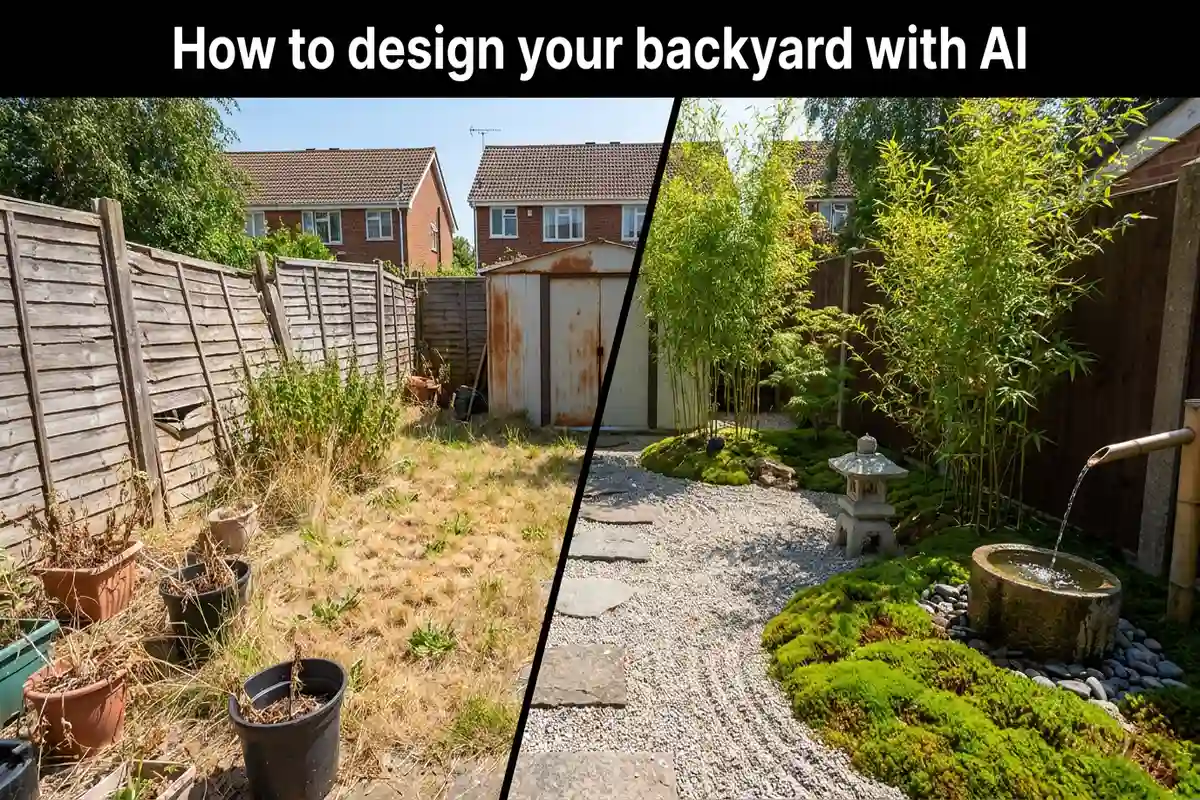
Most backyards never get redesigned. Not because homeowners don't want to change them — but because the planning process is expensive and confusing.
A landscape architect charges $2,000 to $7,000 just to draw up a plan. You spend months going back and forth on ideas. Then the contractor shows up and it still doesn't look quite how you imagined.
AI backyard design skips all of that. You upload one photo, pick a style, and get a photorealistic render of your actual yard — redesigned. No appointments. No fees. No waiting.
I tested this process on my own overgrown side yard last month. Within 10 minutes I had six different design options, picked a direction, and had something concrete to show a contractor. This guide covers exactly how to do it.
What AI backyard design actually does
You upload a photo of your yard. The tool scans it — reading where your fence ends, where the lawn thins out, what's already planted near the house — and builds a new design directly on your actual photo.
When I first tried this, I expected something generic. What I got looked like a real photo of my yard with completely different plants in it. Shadows matched. Scale was right. My back fence was still in the exact same spot. It didn't swap my yard for a stock garden photo — it actually redesigned mine.
Testing six different styles took about 12 minutes. A human designer would have charged $500 just for the first consultation, and you'd wait days for a single concept.
| Garden style | What it looks like | Best for |
|---|---|---|
| Cottage garden | Lush, informal plantings, wildflowers, climbing roses | Traditional homes, relaxed vibe |
| Modern minimalist | Clean lines, gravel, architectural plants, limited color | Low-maintenance, contemporary homes |
| Zen Japanese | Stone paths, bamboo, moss, raked gravel | Peaceful, meditative spaces |
| Tropical paradise | Large-leaf plants, palms, bold colors, water features | Warm climates, resort feel |
| Mediterranean | Terracotta pots, olive trees, drought-tolerant shrubs | Dry climates, elegant outdoor dining |
| Native wildflower | Local wildflowers, grasses, pollinator-friendly plants | Eco-conscious, low water use |
How to do it in four steps
Open AITWO's landscape design tool on your phone or laptop. The whole process takes under 15 minutes.
Step 1: Take a photo from the right angle
Walk to a back corner of the yard and shoot toward the house. You want the full space in frame — lawn, beds, fences, everything. A grey cloudy day actually gives you better results than bright sunshine, because direct sun creates shadows that confuse the AI. My phone camera worked perfectly fine; no special equipment needed.
Step 2: Upload and choose your area
Upload the photo, then pick which part of the yard you want redesigned — full backyard, front yard, side yard, or just existing flower beds. I'd recommend starting with a full area rather than just one bed. The full redesign shows you the whole picture and it's easier to make decisions from there.
Step 3: Pick a garden style and features
Pick a style from the list, then set your maintenance level. If you don't want to spend every weekend pruning, choose low-maintenance — the tool swaps out high-care plants like roses for ornamental grasses and native shrubs that mostly look after themselves.
Don't try to get the perfect style on the first try. Pick three and run them all. You'll know which one is right the second you see it on your actual yard.
Step 4: Download and use it
Save your favorite render. I printed mine and brought it to a local nursery — the staff immediately understood what plants I was looking for. You can do the same with a contractor. A clear photo of the result you want saves a lot of back-and-forth explaining.
Things I wish I knew before starting
After running my own yard through this process a few times, these made the biggest difference:
- 1.Clear the yard before you shoot. Move the hose, the kids' bikes, that random pile of bricks near the shed. My first photo had my neighbor's recycling bins poking into the corner and the AI built the whole design around them. Took me two extra attempts to get a clean result.
- 2.Always enter your location. Without it, the tool picks plants based on what looks good visually. With it, the suggestions are filtered to your climate zone. I'm in zone 6 and the Mediterranean design I loved came back with cold-hardy lavender instead of olive trees — plants that would actually survive my winters.
- 3.Run at least five versions. My favorite ended up being the fourth one I generated. The first three were fine but forgettable. Five minutes of extra generating saved me from a direction I would have regretted.
- 4.Check whether the style suits your house, not just the yard. I almost went with a sleek modern minimalist garden for my 1960s brick house. Side by side in the render it looked wrong — the style clashed with the traditional facade. Cottage worked much better. The render told me before I spent anything.
- 5.Do the front and back as separate uploads. They serve different purposes. The backyard is where you actually spend time — seating, kids' play, garden beds. The front is what visitors and buyers see first. Treating them the same way usually produces designs that are optimized for neither.
What AI can't do for your yard
AI designs are visual plans. They show you what a redesign could look like — they don't account for everything that matters on the ground.
Before starting any work based on an AI render, check your soil drainage. Poor drainage kills plants no matter how well they're positioned in a photo. Find out where your underground utilities run — gas, water, electrical. Call 811 before any digging.
HOA rules matter too. Some neighborhoods restrict plant height, fence placement, and water features. Check before you commit to a design that breaks those rules.
Use AI renders to narrow down your direction and communicate with a contractor. Don't use them as a substitute for professional advice on the actual installation.
Pair landscaping with exterior design
Landscaping alone won't fix everything. If your home's exterior needs work too, the yard design will look mismatched.
Read our guide on visualizing your home exterior before renovating to redesign your siding, paint, and roofing at the same time. When you tackle both together, the result looks intentional rather than patched.
For interior spaces, our AI interior design vs hiring a decorator article breaks down which option makes sense depending on your budget and timeline. The AI approach costs a fraction of hiring a professional for the visualization phase.
If you want to see the transformation as a video, our guide on turning photos into video with AI shows you how to animate before-and-after renders into clips for social media or presentations.
See your backyard redesigned in 30 seconds
Upload a photo of your yard. Pick a style. Get a photorealistic design that shows exactly what your space could look like.