Why Donald Trump AI Videos Are Taking Over the Internet
AI-generated political content has exploded in popularity. In 2025 alone, AI-generated videos featuring world leaders racked up over 2.2 billion views on YouTube, with Donald Trump being the most popular subject by far. From hilarious parody skits to creative satirical content, Trump AI videos have become one of the fastest-growing content categories on TikTok, YouTube Shorts, and Instagram Reels.
The appeal is obvious — Trump's distinctive appearance, iconic expressions, and larger-than-life persona make him the perfect subject for AI-generated content. Whether you want to create a funny birthday message, a political satire sketch, a motivational parody, or just a creative experiment, a Donald Trump AI video generator lets you bring any scenario to life.
With AITwo, you don't need any video editing experience. Our platform combines powerful AI image generation with video generation tools, giving you everything you need to create professional-quality Trump AI videos from a simple text description. Here's exactly how to do it.
Method 1: Image-to-Video (Recommended)
Best for maximum control over how Trump looks — generate the perfect image first, then animate it.
Go to the Image Generation Tool
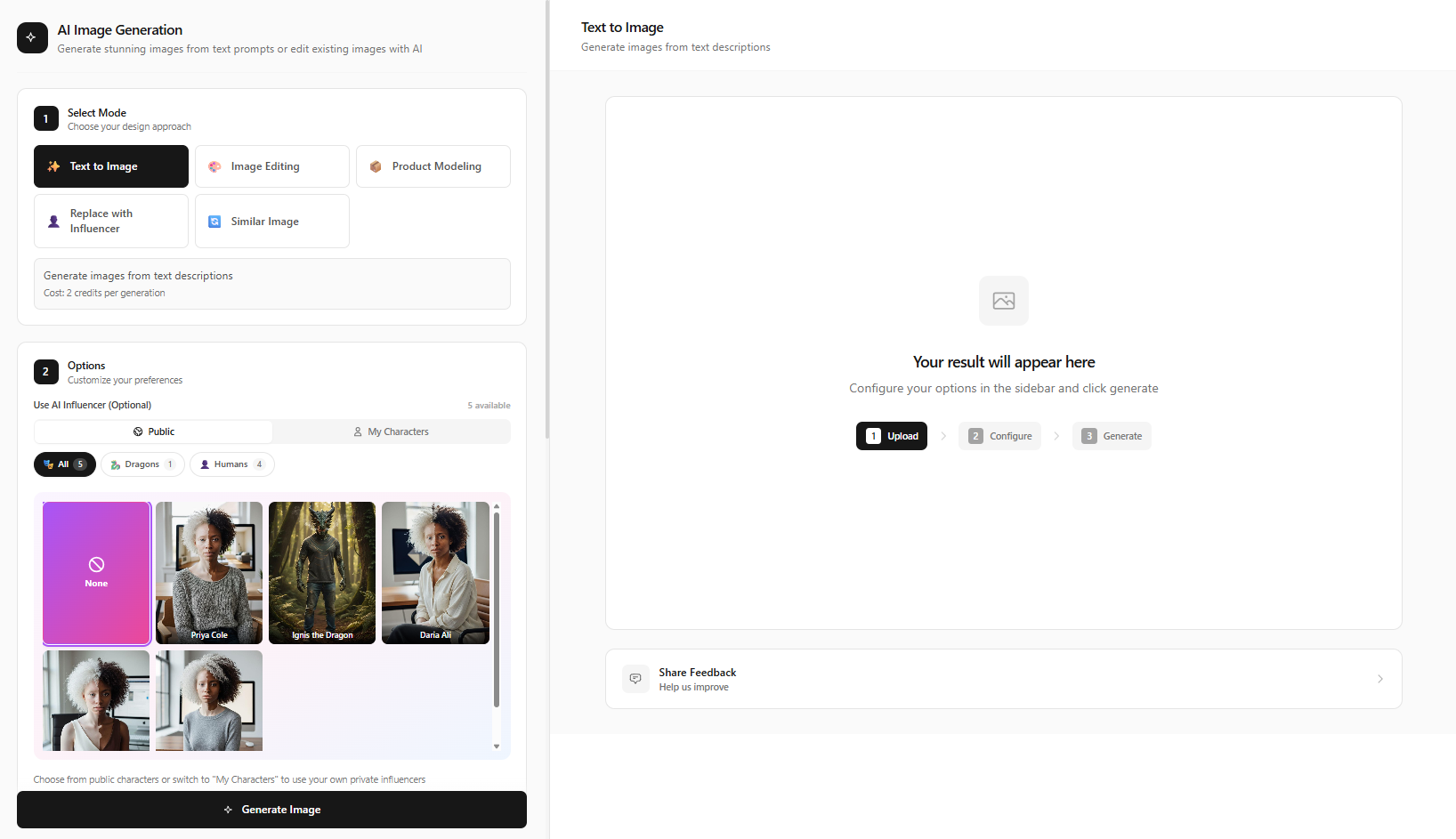
Head to AITwo's Image Generation tool. This is where you'll create a photorealistic AI image of Donald Trump that will serve as the base for your video.
Select "Text to Image" mode from the options panel on the left side. This mode lets you describe exactly what you want and the AI generates it from scratch — no reference image needed.
Write a Detailed Trump Prompt
The quality of your Donald Trump AI video depends heavily on your prompt. Here are some example prompts that produce excellent results:
Prompt Example 1 — Presidential Portrait
"Photorealistic portrait of Donald Trump sitting at a presidential desk in the Oval Office, wearing a navy blue suit with a red tie, American flag in the background, dramatic lighting from the window, serious expression, Canon EOS R5, 85mm lens, shallow depth of field, editorial photography quality"
Prompt Example 2 — Rally Speech
"Full body photo of Donald Trump standing at a podium giving a speech at a large rally, crowd in the background, red MAGA hat, navy suit, pointing gesture, dynamic lighting, news photography style, sharp focus, 8K quality"
Prompt Example 3 — Casual / Comedy
"Donald Trump wearing a chef's hat and apron, cooking hamburgers on a grill at a backyard BBQ, smiling and giving thumbs up, sunny day, photorealistic, cinematic lighting, humorous scene, 4K quality"
Pro Tips for Better Results:
- Always include "photorealistic" and "sharp focus" in your prompt
- Describe the clothing specifically (navy suit, red tie, etc.)
- Mention the setting/background — Oval Office, rally stage, golf course
- Include facial expression — serious, smiling, pointing, speaking
- Add camera details — "85mm lens, Canon EOS R5, shallow depth of field"
- Specify lighting — "dramatic lighting", "golden hour", "studio lighting"
Generate and Select the Best Image
Click "Generate" and wait about 10-30 seconds. AITwo will produce a high-quality AI image based on your prompt. If the first result isn't perfect, you can:
- Generate again with the same prompt for a different variation
- Tweak your prompt to adjust the pose, expression, or setting
- Try a different aspect ratio — use 9:16 for TikTok/Reels or 16:9 for YouTube
Once you have an image you're happy with, download it or keep it in your gallery — you'll use it in the next step.
Open the Video Generation Tool
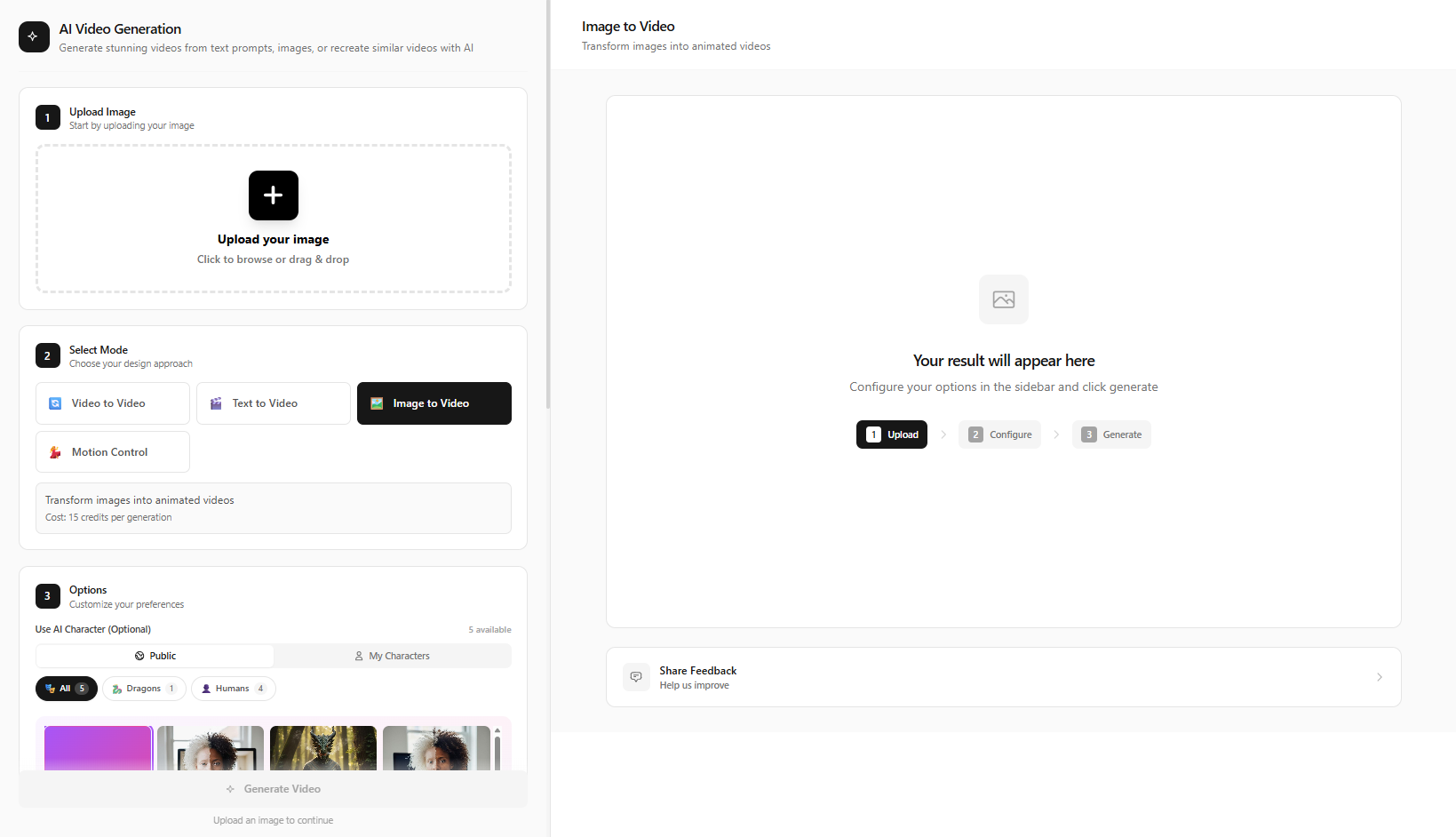
Navigate to AITwo's Video Generation tool. Select "Image to Video" mode — this takes your Trump AI image and brings it to life with realistic motion.
Upload the Trump image you generated in the previous step. Then add a motion description to tell the AI what kind of movement you want:
Motion Prompt Examples
- "He turns to face the camera, gestures with his hand while speaking, slight head movement"
- "Slow zoom in on the face, subtle facial expressions, blinks naturally"
- "He walks toward the camera confidently, waving to the crowd"
- "He picks up the hamburger and takes a bite, laughing and giving thumbs up"
Generate, Download, and Share
Hit "Generate" and wait 1-3 minutes for your Donald Trump AI video to render. Once it's ready, preview it directly in the browser. If you're happy with the result, download it in high quality.
Your finished Trump AI video is ready to upload to TikTok, YouTube Shorts, Instagram Reels, or any platform. For even better results, you can add a Trump AI voiceover using a text-to-speech tool and combine them in a simple video editor.
Method 2: Text-to-Video (Quick & Easy)
Skip image generation entirely — describe your scene and get a video directly.
If you want the fastest path to a Trump AI video, AITwo's Text-to-Video mode lets you skip image generation entirely. Just describe the video scene in text and the AI generates a full video clip.
Go to Video Generation → Text to Video
Open the Video Generation tool and select "Text to Video" mode.
Write Your Video Scene Description
Describe exactly what should happen in the video. Be specific about the action, setting, and mood:
Text-to-Video Prompt Examples
- "Donald Trump walks up to a podium in front of a massive crowd, adjusts the microphone, and begins speaking passionately, camera slowly zooms in, cinematic lighting, photorealistic, 4K quality"
- "Donald Trump sitting in a luxurious golden room, reading from a piece of paper, looks up at the camera with a surprised expression, dramatic lighting, news broadcast style"
- "Donald Trump playing golf on a beautiful sunny course, takes a swing, the ball flies into the distance, he turns to the camera and gives a thumbs up, bright daylight, sports photography"
Generate and Download
Click "Generate", wait for the AI to create your video, then download and share. The text-to-video approach is faster since it's a single step, though the image-to-video method gives you more control over Trump's exact appearance.
Which Method Should You Use?
| Feature | Image-to-Video | Text-to-Video |
|---|---|---|
| Speed | ~3-5 minutes total | ~1-3 minutes |
| Control over appearance | High — you choose the exact image | Medium — AI decides the look |
| Best for | Specific poses, expressions, outfits | Quick clips, simple scenes |
| Quality | Highest — image is refined first | Great — single-step generation |
| Difficulty | Easy (2 steps) | Easiest (1 step) |
Our recommendation: Use Image-to-Video when you want the Trump image to look exactly right (specific outfit, setting, expression). Use Text-to-Video when you just want a quick, fun clip.
Popular Trump AI Video Ideas
Looking for inspiration? Here are some of the most popular types of Donald Trump AI videos that go viral on social media:
Birthday Messages
Create a personalized Trump birthday greeting for friends and family — one of the most shared formats on social media
Political Satire Skits
Comedy sketches featuring Trump in absurd scenarios — the #1 category for AI political videos on YouTube
Motivational Speeches
Trump-style pep talks for gym motivation, study sessions, or work — huge on TikTok and Reels
News Parodies
Fake breaking news segments with Trump for comedy content — popular for political commentary channels
Music Video Parodies
Trump singing popular songs or performing at concerts — one of the most viral formats
Historical Mashups
Trump placed in historical settings or famous movie scenes — creative and highly shareable
Debate Recreations
Recreate or parody presidential debates with custom scenarios and topics
Reaction Videos
Trump reacting to trending topics, memes, or current events — great engagement bait
Why Use AITwo as Your Trump AI Video Generator?
Two Powerful Methods
Unlike single-purpose tools, AITwo gives you both Image-to-Video and Text-to-Video workflows. Generate the perfect still image first, or go straight to video.
State-of-the-Art AI Models
AITwo uses the latest AI image and video generation models for photorealistic results that rival dedicated deepfake platforms.
All Aspect Ratios
Create content for any platform — 9:16 for TikTok and Reels, 16:9 for YouTube, 1:1 for Instagram. No cropping or resizing needed.
More Than Just Trump
AITwo is a complete AI creation suite — fashion models, UGC videos, graphic design, image upscaling, and 30+ tools all in one platform.
Expert Tips for the Best Trump AI Videos
Be Specific in Your Prompts
Don't just say "Donald Trump." Describe the outfit (navy suit, red tie), setting (Oval Office, rally, golf course), expression (serious, laughing, pointing), and camera angle (close-up, full body, low angle).
Match Aspect Ratio to Platform
Use 9:16 if you're posting to TikTok, Instagram Reels, or YouTube Shorts. Use 16:9 for standard YouTube videos. Getting this right from the start saves time.
Use Image-to-Video for Consistency
If you're creating a series of Trump videos, generate your base Trump image once and reuse it across multiple video generations. This keeps the character consistent across clips.
Add Audio Separately
AITwo generates the visual content. For the best results, generate your Trump AI video first, then add a Trump AI voiceover or background music in a video editor like CapCut or iMovie.
Always Label AI Content
When sharing on social media, clearly label your content as AI-generated. This is both ethical and increasingly required by platform policies. It also builds trust with your audience.
Ready to Create Your First Trump AI Video?
Join thousands of creators making viral AI political content. Start with free credits — no credit card required.