Why Anyone Can Now Create an AI Influencer
AI influencers are the fastest-growing creator category. Aitana López from Spain earns €10,000 per month with zero real photos. Lu do Magalu in Brazil has 6 million followers. These virtual personalities post content, partner with brands, and build loyal audiences—all without a real person behind the camera.
Now anyone can create their own AI influencer. You don't need Photoshop, photography skills, or a model. AITwo's Influencer Generator gives you complete control over appearance, clothing, pose, and environment. Initial setup takes 10–20 hours; ongoing content creation runs 5–10 hours per week. Minimum budget: ~$50/month for AI tools.
This guide walks you through four phases: planning your persona, designing your AI influencer on AITwo, creating content across our tools, and launching for growth. By the end, you'll have a custom AI influencer ready to post and monetize.
Phase 1: Planning Your AI Influencer
Choose a Niche
Pick one focus: Fashion, Fitness, Travel, Tech, Lifestyle, Food, or Gaming. Niches with strong visual content (fashion, fitness, travel) work especially well with AI image and video generation. Your niche defines your content, audience, and monetization path.
Create a Persona
Define:
- Name — memorable, brandable
- Age — apparent age range
- Personality traits — confident, laid-back, adventurous
- Backstory — where they're from, what they do
- Values — sustainability, luxury, authenticity
Define Visual Identity
Set a style direction (minimalist, bold, bohemian), color palette (warm, cool, neutral), and signature look (always sunglasses, specific hairstyle, recurring outfit style). Consistency builds recognition.
Phase 2: Design Your AI Influencer on AITwo
6 detailed steps in Influencer Generator.
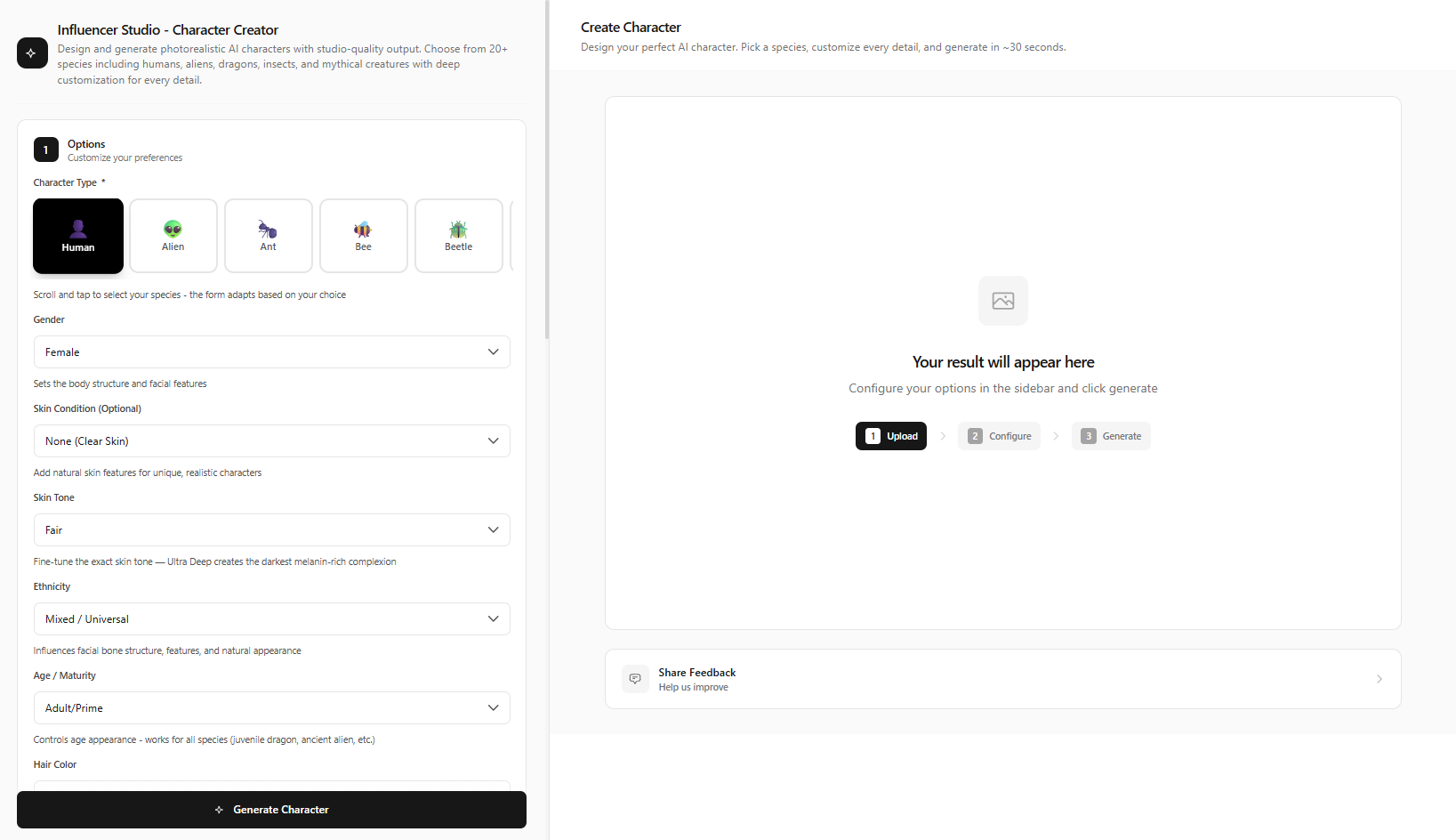
Navigate to Influencer Generator Create
Go to /influencer-generator/create. This is your character design hub.
Select Human and Set Gender
Choose Human as character type. Set gender. This determines the base model for generation.
Design Appearance
Set ethnicity from 50+ options (Northern European, East African, South Asian, East Asian, Mediterranean, and more). Choose skin tone, hair color and style, body type. Match these to your persona and niche.
Choose Signature Clothing Style
Select clothing: casual, formal, streetwear, sporty, bohemian, swimwear. Fashion niche? Lean streetwear or formal. Fitness? Sporty. Travel? Casual or bohemian.
Set First Photoshoot: Environment, Lighting, Pose, Camera Angle
Configure environment (studio, outdoor, urban), lighting, pose, and camera angle. These fields control the final composition.
Click Generate Character, Review, Save to Studio
Click Generate Character. Review the output. Regenerate until you're satisfied. Save to Influencer Studio—this becomes your influencer's identity for ALL future content.
Pro tip:
Generate 5–10 variations and pick the strongest face. This becomes your influencer's identity for ALL future content.
Phase 3: Create Content Across AITwo Tools
Static Posts
Use Image Generation → Replace with Influencer mode. Upload any background or scene, select your saved influencer, click Apply Influencer—your influencer appears in any scene. Perfect for feed posts and ads.
Video Content
Use Video Generation → Image to Video mode. Upload your influencer photo, describe the motion (e.g., "smiling, slight head turn"), click Generate Video. Use for Reels and TikTok.
UGC Content
Use UGC Videos for product demos and testimonials. The workflow: Generate first frame → Create Script → Generate Video. Brands love UGC-style content for product endorsements.
Captions & Scripts
Use Script Writer → Generate Script for captions and voiceovers. Use Hook Writer → Generate Hooks for scroll-stopping openings.
Phase 4: Launch & Grow
Post 3–5 times per week. Use a content calendar. Prioritize TikTok and Reels for short-form video reach. Engage with trends. Build an audience before monetization.
Revenue Potential
Sponsorships: $500–$5K per post at 10K followers. Affiliate marketing: Commission on product links. Digital products: Presets, guides, courses. Brand partnerships: Long-term deals with consistent posting and engagement.
Content Creation Workflow: Tool-by-Tool
Once your influencer is saved in Influencer Studio, you unlock a full content pipeline. Here's exactly which buttons to click and which modes to use.
Image Generation → Replace with Influencer
Upload any background. Select your saved influencer. Click Apply Influencer. Your model appears in the scene—ready for feed posts, ads, lookbooks.
Video Generation → Image to Video
Upload influencer photo. Describe motion in the prompt field. Click Generate Video. Export for Reels, TikTok, YouTube Shorts.
UGC Videos → 3-Step Workflow
Step 1: Generate first frame. Step 2: Create Script. Step 3: Generate Video. Ideal for product demos and testimonials that brands pay premium for.
Script Writer & Hook Writer
Script Writer → Generate Script or Generate Ad Copy. Hook Writer → Generate Hooks or Generate Headlines. Use Video Script mode for reels; Video Hooks for scroll-stopping openings.
Platform-Specific Posting Tips
Each platform rewards different formats. Optimize your AI influencer content for maximum reach.
- Instagram Feed: Use 4:5 aspect ratio for best engagement. Mix carousels (3–5 images) with single posts. Post during peak hours.
- Instagram Reels & TikTok: 9:16 vertical. Hook in first 3 seconds using Hook Writer. Use trending sounds. Post 1–2 short videos daily.
- Pinterest: 2:3 or 1:1 for pins. Fashion and lifestyle AI models perform well. Optimize descriptions with keywords.
- YouTube: Longer-form works for travel, tech, tutorials. Use Script Writer for video scripts. Thumbnails with your AI influencer's face improve CTR.
Budget & Real-World Success
Time: Initial setup 10–20 hours; ongoing 5–10 hours/week. Budget: ~$50/month minimum (AITwo offers free credits). Success: Aitana López earns €10K/month; Lu do Magalu has 6M followers. Consistency, niche focus, and quality content drive results.
You don't need a team. One person can manage an AI influencer—design, content, posting, outreach. Batch your work: create a week's images in one session, scripts in another.
From Zero to First Post: Timeline
Day 1: Plan niche, persona, visual identity. Go to Influencer Generator create, design character, generate 5–10 variations. Pick the best, save to studio. Day 2: Create 5–10 images using Replace with Influencer. Day 3: Create 2–3 videos with Video Generation. Day 4: Write captions with Script Writer, hooks with Hook Writer. Day 5: Schedule and publish first posts. You can go from zero to live in under a week. After launch, post 3–5x per week. Engage with comments. Track what performs and iterate.
Ready to Create Your Own AI Influencer?
Design your character in minutes. Start creating content today.