How AI Is Eliminating the Scriptwriting Bottleneck
92% of marketers report positive ROI from video content. Yet scriptwriting remains the #1 bottleneck — a single script can take 2-8 hours to draft, revise, and polish. That's where the AI video script writer transforms the workflow. Modern AI scriptwriters generate complete, structured scripts in 30-60 seconds from a simple concept.
An AI TV show script generator can produce pilot outlines, episode beats, and character dialogue. A video script generator creates YouTube intros, body content, CTAs, and B-roll suggestions. AI scriptwriting handles ad copy, short films, and educational content. The key is using the right tools in the right order.
AITwo's Script Writer handles YouTube videos, TikTok scripts, ad copy, TV show concepts, short films, and narrative stories. Combined with Hook Writer and Prompt Writer, it's a complete production pipeline from script to published video.
Types of Scripts AITwo Generates
The Script Writer supports multiple modes — each with its own button and output style:
YouTube Video Scripts
Tutorials, reviews, vlogs. Video Script mode → Generate Script. Hook, intro, body, transitions, CTA, B-roll.
TikTok / Reels Scripts
Short-form viral. Video Script mode with short-form parameters. Punchy hooks, quick payoff.
Ad Copy
Product ads, promos. Ad Copy mode → Generate Ad Copy. Multiple variations for A/B testing.
TV Show / Series Scripts
Pilots, episode outlines. Story / Narrative mode → Generate Story. Describe concept, characters, setting.
Short Film Narratives
Three-act structure. Story / Narrative mode. Character development, visual storytelling.
UGC / Testimonial Scripts
Product-focused. Ad Copy or Video Script mode. Authentic, casual voice.
Educational / Training
Learning objectives. Video Script mode. Clear explanations, examples, summary.
Video to Script (Analysis)
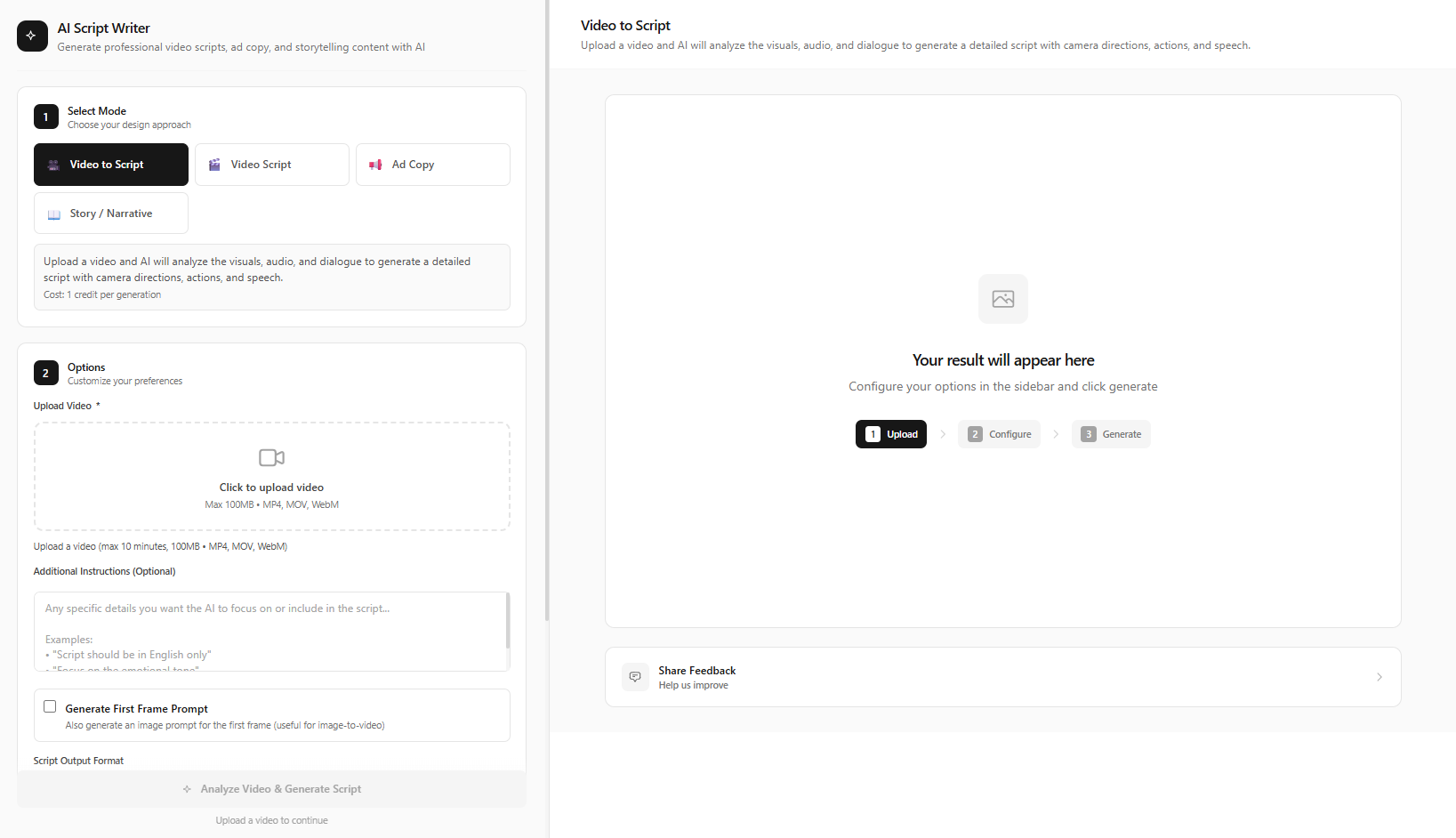
Reverse-engineer. Video to Script mode → upload video → Analyze Video & Generate Script.
Step-by-Step: Complete Script-to-Video Pipeline on AITwo
From concept to finished video in 6 steps.
Generate Your Video Script
Go to /script-writer and select Video Script mode. Enter your topic, target audience, and tone (professional, casual, humorous). Click "Generate Script". The AI produces: Hook, Introduction, Body sections, Transition phrases, CTA, and Outro. Edit and customize the output.
For TV show scripts, use Story / Narrative mode → describe your show concept, characters, setting → click "Generate Story" for a pilot outline.
Analyze Competitor Videos (Optional)
Use Video to Script mode → upload a competitor's video. Click "Analyze Video & Generate Script". The AI reverse-engineers the script structure, pacing, and hooks. Use these insights to improve your own scripts.
Generate Ad Copy (For Promotional Content)
Switch to Ad Copy mode → describe your product or service. Click "Generate Ad Copy" → the AI creates multiple ad script variations. Perfect for product launches, social media ads, and sponsored content.
Create Powerful Hooks
Go to /hook-writer and select Video Hooks mode. Enter your topic, choose hook style (question, statistic, story, contrarian). Click "Generate Hooks" → 10+ hook variations. Also try Headlines & Titles mode → "Generate Headlines" for video titles, and Call-to-Action mode → "Generate CTAs" for compelling endings.
Convert Script Scenes to Visual Prompts
Go to /prompt-writer and select Text to Prompt mode. Paste a scene description from your script. Click "Generate Prompt" → the AI creates an optimized visual prompt. Use this to generate images or video clips.
Produce the Video
Use Image Generation (Text to Image → "Generate Image") for scene stills. Use Video Generation ("Generate Video") for clips. Use UGC Videos for product-focused content (Generate first frame → Create Script → Generate Video). Combine clips in your editor with the script as voiceover guide.
Script Templates
Use these as prompts when describing your concept to the Script Writer:
YouTube Tutorial Script
"Create a YouTube tutorial script: [TOPIC]. Hook in first 10 seconds. 3 main points with examples. Clear transitions. End with summary and subscribe CTA. 5–7 min total. Friendly, educational tone."
TikTok Viral Hook Script
"Write a TikTok script: [TOPIC]. Maximum 60 words. Hook in first line. Twist or payoff at the end. Trendy, conversational tone. Optimized for 15-60 second format."
Product Ad Script
"Create a product ad script for [PRODUCT]. Problem, agitation, solution. Strong CTA. 30 seconds. Authentic UGC style. Multiple variations for A/B testing."
TV Show Pilot Outline
"Write a TV pilot outline: [GENRE]. Describe concept, main characters, central conflict. Cold open structure. Act breaks. Season setup. Story / Narrative mode."
When to Use Video Script vs Ad Copy vs Story Mode
Video Script is your default for YouTube tutorials, vlogs, reviews, and educational content. It produces full scripts with structure — intro, body, CTA, B-roll suggestions. Ad Copy is for promotional material — product launches, social ads, sponsored posts. It's shorter, punchier, and generates multiple variations for A/B testing. Story / Narrative is for TV pilots, short films, narrative series — when you need character arcs, plot structure, and scene-by-scene development. Video to Script is for competitive analysis — upload a competitor video and reverse-engineer its structure, pacing, and hook placement.
Start with the mode that matches your primary goal. If you're producing a mix of content (e.g., both tutorials and ads), run the Script Writer multiple times — once per format — and build a library of templates you can reuse and refine.
AI Script Writing Best Practices
Be specific about format
Tell the Script Writer exactly what you need: "30-second YouTube ad", "10-min tutorial", "TV pilot 45 pages". Format shapes structure.
Include tone and audience
"Funny for Gen Z" vs "Professional for B2B" produces very different scripts. Specify tone and who you're speaking to.
Iterate and hybridize
Generate multiple scripts, then combine the best parts. Use the AI as a collaborator, not a replacement for your judgment.
Use Video to Script for competitive intel
Upload competitor videos and analyze structure. Adapt their pacing and hooks without copying content.
Combine with Hook Writer
Script Writer gives you the body; Hook Writer gives you the opening. Use both for maximum retention.
Convert scenes to prompts
Use Prompt Writer to turn script scene descriptions into optimized visual prompts for Image and Video Generation. Paste each scene block; the AI outputs production-ready prompts.
The full pipeline — Script Writer → Hook Writer → Prompt Writer → Image/Video Generation — typically takes 15–30 minutes from concept to first draft. Iterate on scripts and prompts based on audience feedback and analytics.
Mode Quick Reference
Video Script → Generate Script | Ad Copy → Generate Ad Copy | Story / Narrative → Generate Story | Video to Script → Analyze Video & Generate Script
Ready to Write Your Next Script?
Use AITwo's Script Writer, Hook Writer, and generation tools to go from idea to finished video.