Why AI Prompts Are the Key to Viral YouTube Success
Over 52% of content on TikTok and Instagram Reels now contains AI-generated elements. The shift is undeniable: creators who master AI prompts for YouTube and short-form platforms are winning the algorithm. The economics are staggering — AI video production costs $0.50 to $2.13 per minute versus $1,000 to $10,000 traditionally, a 70-99% savings. But low cost means nothing if your content doesn't perform.
The difference between 1,000 views and 1 million often comes down to the prompts you feed into AI tools. Viral video prompts aren't just scene descriptions — they're engineered formulas that combine hooks, visual tension, curiosity gaps, and storytelling in ways that algorithms and audiences love. Creators using optimized prompts report 3-5x higher engagement compared to generic descriptions.
AITwo gives you dedicated tools for prompt writing, script writing, hook writing, and video generation — all in one platform. The Prompt Writer, Script Writer, Hook Writer, Image Generation, and Video Generation tools work together in a seamless viral content pipeline.
What Makes an AI Video Prompt Go Viral? The SCELA Framework
Top creators structure youtube ai video prompts around six pillars. Use this framework for every prompt:
- Subject: Specific details — color, material, scale. "Sleek matte black smartphone" beats "phone."
- Context: Setting, time of day, atmosphere. "Rustic wooden table at golden hour" beats "table."
- Effect: Visual style and aesthetic. "Cinematic 8K, shallow depth of field, tech reviewer vibe."
- Lighting: Mood and illumination. "Soft studio key light with rim light" beats "good lighting."
- Action: Camera movement and pacing. "Slow zoom into product reveal" or "hands demonstrate technique."
Bad prompt:
"Person cooking in kitchen"
Good viral prompt:
"Extreme close-up of chef's hands drizzling golden honey onto fluffy pancakes, steam rising, morning sunlight through window, rustic wooden counter, warm appetizing tones, ASMR food aesthetic, 8K cinematic"
Pro tip:
Use AITwo's Prompt Writer in Text to Prompt mode — describe your idea in plain English and select "Video prompt" as output. The AI automatically applies SCELA and platform best practices. For reference images, use Image to Prompt mode and click "Analyze & Generate" for an even more targeted prompt.
Step-by-Step: From Prompt to Viral YouTube Video on AITwo
Follow this 5-step workflow from idea to published video.
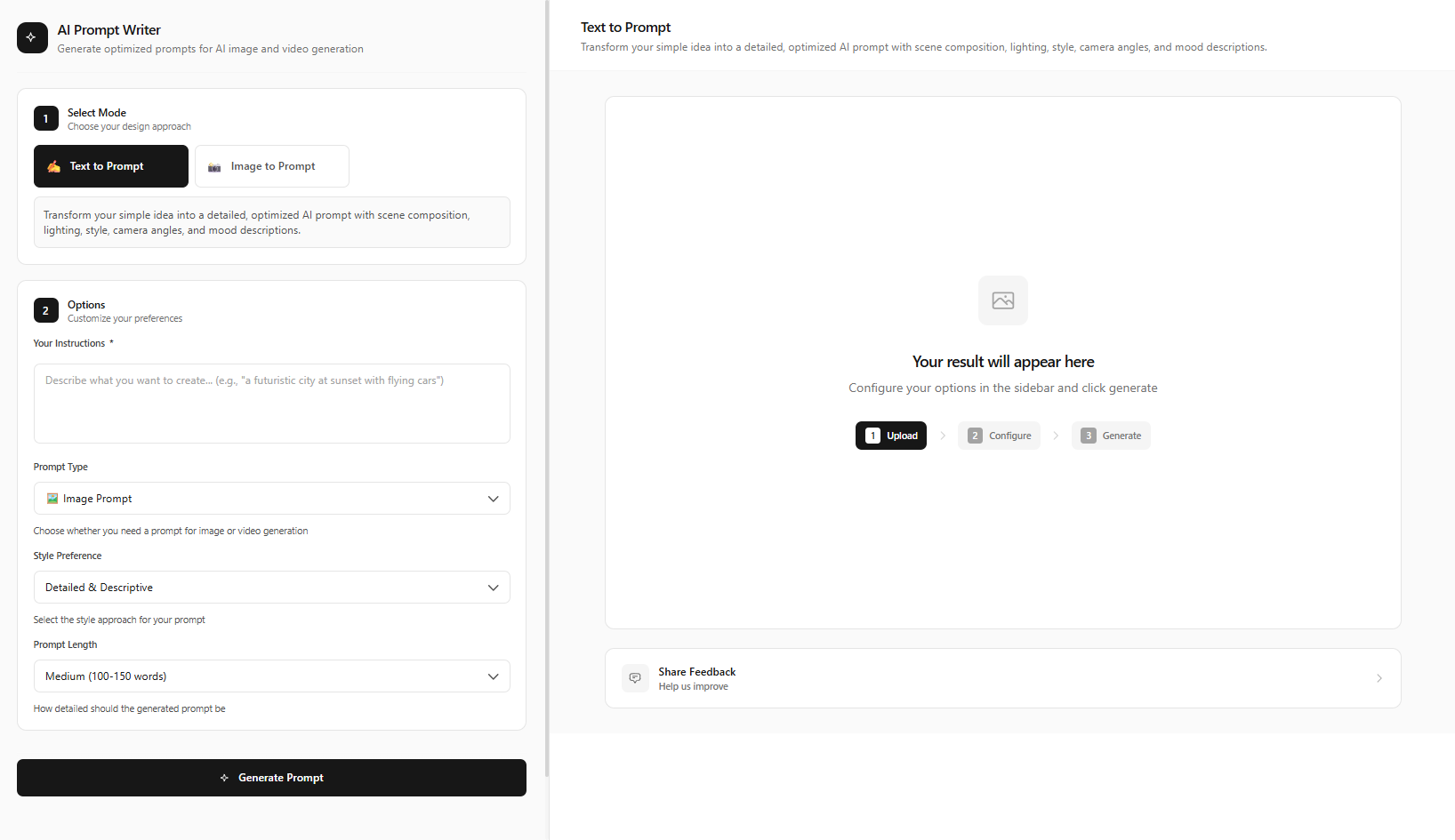
Generate an Optimized Prompt with Prompt Writer
Go to /prompt-writer and select Text to Prompt mode. Describe your video idea in plain English — the niche, topic, and visual style. Select output type: Video prompt. Click "Generate Prompt" — the AI creates a detailed, optimized prompt with SCELA elements built in.
Use Image to Prompt mode if you have a reference image — upload it and click "Analyze & Generate" for an even more targeted prompt.
Write a Complete Video Script with Script Writer
Go to /script-writer and select Video Script mode. Enter your topic, target audience, and tone (professional, casual, humorous). Click "Generate Script" — the AI creates intro hook, body sections, CTA, and B-roll suggestions. Edit the script to match your style.
Try Ad Copy mode for short-form promotional scripts or Story / Narrative mode for narrative-driven content. Each has its own "Generate Ad Copy" or "Generate Story" button.
Create Attention-Grabbing Hooks with Hook Writer
Go to /hook-writer and select Video Hooks mode. Enter your topic, hook style (question, statistic, story, contrarian), and target platform (YouTube, TikTok, Instagram). Click "Generate Hooks" — get 10+ hook variations. Pick the strongest hook for your video opening. Also try Headlines & Titles mode → "Generate Headlines" for video titles, and Call-to-Action mode → "Generate CTAs" for compelling endings.
Generate Visual Assets with Image Generation
Go to /image-generation and select Text to Image mode. Paste your optimized prompt from Step 1. Click "Generate Image" for thumbnails, cover frames, or scene stills. Choose the right aspect ratio: 16:9 for YouTube, 9:16 for Shorts.
Create the Video with Video Generation
Go to /video-generation. For text-only: Select Text to Video → paste your optimized prompt → click "Generate Video". For image-based: Select Image to Video → upload your image → add motion prompt (e.g., "camera slowly zooms in", "hands pick up food") → "Generate Video". Choose video model, duration, aspect ratio, and enable audio if needed.
15 Proven Viral Video Prompt Templates by Niche
Copy, adapt, or feed these into the Prompt Writer for instant optimization:
"Cinematic close-up of hands unboxing a sleek matte black smartphone, dramatic studio lighting, black background, product reveal moment, 8K quality, shallow depth of field, tech reviewer aesthetic"
"Split screen comparison: old laptop vs new ultrabook side by side, minimalist setup, soft diffused lighting, productivity theme, modern desk, YouTube thumbnail style"
"Person typing on laptop in dimly lit room, screen glow on face, focused expression, cozy desk setup, aesthetic productivity content"
"Extreme close-up of golden honey dripping onto fluffy pancakes, steam rising, morning sunlight, rustic kitchen, ASMR food aesthetic, appetizing warm tones"
"Chef's hands kneading dough, flour dust in the air, wooden surface, cozy bakery vibes, warm lighting, step-by-step tutorial style, mouth-watering food photography"
"Overhead shot of colorful salad bowl being assembled, fresh ingredients, natural light, healthy eating content, vibrant and clean"
"Low angle shot of athlete doing push-ups at sunrise, silhouette against orange sky, motivating energy, gym floor, inspirational fitness content style"
"Before and after body transformation split screen, confident pose, gym background, dramatic lighting, motivational video thumbnail, 4K cinematic"
"Person stretching on yoga mat, soft morning light, minimalist room, wellness vibe, calm and aspirational"
"Exaggerated reaction face, shocked expression, vibrant colors, meme-worthy moment, comedic timing, bright studio lighting, viral comedy skit style"
"Person pretending to cry while eating spicy food, dramatic lighting, restaurant setting, funny vlog aesthetic, relatable humor, high energy"
"Whiteboard animation style: hand drawing diagrams explaining complex concept, clean modern aesthetic, educational YouTube style, clear and engaging"
"Talking head with subtle motion, professional background, confident expression, knowledge sharing vibe, podcast/YouTube educator aesthetic"
"Drone shot over pristine beach at golden hour, turquoise water, palm trees, wanderlust aesthetic, cinematic travel vlog"
"Person walking through cobblestone street in European city, golden hour, authentic travel content, exploratory mood"
Viral Video Formulas That Work
Structure your prompts around these proven formulas. Algorithms favor content that triggers curiosity, delivers transformation, or establishes authority. When using the Prompt Writer, you can reference these formulas in your description — the AI will incorporate them into the output.
Curiosity gap
"You won't believe what happens when..." — prompt a reveal moment, tension before payoff. Structure prompts to show mystery or setup first, then the satisfying resolution. Use the Hook Writer to generate curiosity-gap intros; pair with visual prompts that match.
Transformation reveal
Before/after, process to result. Show the journey and the satisfying outcome. Prompt the "reveal moment" as the focal point — the before state, the process, then the satisfying result. Fitness, cooking, and DIY niches thrive on this formula.
Challenge format
"I tried X for 30 days" — structure prompts around tension, effort, and resolution. Generate a series of scene prompts: Day 1 struggle, midpoint milestone, final reveal. The Script Writer can outline the narrative; the Prompt Writer turns each beat into optimized visuals.
Listicle authority
"Top 5..." — prompt each item as a distinct visual beat with clear numbering. Create separate prompts or scenes for each list item. Thumbnails that show "1/5" or "Step 3" perform well. Use the Script Writer for the narrative; use the Prompt Writer for each visual beat.
Platform-Specific Prompt Strategies
YouTube long-form favors 16:9, detailed B-roll prompts, and strong thumbnail prompts (the first frame matters). YouTube Shorts and TikTok need 9:16, punchy hooks in the first 1-2 seconds, and prompts that describe vertical composition. Instagram Reels sit between — often 9:16, aesthetic-driven, trending audio compatibility. When using AITwo, set aspect ratio in Image Generation and Video Generation before generating. Mention the platform in your Prompt Writer description for tailored output.
Thumbnail prompts deserve special attention — they drive click-through rate. Use the Prompt Writer to generate a "thumbnail-optimized" version of your scene: high contrast, clear subject, emotional hook in the composition. Generate multiple thumbnail variants and A/B test them before publishing.
Pro Tips for Maximum Views
- 1. Lead with the hook — your first prompt should describe the most compelling 3-second moment. Algorithms favor high retention in the first few seconds.
- 2. Be platform-specific — 16:9 for YouTube, 9:16 for Shorts and Reels.
- 3. Include motion cues in video prompts — "camera pans left", "hands demonstrate technique", "product rotates 360°".
- 4. Iterate quickly — generate multiple variations and A/B test thumbnails and hooks.
- 5. Use Image to Prompt when you have a reference — upload and click "Analyze & Generate" for precision.
- 6. Combine Hook Writer + Script Writer + Prompt Writer — a full pipeline beats ad-hoc prompting. Run all three before generating visuals.
Track which prompts and formulas perform best for your niche. Use YouTube Studio or TikTok analytics to correlate retention with specific visual patterns, then refine your Prompt Writer inputs accordingly.
Quick Start Checklist
- Prompt Writer (Text to Prompt) → Generate Prompt
- Script Writer (Video Script) → Generate Script
- Hook Writer (Video Hooks) → Generate Hooks
- Image Generation (Text to Image) → Generate Image for thumbnails/stills
- Video Generation (Text to Video or Image to Video) → Generate Video
Start Creating Viral YouTube Videos Today
Use AITwo's Prompt Writer, Script Writer, Hook Writer, Image Generation, and Video Generation to go from idea to viral-ready content in minutes.