How AI is Revolutionizing Instagram Fashion Content
Fashion brands historically spend $5,000 to $50,000 per professional photoshoot—models, photographers, stylists, locations, and retouching add up fast. An AI Instagram model generator slashes that to roughly $5 per image. In 2025, 78% of e-commerce brands tested AI-generated product photos, and the trend is accelerating.
With an AI model generator, you can produce models from 50+ countries, any ethnicity, any body type, any outfit—generated in seconds. No casting, no scheduling, no travel. You get photorealistic images for lookbooks, feed posts, Stories, Reels, and ads. The virtual model generator is the new standard for brands that need speed, diversity, and cost control.
AITwo offers two powerful paths: AI Fashion Models for product-focused imagery (upload your clothing, get the model wearing it), and Influencer Generator for character-focused content (design a custom model from scratch). Both produce Instagram-ready output. Here's your complete guide.
Two Paths: AI Fashion Models vs Influencer Generator
Depending on your goal, pick the right tool from the start.
AI Fashion Models (/ai-fashion-models)
Upload your product (clothing, accessories, bags, jewelry). Select an AI model type. Configure scene, pose, and lighting. Best for e-commerce and product marketing. One product, many models, many looks.
Generate Fashion PhotoInfluencer Generator (/influencer-generator/create)
Create a character from scratch with full control over appearance: gender, ethnicity (50+), skin tone, hair, body type, clothing style. Best for content creation and social media. Your model can be reused across all AITwo tools.
Generate CharacterMethod 1: Create Instagram Models with AI Fashion Models
4 steps to product-on-model imagery.
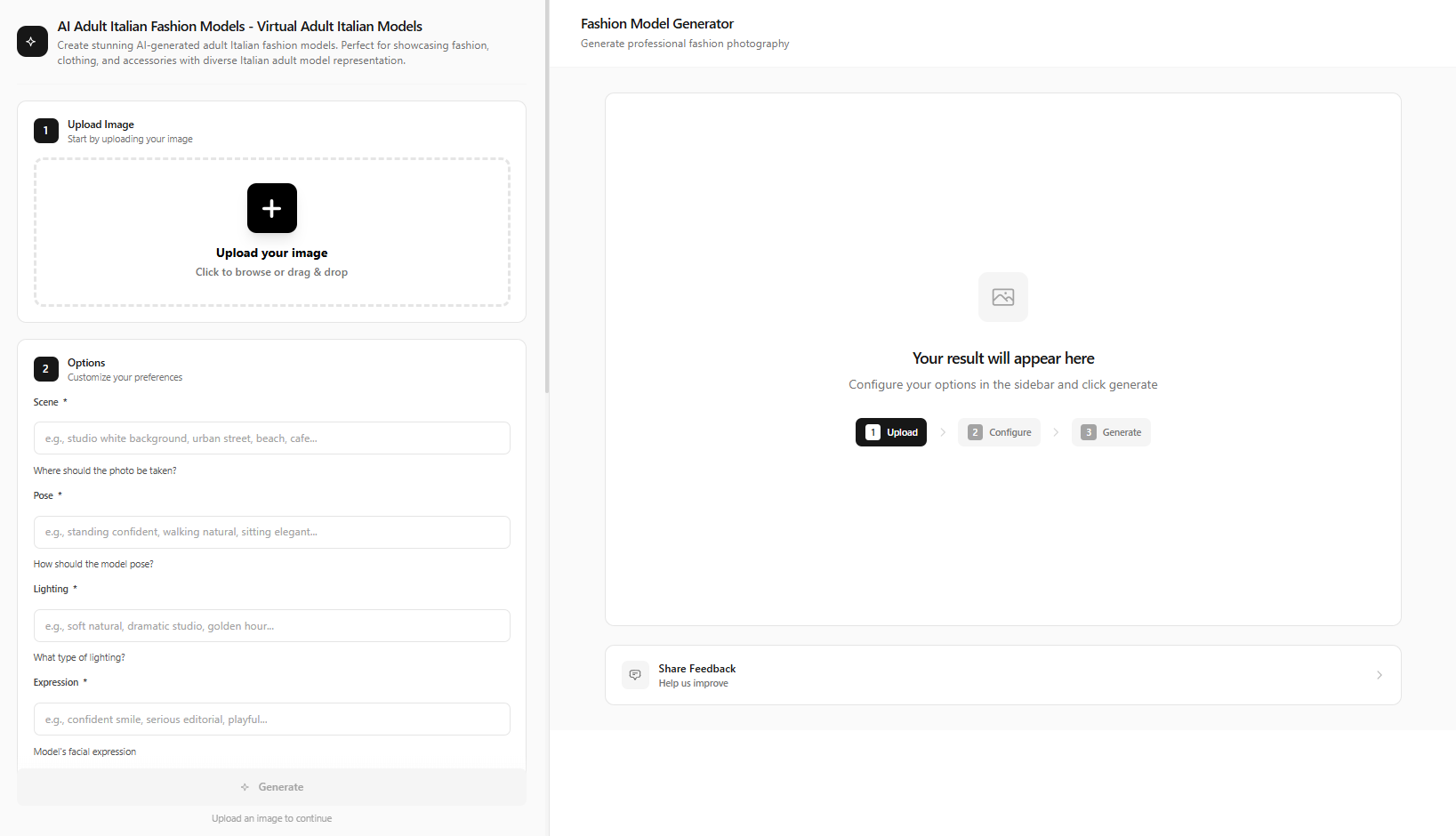
Go to AI Fashion Models and Choose a Model Type
Navigate to /ai-fashion-models. Select a model type: young American, Korean, Indian, Mediterranean, East African, South Asian, Northern European, and more. Match the model to your target audience.
Upload Your Product Image
Upload your product—clothing, jewelry, bags, hats, accessories. Clear product photos on a neutral background work best. The AI will composite the model wearing your product.
Configure Scene, Pose, Lighting, Expression
Choose environment (studio, outdoor, urban, beach, café), pose (standing, sitting, walking), lighting (soft, dramatic, golden hour), and expression (neutral, confident, smiling). These fields directly affect the final image.
• Streetwear: "Urban background, concrete walls, natural daylight, casual pose, confident expression"
• Luxury: "Minimalist white studio, soft diffused light, elegant pose, neutral expression"
• Beach/Resort: "Tropical beach, golden hour, relaxed pose, warm skin tones"
Click Generate Fashion Photo and Download
Click the Generate Fashion Photo button. Within seconds you get an Instagram-ready image. Download and use for feed posts (1:1 or 4:5), Reels (9:16), or Stories.
Method 2: Build Custom Instagram Models with Influencer Generator
5 steps to a unique, reusable AI model.
Go to Influencer Generator Create
Navigate to /influencer-generator/create. This is where you design your custom AI virtual model.
Choose Human, Set Gender and Ethnicity
Select Human as character type. Set gender, then ethnicity from 50+ options (Northern European, East African, South Asian, East Asian, Mediterranean, and more). Choose skin tone, hair color and style, and body type.
Select Clothing Style
Pick a clothing style: casual, formal, streetwear, sporty, bohemian, swimwear, and more. This defines your model's look for the first generation.
Set Pose, Environment, Lighting, Camera Angle
Configure the photoshoot: environment (studio, outdoor, urban), lighting, pose, and camera angle. These options appear in the UI and control the final composition.
Click Generate Character and Use Across Tools
Click Generate Character. Your model is created. Save them to the Influencer Studio to reuse across Image Generation, Video Generation, UGC Videos, and more.
Instagram Content Strategy with AI Models
Use your AI models across 5 content types.
- Feed posts (1:1): Classic square. Use 4:5 for higher engagement. "Minimalist white studio, soft light, full body, product visible."
- Stories / Reels (9:16): Vertical format. "Outdoor café, natural light, mid-shot, casual expression."
- Carousel: Multiple images in one post. Generate 3–5 variations with different poses or outfits.
- Product flat lay: Combine with your AI model in lifestyle context for variety.
- Lifestyle shots: Model in environment—beach, city, gym. "Urban street, golden hour, walking pose, streetwear."
• Café: "Cozy coffee shop interior, warm lighting, sitting pose, relaxed expression"
• Gym: "Modern gym interior, athletic wear, dynamic pose, confident expression"
• Beach: "Tropical beach, sunset, swimwear, walking pose"
Pro Tips for Instagram-Ready AI Models
Prioritize diversity
Use 50+ ethnicity and body type options. Authentic representation resonates and improves engagement.
Match ratio to content type
4:5 for feed (best engagement), 9:16 for Reels/Stories, 1:1 for grid consistency.
Keep styling consistent for campaigns
Save your Influencer Generator character and reuse across a series for cohesion.
Layer with video for Reels
Generate a still, then animate with Video Generation → Image to Video mode.
Use Replace with Influencer for any scene
In Image Generation, use "Replace with Influencer" mode to place your saved model in any background.
Generate multiple variations
Run 5–10 generations and pick the strongest. Small tweaks in lighting or pose can dramatically improve results.
By the Numbers: Why Brands Are Switching to AI Models
The shift to virtual models isn't anecdotal—it's backed by data. Traditional fashion photoshoots require coordination across multiple parties, often spanning weeks. AI model generation collapses that timeline to minutes while maintaining quality that rivals professional photography.
- 90% cost reduction — Brands report saving up to 90% vs. traditional shoots
- 78% adoption — 78% of e-commerce brands tested AI-generated product photos in 2025
- 50+ countries — Full representation across ethnicities without casting
- Minutes vs. weeks — Same-day turnaround vs. multi-week production
Whether you're a small DTC brand or a large retailer, an AI Instagram model generator levels the playing field. You can compete on visual quality without the budget of traditional fashion houses. AITwo's AI Fashion Models and Influencer Generator put that power in your hands.
Start with a single product or a single character. Test both paths—AI Fashion Models for quick product shots, Influencer Generator for brand-led campaigns. Most successful brands use a mix: product-focused imagery for e-commerce, character-driven content for storytelling and community building.
Legal & Ethical Considerations
AI-generated models don't require model releases—they're synthetic. You own the content you create. However, some platforms require AI content disclosure. Check Instagram, TikTok, and your target market guidelines. Transparency builds trust; many consumers appreciate knowing when content is AI-assisted.
Ready to Create Your First AI Instagram Model?
Join brands saving 90% on photoshoots. Generate virtual models in minutes.