The Rise of Virtual Influencers
Virtual influencers are a $15B+ market and growing. Lil Miquela has over 3M followers. Aitana López reportedly earns €10K per month. Shudu Gram has modeled for Balenciaga. These aren't real people — they're AI-generated characters that post content, endorse products, and build loyal audiences. Brands like Prada, Calvin Klein, and Louis Vuitton have worked with virtual influencers because they save an estimated 90% on content costs compared to traditional shoots.
An AI influencer generator eliminates the need for expensive photo shoots, models, and travel. You design the perfect virtual spokesperson for your brand — same face, same style, across every post. No scheduling conflicts, no PR risks, no cancellations. Create 100 posts in a day if you want.
AITwo lets you generate, customize, and deploy AI influencers in minutes. Our Influencer Generator creates photorealistic characters from your specifications. Use them in Image Generation, Video Generation, UGC Videos, and AI Fashion Models. Here's how.
What Is an AI Influencer Generator?
An AI influencer generator is a tool that creates photorealistic virtual humans you can use as consistent "influencers" across content. Unlike general image generators that produce random faces each time, an AI influencer tool lets you design a character once — ethnicity, skin tone, hair, body type, clothing — and reuse that same identity across hundreds of images and videos. That consistency is what builds brand recognition and audience trust.
AI influencers maintain consistent identity across posts. That's what makes them valuable for brands — recognition builds trust. AITwo's generator goes beyond basic portraits — you control pose, environment, lighting, and camera angle to create the exact look you need. Generate once, use everywhere: photos, videos, ads, and product content.
Quick Start Checklist
- ✓ Go to /influencer-generator/create
- ✓ Select Human + Gender
- ✓ Customize ethnicity, skin tone, hair, body type, clothing
- ✓ Set pose, environment, lighting
- ✓ Click "Generate Character"
- ✓ Use in Image Generation, Video Generation, UGC Videos, or AI Fashion Models
Ready to create your first AI influencer? Follow these six steps. The entire process takes under 10 minutes from start to first generated image.
Step-by-Step: Create Your AI Influencer on AITwo
Six steps from zero to your first AI influencer.
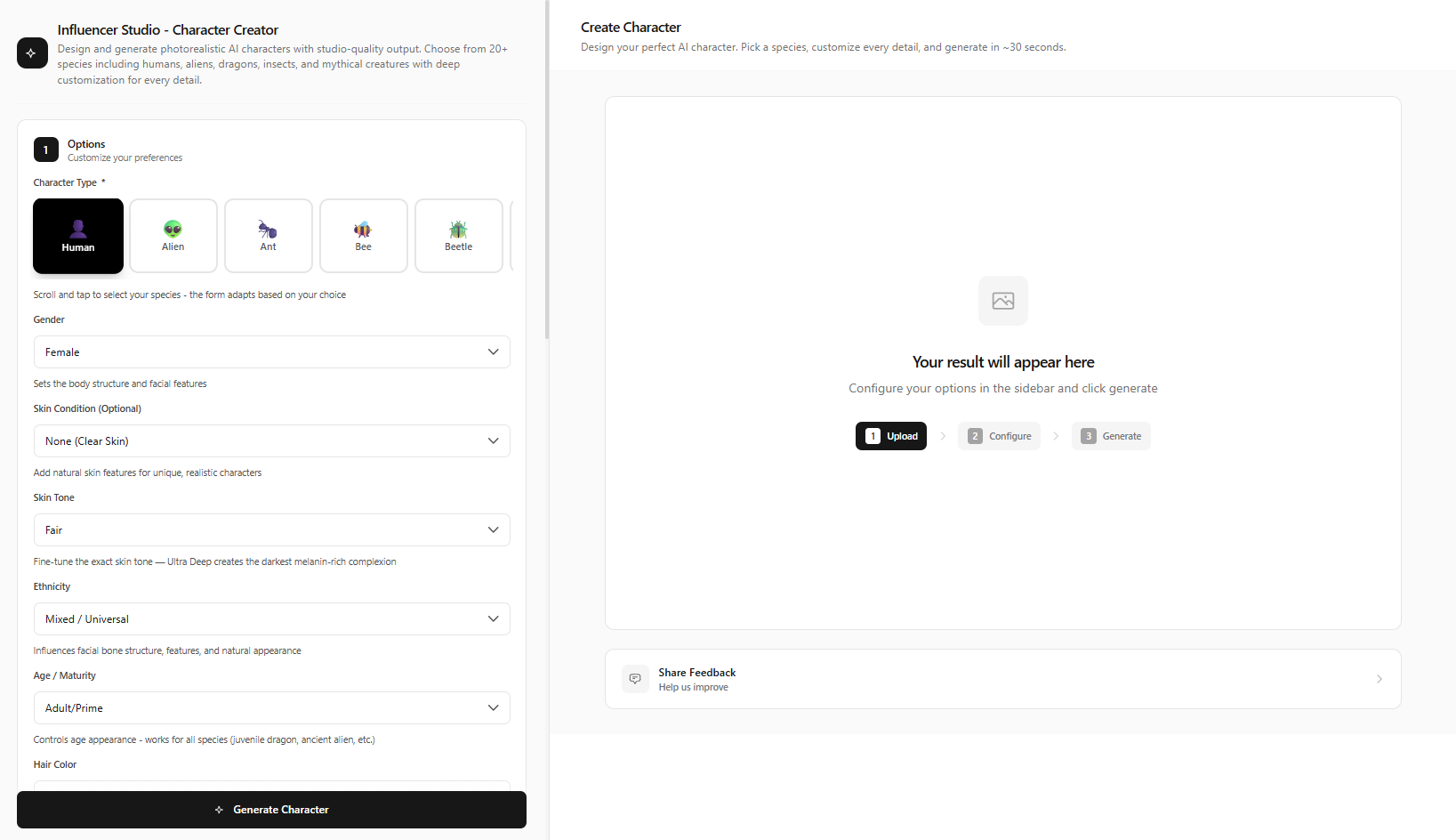
Go to the Influencer Generator
Navigate to /influencer-generator/create. Or browse existing public models at /influencer-generator/studio and click "Use Model" to start from a template.
Choose Character Type
Select "Human" from the character type dropdown (AITwo also supports aliens, anime, animals, and more). Select gender: Male, Female, or Non-Binary.
Design the Appearance
Customize every detail:
- Ethnicity — 50+ options spanning Northern European, East African, South Asian, Latin American, and more
- Skin tone — Fair, Medium, Olive, Deep, Ultra Deep
- Hair — Color (black, blonde, brunette, red, etc.) + Style (straight, curly, wavy, braids, afro, etc.)
- Body type — Slim, Athletic, Average, Curvy, Muscular, Plus Size
- Clothing — Casual, Formal, Streetwear, Sporty, Bohemian, Business, Swimwear
Set the Scene
Choose Pose (Standing, Sitting, Walking, Leaning, Dynamic), Environment (Studio, Urban, Beach, Office, Gym, Café), Lighting (Studio, Natural, Golden Hour, Dramatic), and Camera angle (Eye level, Low angle, High angle).
Click "Generate Character"
Hit the "Generate Character" button. Wait 10-30 seconds for your AI influencer. Generate multiple variations to find the perfect look. Your influencer is saved to your studio for reuse.
Create Content with Your AI Influencer
Your AI influencer is ready. Use them across AITwo:
- Image Generation — "Replace with Influencer" mode → Click "Apply Influencer" → Generate Image
- Video Generation — Image to Video → Upload influencer image → Generate Video
- UGC Videos — Product demos, testimonials → Create Now
- AI Fashion Models — Product modeling → Generate Fashion Photo
Why Brands Choose AI Influencers Over Real Ones
The ROI is clear. A traditional influencer campaign can cost $5,000+ per photoshoot — talent fees, travel, crew, location. An AI influencer costs a fraction of that and delivers the same visual quality. Plus, you get full creative control: no scheduling conflicts, no PR risks, no cancellations. Here's the breakdown:
| Factor | AI Influencer | Real Influencer |
|---|---|---|
| Cost | ~$50/month | $5,000+ per photoshoot |
| Availability | 24/7 | Scheduling conflicts |
| Consistency | Same face every time | Wardrobe/hair changes |
| Diversity | Instant ethnicity/style changes | Limited to one person |
| Scalability | 100+ posts/day possible | Limited output |
| Control | No PR risks, no cancellations | Reputation risk |
Monetization Strategies for AI Influencers
Build an audience with consistent content, then monetize through brand partnerships, sponsored posts, affiliate marketing, and product endorsements. Virtual influencers like Aitana López reportedly earn €10K per month; Lil Miquela has closed seven-figure deals. The key is consistency, niche focus, and quality content.
Use Script Writer for engaging video scripts and Hook Writer for scroll-stopping captions. Pair your AI influencer with product demos from UGC Videos for affiliate-ready content.
Tips for Building a Successful AI Influencer
Match your target audience — choose ethnicity and style that resonate with your customers.
Post consistently — 3-5 times per week builds recognition faster.
Use a clear niche — fitness, fashion, tech — to attract the right followers.
Mix content types — photos, reels, UGC-style product demos.
Create multiple influencers for different campaigns or product lines.
Use Hook Writer for attention-grabbing openings that stop the scroll.
Start with one influencer and one niche. Build an audience before expanding. Quality and consistency beat quantity — a well-maintained AI influencer account with 10K engaged followers often outperforms one with 100K passive followers.
Use analytics to understand what resonates, then double down on it. Track which posts get the most engagement and replicate that format across future content. AITwo's full toolset — from Script Writer to UGC Videos — supports every step of your influencer content pipeline.
Common Questions Before You Start
Can I edit my influencer after generating? Yes — save them to Influencer Studio and regenerate with different settings anytime. You can also create multiple variations (different outfits, poses) of the same base character.
How do I use my influencer in other tools? After generating, your character is saved. In Image Generation, use "Replace with Influencer" mode and click "Apply Influencer" to insert them into any scene. In Video Generation, upload the influencer image in Image-to-Video mode. For UGC Videos and AI Fashion Models, your saved influencer can be applied directly from the tool interface.
What if I want to start from an existing model? Visit Influencer Studio to browse public models. Click "Use Model" on any template to start customizing from that base — great for inspiration or when you need a quick starting point.
Create Your First AI Influencer Today
Join brands using AITwo to build virtual influencer campaigns. Free to start — no credit card required.